
This investigation identified an active phishing campaign leveraging Microsoft Teams-themed lures to distribute a legitimate remote access tool configured for unauthorized access. Victims are directed to convincing landing pages that impersonate collaboration and productivity services, where they are prompted to download software presented as a meeting transcript viewer, recording utility, or document-related application. The campaign combines social engineering, trusted software abuse, and resilient infrastructure to maximize victim engagement while minimizing detection.
Infrastructure analysis revealed a dual-hosting strategy consisting of compromised legitimate websites and attacker-controlled cloud-hosted infrastructure. The use of compromised business websites provides reputational legitimacy, while dedicated infrastructure enables rapid deployment and campaign scalability. The operation demonstrates active maintenance, with the majority of identified infrastructure observed within the last three to six months, indicating continued development and operational investment.
Post-execution activity establishes a persistent foothold through multiple mechanisms, including service installation, Safe Mode persistence, credential provider registration, LSA authentication package integration, and COM object registration. These capabilities provide long-term access, credential interception opportunities, and resilience against remediation efforts. Overall, the campaign reflects a mature and adaptive threat operation that relies on trusted infrastructure and legitimate software to evade traditional security controls while maintaining a global targeting capability.
Victims receive phishing emails or messages impersonating Microsoft Teams notifications. The lure typically claims that a meeting transcript or recording is available for download. The messaging leverages urgency and familiarity to drive user interaction.
Common lure themes observed:
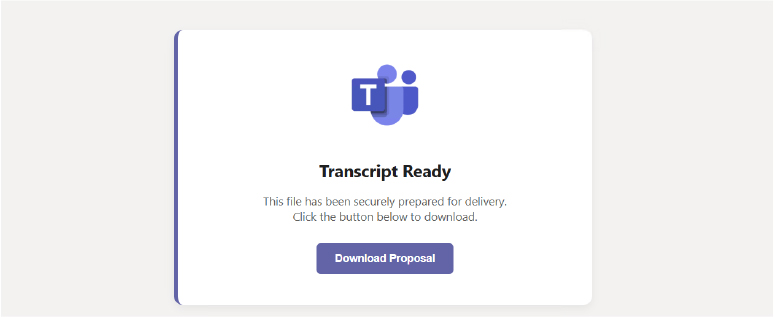
The phishing link directs victims to a fraudulent landing page styled to resemble a legitimate Microsoft Teams interface. The page prompts the user to download a file, which is presented as a transcript viewer, meeting plugin, or document converter. The downloaded file is a signed installer for a legitimate remote access tool.
Analysis reveals two distinct infrastructure categories:
This multi-theme approach allows the threat actor to:
Age distribution analysis reveals sustained, active operation:
The presence of recent scans confirms that the campaign is currently active. The 56% concentration in the 3–6-month range suggests a significant expansion phase beginning approximately 3 months prior to this analysis (March 2026).
Notably, older pages (5-7 months) show slightly larger average sizes (23-28 KB vs 20-22 KB for recent pages), suggesting the actor has streamlined their template over time, possibly removing unnecessary assets to reduce detection surface and improve load times.
Upon execution, the installer performs a standard Windows Installer (MSI) deployment via msiexec.exe. The installation is pre-configured with attacker-controlled relay server parameters embedded in the command line and configuration overlay.
Key installation artifacts:
The installer exhibits anti-analysis behaviors:
Domain TLD distribution reveals a global operation with concentration in traditional TLDs:
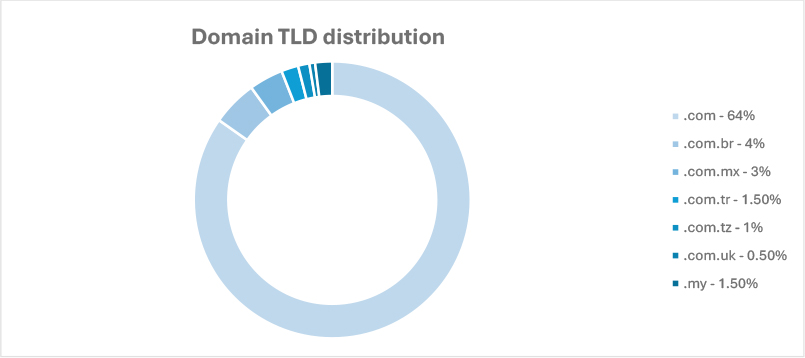
The heavy reliance on .com (64%) suggests the campaign prioritizes perceived legitimacy over geographic specificity. However, the presence of country-code TLDs indicates either:
This campaign reflects a broader evolution in cybercriminal tradecraft, where threat actors increasingly combine trusted cloud-hosted services, compromised legitimate websites, and commercially available remote access software to reduce detection rates and extend operational longevity. The abuse of serverless and static web hosting platforms demonstrates a growing trend toward leveraging reputable infrastructure that benefits from established domain reputation, encrypted communications, and globally distributed content delivery networks. Simultaneously, the use of compromised small-business websites enables malicious content to blend with legitimate web traffic, reducing the effectiveness of traditional reputation-based security controls. These techniques align with wider industry observations of threat actors increasingly relying on trusted infrastructure rather than dedicated malicious hosting environments.
Over the next six to twelve months, the campaign is likely to continue diversifying its social engineering themes beyond Microsoft Teams notifications. As awareness and detection coverage increase around meeting transcript and recording lures, operators may expand into adjacent collaboration and productivity platforms, including cloud-based document sharing, file storage, conferencing, and workflow management services. The observed multi-theme delivery strategy suggests an emphasis on testing victim engagement across different business functions, indicating future campaigns may employ increasingly tailored lures, localized language variations, and role-specific messaging to improve infection success rates. The continued reliance on legitimate signed software and remote administration capabilities further indicates a preference for stealth, operational efficiency, and reduced malware development overhead.
From a strategic perspective, the campaign’s sustained activity over several months suggests a mature and actively maintained operation rather than a short-lived phishing effort. The observed infrastructure age distribution indicates ongoing infrastructure rotation, adaptation to defensive controls, and continuous campaign refinement. Future iterations may incorporate more sophisticated evasion mechanisms, including dynamic payload delivery, victim profiling, geolocation-based filtering, and conditional execution designed to evade automated analysis systems. As threat actors increasingly adopt trusted services and legitimate software ecosystems, organizations should prioritize behavioral detection capabilities, phishing-resistant authentication mechanisms, application control policies, and monitoring of remote access tool deployments rather than relying solely on domain reputation or static indicators of compromise.
| Tactic | Technique ID | Technique Name |
| Initial Access | T1566.002 | Phishing: Spear phishing Link |
| Execution | T1204.002 | User Execution: Malicious File |
| Persistence | T1543.003 | Create or Modify System Process: Windows Service |
| Persistence | T1547.002 | Boot or Logon Autostart Execution: Authentication Package |
| Persistence | T1546.015 | Event Triggered Execution: Component Object Model Hijacking |
| Credential Access | T1556 | Modify Authentication Process |
| Discovery | T1120 | Peripheral Device Discovery |
| Stealth | T1497.001 | Virtualization/Sandbox Evasion: System Checks |
| Stealth | T1497.003 | Virtualization/Sandbox Evasion: Time Based Evasion |
| Command and control | T1219 | Remote Access Tool |
title: Unsigned DLL Loaded by Windows Utility
description: |
Detects windows utilities loading an unsigned or untrusted DLL.
tags:
– attack.stealth
– attack.t1218.011
– attack.t1218.010
logsource:
product: windows
category: image_load
detection:
selection:
Image|endswith:
# Note: Add additional utilities that allow the loading of DLLs
– ‘\InstallUtil.exe’
– ‘\RegAsm.exe’
– ‘\RegSvcs.exe’
– ‘\regsvr32.exe’
– ‘\rundll32.exe’
filter_main_signed:
Signed: ‘true’
filter_main_sig_status:
SignatureStatus:
– ‘errorChaining’
– ‘errorCode_endpoint’
– ‘errorExpired’
– ‘trusted’
– ‘Valid’
filter_main_signed_null:
Signed: null
filter_main_signed_empty:
Signed:
– ”
– ‘-‘
filter_main_sig_status_null:
SignatureStatus: null
filter_main_sig_status_empty:
SignatureStatus:
– ”
– ‘-‘
filter_main_windows_installer:
Image:
– ‘C:\Windows\SysWOW64\rundll32.exe’
– ‘C:\Windows\System32\rundll32.exe’
ImageLoaded|startswith: ‘C:\Windows\Installer\’
ImageLoaded|endswith:
– ‘.tmp-\Microsoft.Deployment.WindowsInstaller.dll’
– ‘.tmp-\Avira.OE.Setup.CustomActions.dll’
filter_main_assembly:
Image|startswith:
– ‘C:\Windows\SysWOW64\’
– ‘C:\Windows\System32\’
– ‘C:\Windows\Microsoft.NET\Framework64’
Image|endswith: ‘\RegAsm.exe’
ImageLoaded|endswith: ‘.dll’
ImageLoaded|startswith: ‘C:\Windows\assembly\NativeImages’
filter_optional_klite_codec:
Image:
– ‘C:\Windows\SysWOW64\regsvr32.exe’
– ‘C:\Windows\System32\regsvr32.exe’
ImageLoaded|startswith:
– ‘C:\Program Files (x86)\K-Lite Codec Pack\’
– ‘C:\Program Files\K-Lite Codec Pack\’
condition: selection and not 1 of filter_main_* and not 1 of filter_optional_*
falsepositives:
– Unknown
level: medium
Source: Open source
The analyzed campaign represents a sophisticated phishing operation that combines effective social engineering with the abuse of legitimate software and trusted infrastructure. By leveraging familiar collaboration-platform themes and distributing signed remote access software, the threat actor reduces suspicion during both the delivery and execution phases. The campaign’s infrastructure strategy balances operational flexibility with reputation-based evasion techniques, enabling sustained activity across multiple regions and target sectors.
The presence of layered persistence mechanisms and credential interception capabilities indicates objectives extending beyond initial access, potentially supporting long-term unauthorized access, credential harvesting, and follow-on intrusion activity. Infrastructure age analysis further suggests an established operation that continues to evolve through infrastructure rotation, template refinement, and ongoing campaign maintenance.
Given the continued effectiveness of collaboration-platform phishing lures and the increasing use of legitimate software for malicious purposes, organizations should expect similar campaigns to persist and expand. Defensive efforts should prioritize user awareness, phishing-resistant authentication, behavioral monitoring, application control, and detection of unauthorized remote access tool deployments. A defense strategy focused solely on malicious file signatures or domain reputation is unlikely to provide sufficient protection against campaigns employing trusted software and reputable hosting environments.
To reduce the risk posed by this campaign, organizations should implement a layered defense strategy that addresses phishing, unauthorized software installation, credential theft, and persistence mechanisms. Given the campaign’s reliance on legitimate software and trusted infrastructure, security controls should focus on behavioral indicators and user activity rather than solely on traditional signature-based detection.
Email and User Awareness Controls
Identity and Access Security
Endpoint Protection and Application Control
Detection and Monitoring
Network and Infrastructure Security
Incident Response Preparedness
Organizations should assume that successful execution of the installer may result in persistent unauthorized access and potential credential compromise. As such, any affected systems should undergo comprehensive forensic review, credential resets for associated accounts, and validation that all persistence mechanisms have been fully removed.
