Published On : 2026-10-08
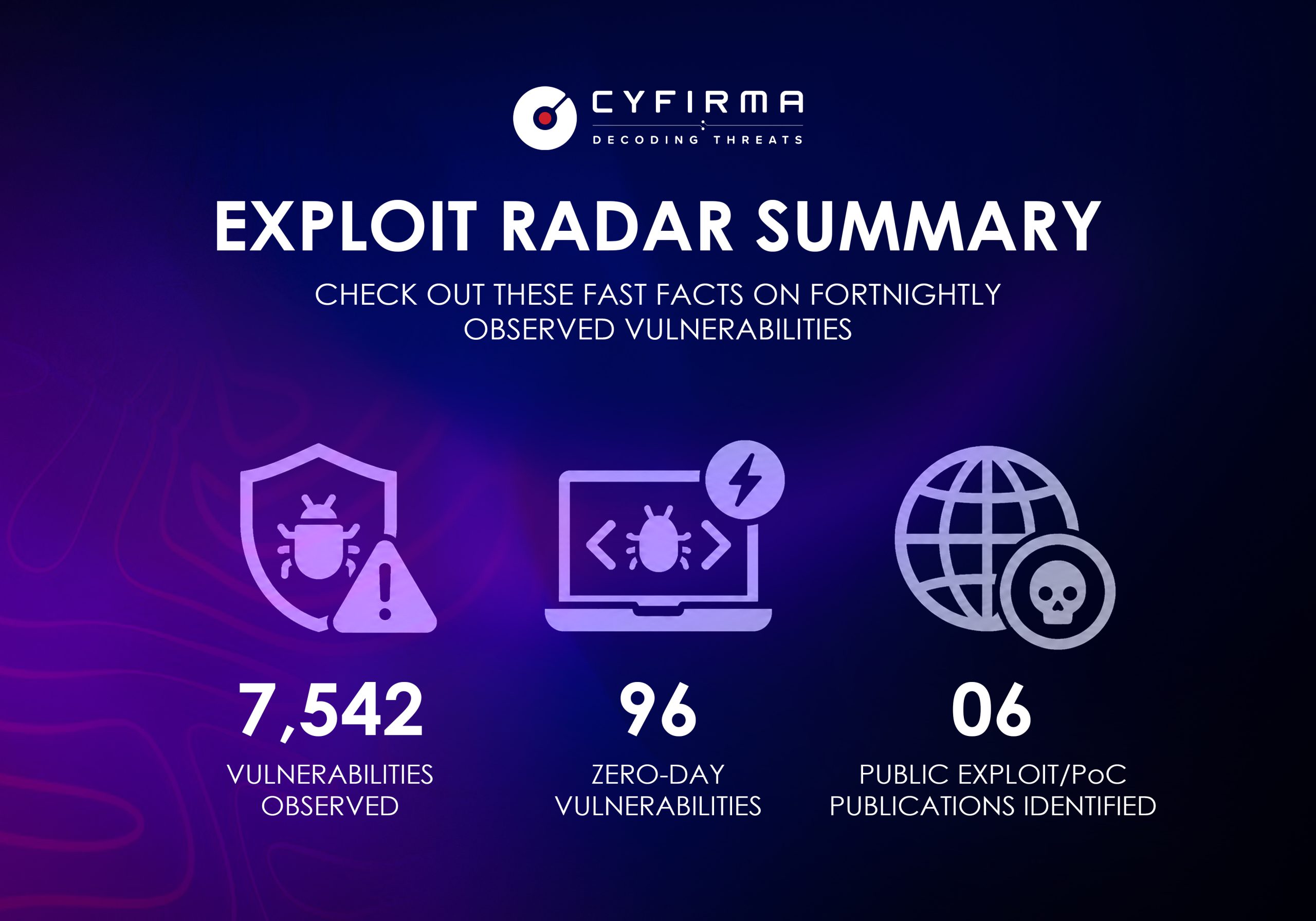
EXPLOIT RADAR SUMMARY
CHECK OUT THESE FAST FACTS ON FORTNIGHTLY OBSERVED VULNERABILITIES.
Most Affected Products/Technologies Observed This Fortnight
Linux | MacOS | Chrome
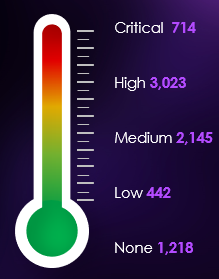
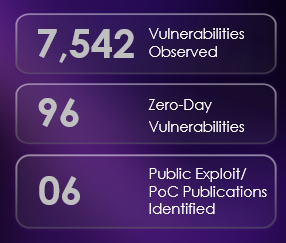

47.02% increase in vulnerabilities compared with the previous two weeks.
Fortnightly Trends in Vulnerabilities
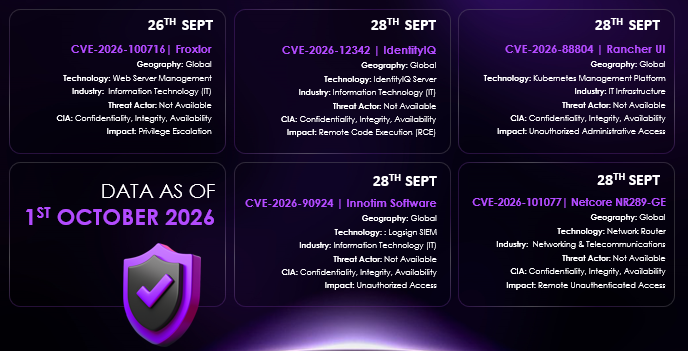
| CVE |
CVSS Score
(NVD) |
CYFIRMA CVSS Score |
Product |
Affected Version |
Fixed Version |
| CVE-2026-100716 |
9.9 |
9.4 |
Froxlor |
2.3.10 |
2.3.12. |
| CVE-2026-12342 |
9.6 |
9.6 |
Identityiq |
8.5 <=8.5p2
8.4 <=8.4p4
8.3 <=8.3p5 |
8.5p3 / 8.4p5 / 8.3p6- |
| CVE-2026-88804 |
9.6 |
9.6 |
Rancher |
2.15.0 < 2.15.2 2.14.0 < 2.14.6 2.13.0 < 2.13.10 2.12.0 < 2.12.14 2.11.0se < 2.11.18 |
2.15.2 / 2.14.6 / 2.13.10 / 2.12.14 / 2.11.18 |
| CVE-2026-90924 |
9.8 |
9.8 |
Logsign siem |
6.4.101 < 6.4.117 |
6.4.117 |
| CVE-2026-101077 |
10 |
9.3 |
Nr289 ge |
1.4.5102 |
No vendor-fixed release identified |
Mitigation of CVEs
CVE-2026-100716:
- Upgrade to Froxlor 2.3.12 or later. The vulnerability is explicitly marked as fixed in 2.3.12.
- Restrict access to the Froxlor management/customer interface to trusted networks and authorized users.
- Monitor root-owned cron activity and unexpected ownership changes.
- Disable/restrict the DataDump/export functionality until patching is completed.
- Review customer directories, export destinations, and cron jobs for malicious symlinks, unexpected ownership changes, or suspicious activity.
- Review Froxlor cron jobs and system logs for suspicious export or privilege-escalation activity.
CVE-2026-12342:
- Apply the vendor eFix/security patch for the affected IdentityIQ version; available guidance identifies 8.5p3+, 8.4p5+, or 8.3p6+.
- Restrict IdentityIQ web-service/API endpoints to trusted networks until patched.
- Restrict IdentityIQ web-service/API access to trusted networks and authorized users.
- Avoid direct Internet exposure of IdentityIQ where it is not operationally required, and use WAF/API filtering as an interim control.
- Review and update affected inline scriptlet Field values in accordance with SailPoint’s eFix guidance.
- Monitor API traffic and system logs for malformed, suspicious, or potentially malicious requests.
CVE-2026-88804:
- Upgrade Rancher to 2.15.2, 2.14.6, 2.13.10, 2.12.14, or 2.11.18, as applicable.
- Restrict Rancher management access to trusted administrative networks.
- Use a reverse proxy, WAF, or ingress controls to limit unauthorized requests.
- Block suspicious method-override requests targeting unauthenticated /v3/settings/* endpoints.
- Monitor Rancher settings and logs for unauthorized changes or suspicious activity.
CVE-2026-90924:
- Immediately change all default and known/common credentials.
- Restrict the SIEM management interface to trusted internal IP ranges; disable direct Internet exposure.
- Enable MFA and strong, unique credentials where supported.
- Monitor authentication logs for suspicious login attempts or unauthorized administrative activity.
CVE-2026-101077:
- No vendor patch is currently available; contact Netcore for an updated firmware release.
- Disable WAN/remote administration and allow management only from trusted networks.
- Apply firewall/ACL rules to block unauthorized access to the vulnerable web interface.
- Monitor for unexpected firmware, configuration, or file-write activity.
- If no vendor fix becomes available, replace affected NR289-GE devices, particularly in security-sensitive environments.
Recommended Customer Prioritization
P1 – EMERGENCY
- CVE-2026-101077 – Netcore NR289-GE
- Reason: Unauthenticated remote exploitation + public exploit + total technical impact. Isolate affected devices immediately if a fixed firmware is unavailable.
P1 – IMMEDIATE
- CVE-2026-100716 – Froxlor
- Reason: public PoC and potential host/cross-tenant privilege escalation. Upgrade to 2.3.12+.
- CVE-2026-12342 – IdentityIQ
- Reason: unauthenticated RCE against an enterprise identity-management platform. Apply the branch-specific SailPoint fix and restrict API access.
- CVE-2026-88804 – Rancher
- Reason: Unauthenticated attack against the Kubernetes management plane with potential downstream cluster compromise. Upgrade immediately.
- CVE-2026-90924 – Logsign SIEM
- Reason: Unauthenticated use of default credentials against a security-monitoring platform; exploitation is potentially trivial where the management interface is reachable. Upgrade to 6.4.117 and change credentials.
OVERALL ASSESSMENT
- All five vulnerabilities should remain in the Critical/P1 remediation queue. The strongest differentiators are not the CVSS numbers—which are all already critical—but whether the affected version is actually deployed, whether the management interface is externally reachable, whether exploitation code is available, and how strategically important the technology is to the customer’s environment.
- For customer reporting, I would explicitly label deployment count and external exposure as “Not confirmed from public evidence” unless your ASM/asset inventory has independently verified them. This avoids presenting vendor-wide customer counts or Internet-search results as confirmed vulnerable customer deployments.
DOES THIS AFFECT ME?
- Froxlor: Yes, if the customer uses a Froxlor version below 2.3.12.
- IdentityIQ: Yes, if an affected 8.3, 8.4, or 8.5 version is deployed.
- Rancher: Yes, if the deployed Rancher version falls within the affected versions.
- Logsign SIEM: Yes, if running 6.4.101 to below 6.4.117.
- Netcore NR289-GE: Yes, if the device uses firmware 1.4.5102.
HOW EXPOSED AM I?
- Exposure depends on whether vulnerable systems are accessible from the Internet or untrusted networks.
- Risk increases when management interfaces, APIs, or administrative services are externally accessible.
- Exploitation may result in unauthorized access, data exposure, system compromise, or service disruption.
- Publicly available exploit information can increase the likelihood of attempted exploitation.
- From a customer perspective, properly restricted and internally isolated systems have lower exposure.
WHAT SHOULD I DO NOW?
- Identify whether the affected products and vulnerable versions are present in the environment.
- Apply the latest vendor security patches or upgrade to fixed versions.
- Restrict Internet exposure and limit management interfaces to trusted networks.
- Change default credentials and review access permissions for affected systems.
- Prioritize Internet-facing and business-critical systems for immediate remediation.
- Isolate or replace affected systems if no security fix is available.